Black Friday: the specs to check before you buy
Best picks
Updated November 7, 2026Best USB Microphones in 2026 for Podcasting and Streaming
Short answer
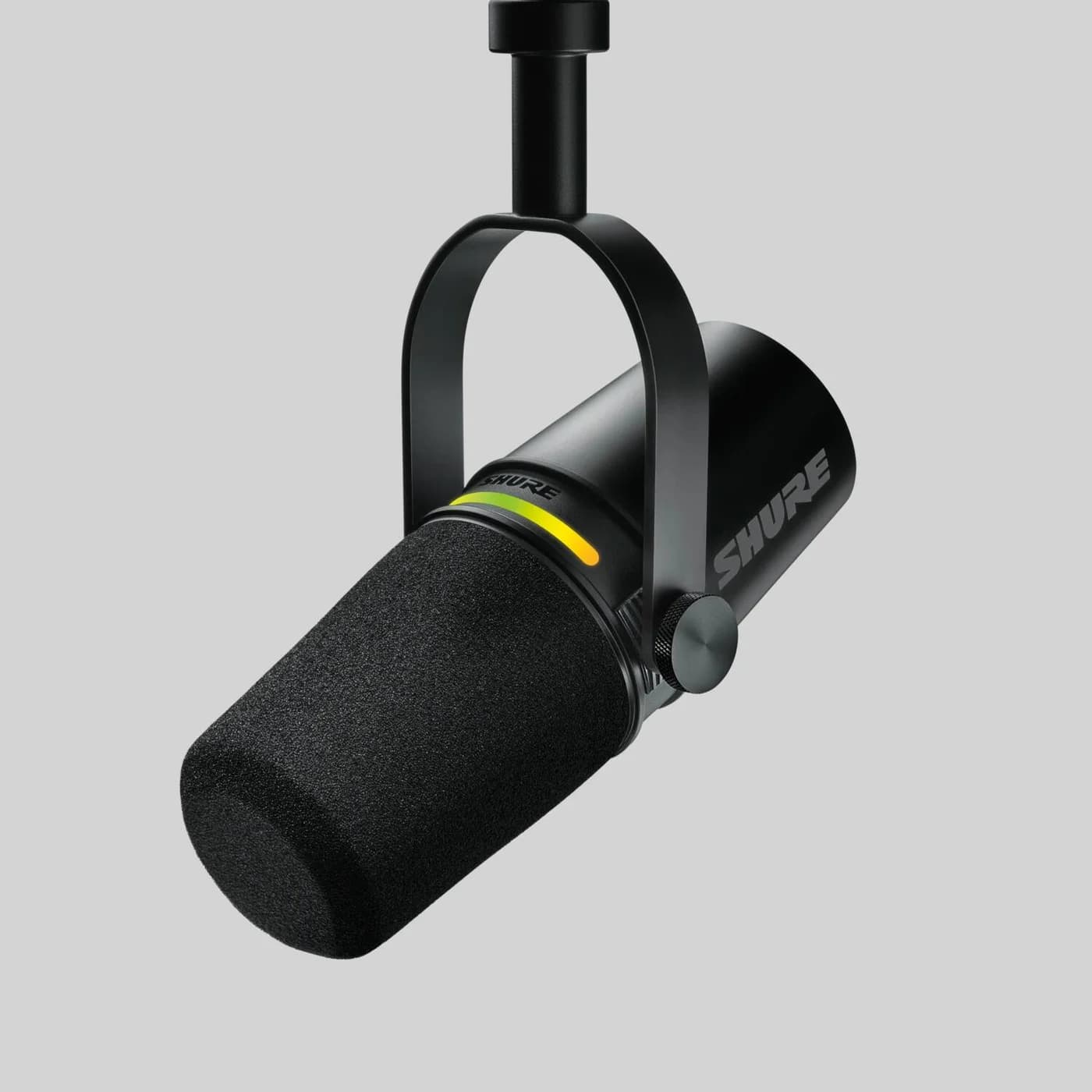
The best USB microphone for most people is the Shure MV7+: a dynamic microphone with both USB-C and XLR outputs, so it records straight into your computer today and plugs into an audio interface later if your studio grows. It keeps the warm broadcast tone Shure describes as SM7-inspired, ignores untreated rooms better than any condenser here, and taps to mute. If gaming is the main job, the Shure MV6 Gen 2 is the value pick: USB-C plug-and-play with Auto Level Mode keeping your voice consistent from whisper to victory shout, and a desktop stand and cable in the box. And for streamers who want effects on the mic itself, the Elgato Wave:3 runs DSP and Clipguard protection onboard.
Our picks at a glance
- Find on Amazon
Best compact all-rounder
RØDE NT-USB Mini
- 4Polar patterns on the Logitech Yeti, the most versatile pick here
- 130 dBSPLMax SPL of the Elgato Wave:3, the highest on this page
- 585 gWeight of the compact RØDE NT-USB Mini with its stand
- 2mUSB-C cable included with the Shure MV6
Quick picks
| Pick | Best for | Capsule | Polar pattern(s) | Connection |
|---|---|---|---|---|
| Shure MV7+ | Best overall | Dynamic | Cardioid | USB-C and XLR |
| Shure MV6 Gen 2 | Gaming and streaming | Dynamic | Cardioid | USB-C |
| Elgato Wave:3 | Onboard DSP for streamers | 16 mm condenser | Cardioid | USB-C (USB 2.0) |
| Logitech Yeti | Podcasting and voiceover | 3x 14 mm condenser | Cardioid, Bidirectional, Omnidirectional, Stereo | USB |
| RØDE NT-USB Mini | Compact all-rounder | Electret condenser | Cardioid | USB-C |
| Blue Yeti Nano | Plug-and-play alternative | 2x 14 mm condenser | Cardioid, Omnidirectional | USB |
Our picks for streaming, podcasting and voiceover
- Yes: Headphone jack on every pick, so you can monitor yourself latency-free
- Yes: Driver-free, plug-and-play USB audio on all six picks
- Yes: Onboard or software DSP: MOTIV Mix (Shure), Wave Link (Elgato), G HUB (Logitech), RØDE Connect (RØDE)
- Partly: Consoles: makers say USB chat support depends on each game and platform - check before buying
- No: XLR output: only the MV7+ has one, so only it can move to an audio interface later
Best overall: Shure MV7+
Shure's MV7+ Podcast Microphone is the safest single purchase on this page because it never traps you. It records over USB-C with no interface and no drivers, and its XLR output means that when you do buy an interface, the microphone comes with you - Shure even notes you can use both outputs at once. The dynamic cardioid capsule with Voice Isolation Technology focuses on your voice, which Shure says delivers great sound even in noisy environments.
The onboard features are what buyers pay the premium for: an LED touch panel that doubles as a live audio meter and mutes the mic when you tap it, 16.8 million color options for that panel, a Digital Popper Stopper that removes plosive sounds without a physical pop filter, and three types of reverb (Plate, Hall, Studio) plus a limiter and compressor through the free MOTIV Mix desktop app. Monitoring is latency-free through the 3.5mm headphone jack. Shure's published specs put the frequency response at 50 Hz–16 kHz with a sensitivity of -33.0 dBFS/Pa, in a 574 g body. MOTIV Mix needs Windows 10 or higher or macOS 12 or higher with 8 GB of RAM; the mobile MOTIV apps need iOS 16 or Android 12 or higher. Shure's box list includes the mic, a USB-C to USB-C cable and a quick start guide; its product selector offers optional desktop and boom stands.
Best for gaming and streaming: Shure MV6 Gen 2
The MV6 Gen 2 is the microphone Shure built for people whose audio lives in a game lobby rather than a studio. It is a dynamic cardioid USB-C microphone with Voice Isolation Technology, and Shure positions it explicitly against headset mics and entry-level USB microphones: it "helps you sound your best" with the company's dynamic mic design and intelligent digital audio processing in a plug-and-play package.
Three gaming-specific features stand out on the spec sheet. Adjustable Auto Level Mode keeps your voice consistent through whispers, callouts and victory shouts with customizable gain targets and response times. An adjustable real-time Denoiser lets you control how much background ambience stays in your stream. And Smart Audio Presets switch between Speech, Singing and Instrument modes with tuned profiles, alongside a 5-band EQ and a tone slider. The Digital Popper Stopper and tap-to-mute carry over from the MV7+, with no software, delay or audible clicks on the mute. It works across PC, Mac, iOS and Android; MOTIV Mix needs Windows 10 or macOS 14, both 64-bit, with 2 GB of RAM and 500 MB of disk. The box includes the microphone, a 2m USB-C to USB-C cable and a 12cm round-base desktop stand, so unlike the MV7+ it is complete out of the box. For two-person streams, MOTIV Mix can mix and control up to five audio channels, which lets two MV6s share one PC without a mixer.
See the MV6 Gen 2 on Shure's site
Best onboard DSP for streamers: Elgato Wave:3
Elgato's Wave:3 is the condenser for streamers who want the processing done inside the microphone. Its current version, which Elgato's page titles Wave:3 MK.2, adds a Wave FX Processor that runs DSP effects and Clipguard 2.0 protection directly on the mic, plus VST plugin integration and a streamlined design with an LED ring for real-time level monitoring. Elgato describes Wave:3 as being for streamers, podcasters and anyone who wants professional vocals with minimal setup.
The hardware numbers are strong for the money: a 16 mm condenser capsule with integrated JFET, 24-bit/48 kHz capture, a 70–20000 Hz frequency response, a 130 dBSPL max SPL at 1 kHz - the highest on this page - and 110 dB of dynamic range. There is a 3.5mm stereo headphone jack for monitoring with onboard DSP applied, a cardioid pickup pattern that keeps your voice front and center, and a built-in pop filter. Auto Gain sets your level with a five-second hold on the multifunction dial. It connects over USB-C (USB 2.0 HS), with Wave Link software for Windows 11 or newer and macOS 14.2 or newer; Elgato says it also works with any phone or tablet that supports USB Audio Class 2.0, though VST effects need Wave Link on a computer. The box includes a desk stand, a 250 cm USB-C cable and 5/8" and 3/8" thread adapters.
See the Wave:3 on Elgato's site
Best for podcasting and voiceover: Logitech Yeti
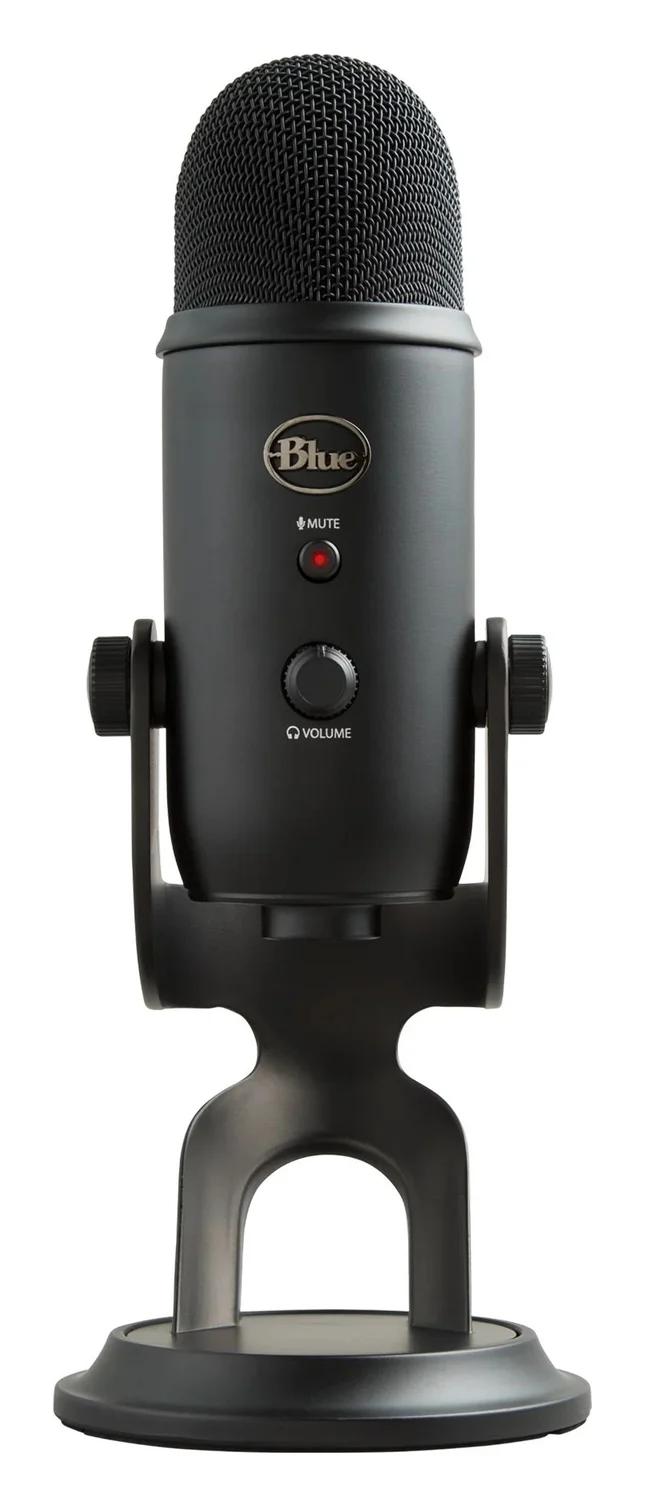
The Yeti remains the multi-pattern workhorse. Its three 14 mm condenser capsules give four polar patterns - Cardioid, Bidirectional, Omnidirectional and Stereo - which no other pick here matches: cardioid for solo voice, bidirectional for a two-person face-to-face podcast, omnidirectional for a room, stereo for instruments or ambient capture. Logitech's frequency response runs 20 Hz–20 kHz with a max SPL of 120 dB (THD: 0.5% 1 kHz), and it records at 48 kHz in 16-bit.
Studio controls sit on the mic itself: a latency-free headphone output, a gain control and an instant mute button, with an internal shockmount protecting the capsule array. The desktop stand adjusts to the ideal angle or comes off entirely for a boom arm. Blue VO!CE filters and effects - EQ, a limiter, a de-popper and vocal effects like reverb and echo - come through the free G HUB software, which is the only download required. It draws 5V 150mA over USB, and the microphone weighs 0.88 kg, with dimensions of 12 cm x 12.5 cm x 29.5 cm extended in its stand. It is plug-and-play with no drivers. If four patterns is overkill, the Yeti Nano below trades down to two capsules and two patterns at a lower weight of 0.63 kg.
See the Yeti on Logitech G's site
Best compact all-rounder: RØDE NT-USB Mini
The NT-USB Mini is the pick that disappears into a small desk or a travel bag while still behaving like a studio mic. It is a 585 g cardioid condenser with a 20 Hz–20 kHz frequency response, 48 kHz/24-bit conversion, and an input SPL of 121dB (A-weighted, as per IEC651), in a body RØDE measures at 141.9 mm high with a 89.3 mm base.
Everything about it is tidy: an in-built pop filter (the full-size NT-USB uses an external one), a detachable magnetic desk stand, a 360-degree swing mount that positions the mic upright, angled, sideways or upside down, a headphone-volume control and a switchable zero-latency monitoring mode. It is bus powered over USB-C, class-compliant with no drivers, and works with PCs, Macs, Android devices and Lightning iOS devices with the camera connector kit. RØDE lists macOS 11 or later and Windows 10 Version 1803 or later. The free RØDE Connect app unlocks the mic's built-in DSP - a noise gate, compressor and APHEX Aural Exciter and Big Bottom processors - and can record up to four NT-USB Minis on one computer for a multi-person podcast without any hardware mixer. RØDE suggests around 10-15cm from the mouth for speaking work.
See the NT-USB Mini on RØDE's site
Best plug-and-play alternative: Blue Yeti Nano
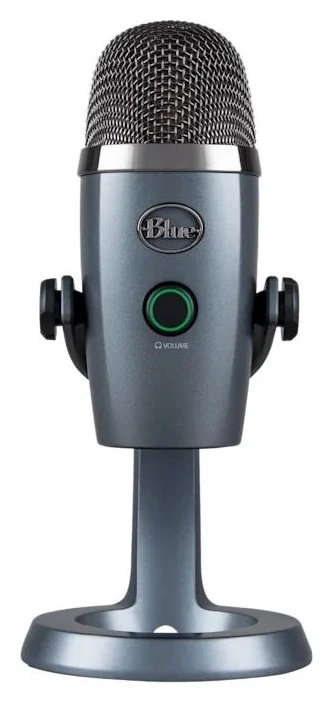
The Yeti Nano is the Yeti for people who want the Blue sound without the bulk or the pattern count. Its two proprietary 14 mm condenser capsules switch between Cardioid and Omnidirectional, covering solo voice and room pickup, with the same 20 Hz–20 kHz frequency response and 120 dB (THD: 0.5% 1 kHz) max SPL as the larger Yeti - but it records in 24-bit at 48 kHz and weighs 0.63 kg with its stand.
It is pure plug-and-play: no drivers, USB connection, 5V 150mA power, and a headphone output that Logitech specs at 15 Hz–22 kHz for monitoring. Like the Yeti it works with Blue VO!CE filters and effects in the free G HUB software for EQ, noise cleanup and vocal effects. For a solo podcaster, streamer or home-office voice, the two patterns it keeps are the two that matter, and the smaller footprint is the whole point.
See the Yeti Nano on Logitech's site
How to choose a USB microphone
Pick dynamic or condenser
Dynamics (MV7+, MV6) reject room noise; condensers (everything else here) capture more detail in a quiet, soft room.
Match your computer's ports
USB-C on the Shure, Elgato and RØDE picks; the Yeti and Yeti Nano connect over USB. All are USB audio devices - no interface, no drivers.
Check the box contents
The MV6 and Wave:3 include stands and cables; Shure's MV7+ box list includes a USB-C to USB-C cable, and its product selector offers optional desktop and boom stands.
Decide on effects
MOTIV Mix, Wave Link, G HUB and RØDE Connect are all free, but each unlocks different DSP on its own mic.
Dynamic or condenser is the biggest decision. A dynamic capsule like the MV7+'s or MV6's is less sensitive to what happens off-axis and behind the mic, which is why Shure aims the MV6 at gaming setups and calls the MV7+ suited to "recording perfect audio in less than perfect spaces." Condensers hear more of the room - great in a treated, quiet space, less great next to a mechanical keyboard. If your recording space is also your gaming space, lean dynamic.
Onboard processing is the quiet differentiator. Every maker here now ships DSP with the mic or its app: Auto Level Mode and the real-time Denoiser on the MV6, Clipguard and VST hosting on the Wave:3, Blue VO!CE on the Yeti line, and APHEX processing through RØDE Connect on the NT-USB Mini. On paper this is the feature set that separates a modern USB microphone from a bare capsule, and it is all free software.
Headphone monitoring matters more than it sounds. Every pick here has a headphone jack, which lets you hear yourself without the delay of round-tripping through the computer - RØDE's zero-latency mode is switchable. Without it you hear yourself late, which makes speaking unnaturally difficult. Do not buy a USB microphone without one.
Max SPL, compared.
Source: Elgato, Logitech and RØDE spec pages (Yeti and Yeti Nano at 0.5% THD, 1 kHz; NT-USB Mini A-weighted per IEC651)
Max SPL only matters when you shout or point the mic at an instrument; for spoken voice any figure here is comfortable. Frequency response tells you more: the condensers here reach 20 Hz–20 kHz (the Wave:3 from 70 Hz), while the MV7+ dynamic is specified at 50 Hz–16 kHz.
Compatibility and fit: computers, consoles and mounts
On computers, everything here is a class-compliant USB audio device: no drivers, and no audio interface. The Shure, Elgato and RØDE picks connect over USB-C, and the MV6, Wave:3 and NT-USB Mini ship with USB-C cables in the box; the Yeti and Yeti Nano connect over USB. Software minimums vary if you want the DSP apps: MOTIV Mix for the MV7+ needs Windows 10 or higher or macOS 12 or higher with 8 GB of RAM, the MV6 version needs Windows 10 or macOS 14 (64-bit) with 2 GB of RAM, Wave Link needs Windows 11 or newer or macOS 14.2 or newer, and RØDE lists macOS 11 or later and Windows 10 Version 1803 or later for the NT-USB Mini.
Phones and tablets are better supported than they used to be: Shure lists the MV6 across PC, Mac, iOS and Android, and the MV7+ with MOTIV apps on iOS 16 and higher and Android 12 and higher; Elgato says Wave:3 works with any device supporting USB Audio Class 2.0; RØDE says the NT-USB Mini works with Android and Lightning iOS devices using the camera connector kit. Consoles are the weak spot: Shure recommends checking the latest compatibility for your platform and game before buying, because support for USB microphones in voice chat varies by title. For general cable and port questions, our USB-A to USB-C adapter guide covers connecting USB-C gear to older computers.
For mounting, the Yeti's stand detaches for a boom arm, the NT-USB Mini's magnetic base comes off for a mic stand or studio arm, the Wave:3 includes 5/8" and 3/8" adapters, and the MV7+ is sold with a choice of stand types, including desktop and boom options. If your setup leans on headsets rather than mics, our USB-C audio adapter guide covers adding a headphone jack to laptops that lost theirs.
How we choose
We have not put these microphones on a test bench. Our picks come from research:
- Manufacturer spec sheets. Every number on this page comes from Shure's, Elgato's, Logitech's and RØDE's own product pages, including Shure's own MV6-versus-MV7+ comparison article.
- Compatibility statements. Operating systems, phones, tablets and console caveats are what each maker publishes, not assumptions.
- Feature fit. We compared capsule types, polar patterns, onboard DSP, headphone monitoring and box contents across the spec tables, and matched them to streaming, podcasting, gaming and voiceover jobs.
- Buyer-reported patterns. The Yeti line and Shure's MV7 family are widely recommended in the creator community, which we weighed alongside the spec sheets.
Verdict
Buy the Shure MV7+ if you want one microphone that covers podcasting today and an interface-based studio later: dynamic capsule, dual USB-C and XLR outputs, tap-to-mute LED panel and onboard reverb, limiter and compressor. Buy the MV6 Gen 2 for gaming and streaming simplicity with a stand and cable in the box, the Elgato Wave:3 for onboard DSP and the highest max SPL here, and the Logitech Yeti when four polar patterns buy you versatility a single-pattern mic cannot. The RØDE NT-USB Mini is the compact class-compliant pick that travels, and the Yeti Nano is the smaller, simpler Blue for a solo voice. None of them needs a driver, an interface or anything but a USB port and your voice.
Frequently asked questions
What is the best USB microphone for podcasting?
For most podcasters the Shure MV7+: a dynamic capsule that ignores room noise, dual USB-C and XLR outputs so it grows with you, and a Digital Popper Stopper that tames plosives without a physical pop filter. If two people share one desk, Shure says the free MOTIV Mix app can mix and control up to five audio channels and its MV6 FAQ specifically says two MV6s can share one PC without a hardware mixer. RØDE Connect supports up to four NT-USB Minis on one computer for the same job.
Shure MV7 vs MV6 - which one should I buy?
Shure's own comparison is the honest one: the MV7+ (the current version of the MV7 line) keeps the warm SM7-style broadcast tone and adds reverb, a limiter, a compressor and a customizable LED panel, with both XLR and USB outputs; the MV6 is brighter, USB-only, and aimed at gamers who want simplicity from minute one. If you may upgrade to an audio interface later, the MV7+'s XLR output saves you buying twice. If you just want to sound good on squad chat today, the MV6 is the cheaper path.
Do I need an audio interface for a USB microphone?
No. A USB microphone has its mic capsule, preamp and analog-to-digital converter built in, so it plugs straight into a USB port and shows up as a sound device - Shure, Elgato, Logitech and RØDE all list their mics here as driver-free plug-and-play. You only need an audio interface when you buy an XLR microphone: the MV7+ has an XLR output for exactly that upgrade path. Our USB-C audio adapter guide covers the smaller job of adding a headset jack to a laptop.
Do USB microphones work with phones, tablets and consoles?
Increasingly yes, but check each maker's list. Shure lists the MV6 as plug-and-play over USB-C across PC, Mac, iOS and Android, and the MV7+ works with MOTIV apps on iOS 16 and higher and Android 12 and higher. Elgato says Wave:3 works with any phone or tablet supporting USB Audio Class 2.0. RØDE says the NT-USB Mini works with any class-compliant device, including Android and Lightning iOS with the camera connector kit. For consoles, Shure recommends checking each platform and game before buying, because voice chat support varies.
Do I need to install drivers or software?
No driver is required for any pick here - they are class-compliant USB audio devices. Optional apps add real value though: Shure's MOTIV Mix unlocks the MV7+'s LED panel, EQ and compression and needs Windows 10 or higher or macOS 12 or higher with 8 GB of RAM; Elgato's Wave Link customizes the Wave:3's effects and mix levels; RØDE Connect unlocks the NT-USB Mini's noise gate, compressor and APHEX processors; and Logitech's G HUB enables the Yeti's Blue VO!CE filters. Each is a free download.
Condenser or dynamic - which USB microphone is better for me?
Dynamic capsules (MV7+, MV6) pick up less room noise and suit untreated rooms, gaming setups and tight desk spaces. Condensers (Wave:3, Wave Neo, Yeti, Yeti Nano, NT-USB Mini) are more sensitive and capture more detail and ambience, which suits a quiet, soft-furnished room for voiceover or music. RØDE's guide suggests 10-15cm from the mouth for speaking work with a condenser, which also improves the voice-to-background ratio.
Best overall
Shure MV7+
Related guides
Best USB Audio Interfaces in 2026 for Home Recording and Streaming
The best USB audio interfaces for home studios, streaming and podcasting: clear picks with inputs, sample rates, phantom power and USB-C fit from makers' specs.
Updated November 7, 2026Read
Best USB Headsets for Calls, Offices and Gaming (2026)
Compare the five best USB headsets of 2026: plug-and-play USB-C picks for Teams and Zoom, wireless work models, and a 120-hour gaming set, with specs.
Updated November 7, 2026Read
Best USB-C Earbuds and Headphones in 2026: Charging, Wired Audio and Phone Fit
USB-C earbuds and headphones compared on what the port really does: case charging, Qi and MagSafe, wired lossless audio, and which phone each pair suits best.
Updated November 8, 2026Read