Black Friday: the specs to check before you buy
Comparison
Updated November 3, 2026OWC Thunderbolt Go vs Plugable TBT4-UD5: Which Dock Should You Buy?
Short answer
Buy the Plugable TBT4-UD5 for a desk with two HDMI monitors: it provides dual 4K at 60Hz on supported laptops, with the power supply and host cable included. Consider the OWC Thunderbolt Go if avoiding a separate bulky power adapter or getting 2.5G Ethernet matters more, but confirm its complete regional kit before buying.
Our picks at a glance
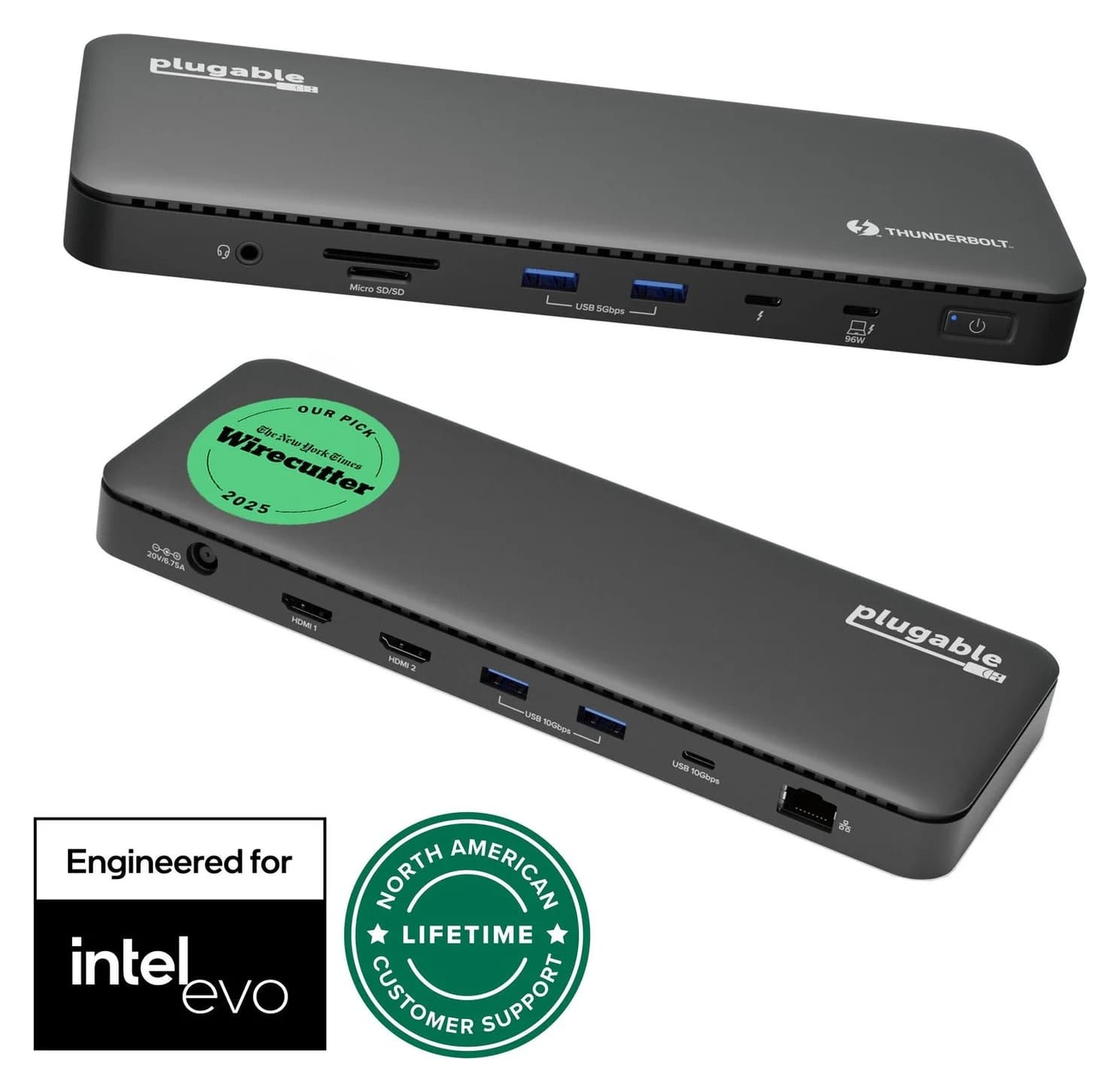
Best for a dual-HDMI deskPlugable
Plugable Thunderbolt 4 Dock (TBT4-UD5)
- to laptop
- 96W
- data
- 40 Gbps
- video
- 4K
- Choose
- Two HDMI outputs support dual 4K at 60Hz on qualifying hosts, with a power supply and Thunderbolt cable included.
- Limit
- Gigabit (not 2.5GbE) Ethernet
Advertised without a bulky power adapter; 2.5G Ethernet, subject to confirming the rest of the kit
OWC Thunderbolt Go, conditionally
Quick picks
| Your priority | Our choice | Why |
|---|---|---|
| Two HDMI monitors at a regular desk | Plugable TBT4-UD5 | Two built-in HDMI outputs; supplied power equipment and host cable |
| Moving a workstation; faster wired networking | OWC Thunderbolt Go, conditionally | Advertised without a bulky power adapter; 2.5G Ethernet, subject to confirming the rest of the kit |
The practical distinction is the equipment you actually need to connect your laptop and monitors. Choose the Plugable by default when its documented setup fits; make the OWC purchase contingent on confirming the details below.
The comparison: confirmed specifications and their limits
The official Thunderbolt product registry identifies the Go as an OWC Thunderbolt 4 dock with three Thunderbolt ports. The Plugable product page supplies a much more detailed specification and package list for the TBT4-UD5.
| Feature | OWC Thunderbolt Go | Plugable TBT4-UD5 |
|---|---|---|
| Thunderbolt connections | 3 total; registry identifies Thunderbolt 4 | One host connection plus one downstream Thunderbolt 4 port; downstream up to 40Gbps and 15W |
| HDMI | HDMI output listed; version and count not specified in the registry | 2x HDMI 2.0; up to dual 4K at 60Hz on supported hosts |
| Higher-resolution claim | Up to 8K; registry does not specify refresh rate | Single 8K at 30Hz through downstream Thunderbolt; host dependent |
| Wired networking | 2.5G Ethernet | Gigabit Ethernet (1Gbps) |
| USB accessories | USB-C and USB-A; split not specified in the registry | 2x USB-A 10Gbps, 2x USB-A 5Gbps, 1x USB-C 10Gbps |
| Memory cards | SD reader | Full-size SD and microSD; SD supports UHS-II |
| Audio | Headphone/microphone combo jack | 3.5mm TRRS headset jack |
| Power equipment | Self-powered; advertised without a bulky external adapter | Separate power supply and power cable included; supply specified at 134W |
| Laptop charging | Not specified in the registry; confirm with OWC | Advertised 100W; 96W certified and specified at the host port |
OWC sourcing limit: its detailed product, package and support pages could not be retrieved with our evidence-fetching tool. The registry verifies the features above but does not establish the exact power cord, included cable, host charging wattage, dimensions or complete carried weight. Those are purchase conditions to confirm with OWC, rather than specifications to fill in from a different dock or a reseller.
Source: Official Thunderbolt registry and Plugable specifications
Best for a dual-HDMI desk: Plugable TBT4-UD5
Plugable
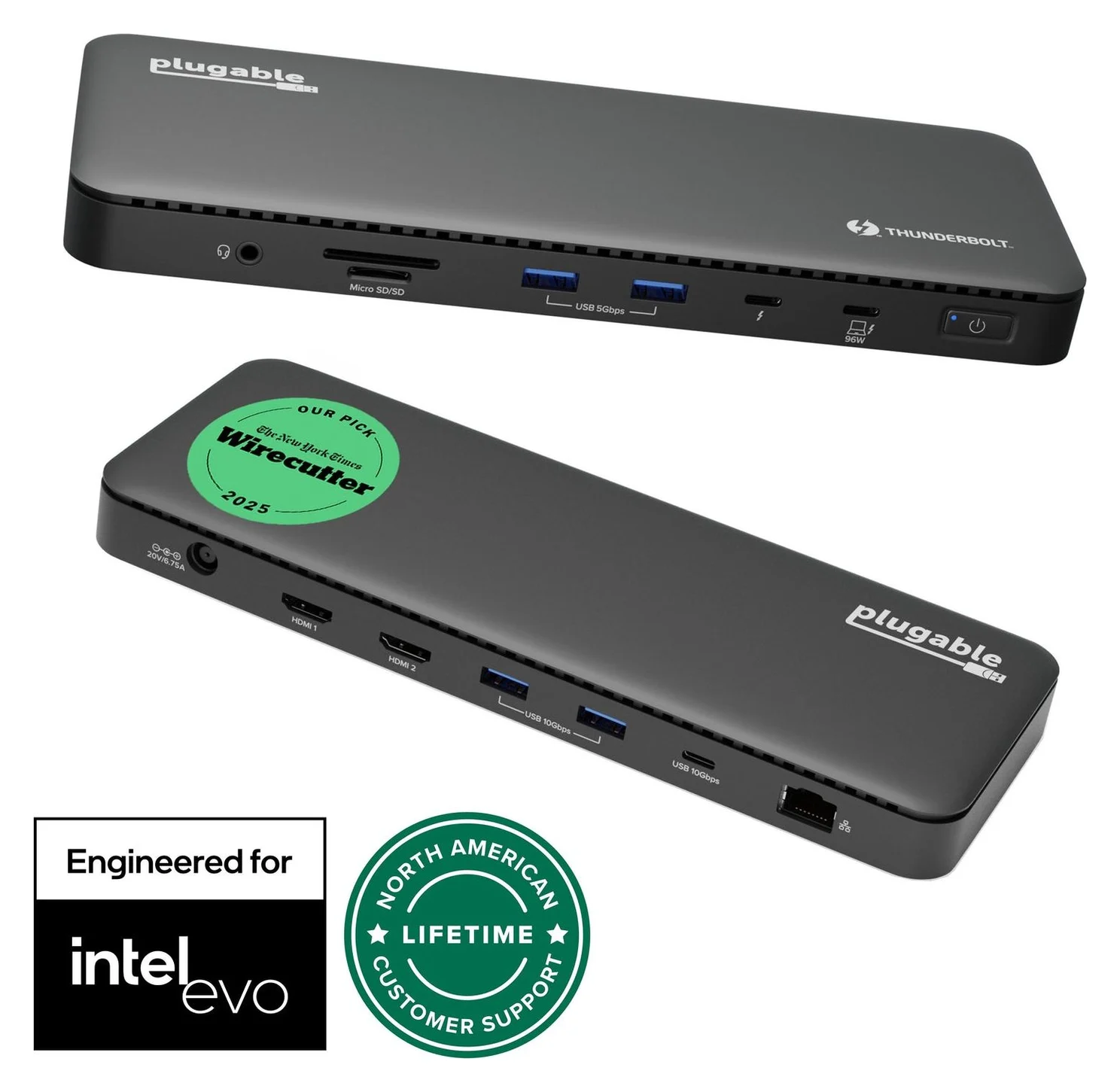
Plugable Thunderbolt 4 Dock (TBT4-UD5)
A Thunderbolt 4 dock with dual HDMI, 100W laptop charging (96W certified), Gigabit Ethernet and an SD/microSD reader.
- 96W PD passthrough
- 40 Gbps data
- 4K video
- 13 ports
The TBT4-UD5 is the clearer purchase for a compatible laptop and two HDMI monitors because the display connectors are already on the dock. Plugable includes a 1m Thunderbolt 4 cable, a power supply and a power cable; HDMI cables are absent from its included-items list. Check the cables you already own before adding anything to the order.
For accessories, its USB-A ports split into two at 10Gbps and two at 5Gbps, alongside a 10Gbps USB-C port. The downstream Thunderbolt port supports USB-C monitors and Thunderbolt peripherals, with up to 15W for a connected device. Reserve that connection for the accessory that actually needs it.
Charging language needs care: Plugable advertises 100W, qualifies it as 96W certified, and its electrical table specifies 96W to the host. The 134W supply rating is not the power delivered to the laptop, and Plugable warns that demanding gaming or performance laptops may not charge properly. Compare the host output with your laptop maker’s requirements; budget for its original charger if necessary.
Check the Plugable TBT4-UD5 price on Amazon
Conditional pick for moving workstations: OWC Thunderbolt Go
OWC’s listing in the Thunderbolt registry describes the Go as a self-powered dock that avoids a bulky, heavy power adapter. That is a useful packing distinction when your dock regularly moves between workspaces. Its confirmed attractions also include 2.5G Ethernet, SD ingestion, USB-A and USB-C, and a headphone/microphone jack.
Our buying rule is simple: choose it only after the current OWC package and display specifications match the laptop and monitors you will use. Ask for the exact regional model, laptop charging output, power cord, host cable and any display adapters needed. A tidier power arrangement is valuable only if the resulting kit connects everything you need.
Do not read its three Thunderbolt ports as three spare accessory ports: that registry figure is a total. Likewise, its 8K headline does not establish a refresh rate or a supported dual-monitor combination for your laptop. If those details determine the purchase, obtain a model-specific confirmation before ordering.
See the Thunderbolt Go configuration on OWC
Match the laptop before counting monitors
Plugable publishes the following host guidance for the TBT4-UD5; these are its limits, not an OWC compatibility matrix.
| Laptop or host connection | Plugable’s stated support |
|---|---|
| Windows 10+ with Thunderbolt 4, Thunderbolt 5 or USB4 | Two external displays |
| Windows Thunderbolt 3 or non-Thunderbolt USB-C | One external display; USB-C video requires Alt Mode |
| Base M1 or M2 MacBook | One external display |
| Base M3 MacBook | Two only with lid closed, according to feature text; see conflict below |
| M4, M5 or M-series Pro/Max Mac | Two external displays |
Manufacturer conflict: Plugable’s feature text permits two displays on base M3 in clamshell mode, while a Q&A on the same page says base M1/M2/M3 support only one. Do not turn that into an unconditional dual-display recommendation for base M3; confirm the precise configuration with support.
On plain USB-C with Alt Mode, the detailed Plugable table lists single 3840×2160 output at 30Hz, so a connector that fits does not establish the dual-4K-at-60Hz setup. For a broader choice of docks, use our Thunderbolt dock guide; for your particular Mac, start with our MacBook Pro dock guide.
Build the complete display and travel kit
Start with monitor inputs, then list the cables and conversion hardware the order must contain. Do not compare a bare dock against another dock plus all of its power equipment.
| Monitor setup | TBT4-UD5 shopping list | OWC purchase condition |
|---|---|---|
| Two HDMI monitors | Two suitable HDMI cables; no video adapters on a qualifying host | Confirm native output count and the route to the second screen; include any adapter in the order |
| A USB-C monitor | Use its downstream Thunderbolt port with a suitable display cable | Confirm the display-capable output and cable requirements for that monitor |
| DisplayPort-only monitors | Do not assume an HDMI-to-DisplayPort adapter is a supported solution; Plugable advises against it | Obtain a supported connection plan, including every required adapter, before choosing the kit |
Plugable lists the dock body at 365g and 22.5 × 8.5 × 2.3cm when reordered as width × depth × height. Its separate supply and cables are additional components in the package. OWC’s registry supplies no comparable complete-kit weight or packed dimensions. There is no defensible carried-weight winner from these sources. Compare the dock, supply, mains cord, host cable and required video hardware together.
For a checkout comparison, add the dock, missing monitor cables, required video adapters and any laptop charger you still need. Recheck bundle contents and the regional power cord when considering a promotion; a longer accessory list does not make the wrong configuration useful.
Match the host
Confirm the laptop port and its supported display count.
Match the screens
Write down monitor inputs and the exact cables or adapters needed.
Count the power equipment
Include the dock supply, mains cord and any separate laptop charger.
Compare the complete order
Check the actual regional bundle and all missing parts together.
Variants and setup details worth checking
Keep TBT4-UD5 separate from TBT4-UDZ: Plugable lists them as different products in its comparison chart. The TBT-UDM is another named option: Plugable describes an aluminum case and Mac-focused firmware, while saying the port specifications and included accessories remain the same as the UD5. Do not let a similar product name substitute for the model on your order.
For initial UD5 setup, use the front host port beside the power button, marked with a laptop symbol and 96W; the other USB-C connections do not serve as host ports. Plugable describes the dock as driverless, but that does not remove the host and display restrictions in its compatibility guidance. If the setup does not match the published configuration, contact the maker before buying extra conversion hardware.
How we choose
This is a comparison based on official specifications, not a report of physical use. Specifications come from Plugable’s model-specific page and the official Thunderbolt registry entry for the OWC Go. We separate documented features from missing package information, and flag the maker’s conflicting display statements. The recommendations prioritize a working monitor connection, sufficient laptop charging and a complete equipment list; no measured speed, heat or reliability result is implied.
Verdict
Choose the Plugable TBT4-UD5 for a documented dual-HDMI setup: two HDMI outputs, dual 4K at 60Hz on qualifying hosts, and included power equipment and host cable. Choose the OWC Thunderbolt Go conditionally for its power-adapter arrangement and 2.5G Ethernet, after OWC confirms the exact laptop, display and regional package details. Until that confirmation, the Plugable is our purchase recommendation when its compatibility table fits your equipment.
Check the Plugable TBT4-UD5 price on Amazon · Check the OWC configuration
Frequently asked questions
Is the OWC Thunderbolt Go better than the Plugable TBT4-UD5?
For a pair of HDMI monitors, our pick is the Plugable TBT4-UD5: its two HDMI outputs support dual 4K at 60Hz on qualifying hosts, and its power supply and host cable are included. OWC is the conditional choice for its advertised power-adapter arrangement and 2.5G Ethernet. Confirm its exact charging, display and package specifications before ordering; the official Thunderbolt registry does not provide a complete kit specification.
Does the Plugable TBT4-UD5 support two monitors on a MacBook?
Plugable lists dual displays on M4, M5 and M-series Pro/Max Macs, and on base M3 MacBooks with the lid closed. Base M1 and M2 MacBooks get one external display. Its page also contains a conflicting Q&A that groups base M3 with single-display models. Follow up with Plugable for your exact Mac if that distinction determines the purchase; do not assume every MacBook supports two displays.
Is the Thunderbolt Go lighter to carry than the TBT4-UD5?
A fair complete-kit weight comparison is not established by the official evidence available here. Plugable lists its dock alone at 365 grams, then separately lists a power supply, power cable and Thunderbolt cable in the box. The OWC registry describes the Go as avoiding a bulky power adapter but supplies no kit weight. We would choose on packing convenience only after weighing every component needed for the intended monitors.
Do I need display adapters with the TBT4-UD5?
For two HDMI monitors, use two suitable HDMI cables; the dock already has the HDMI connectors, so no video adapters are needed on a supported dual-display host. The included-items list does not include HDMI cables. A DisplayPort-only monitor changes the purchase: Plugable advises against HDMI-to-DisplayPort adapters. Match your monitor inputs before choosing the dock, and account for any required conversion equipment separately.
Related guides
Best External GPU Enclosures in 2026: Thunderbolt eGPUs That Still Exist
The current Thunderbolt eGPU enclosures from maker pages: Sonnet's Breakaway Box 850 T5 and 750ex and Razer's Core X V2, plus the Mac compatibility truth and what to check before buying.
Updated November 7, 2026Read
OWC Thunderbolt Go vs CalDigit TS4: Which Thunderbolt Dock Should You Buy?
The Go Dock packs its own power for travel; the TS4 anchors a desk with 18 ports and 98W charging. Compare full kits, monitors and which to buy.
Updated November 5, 2026Read
Plugable TBT4-UD5 vs UD-3900PDH: Which Dock for Dual Monitors?
Choose between Plugable's TBT4-UD5 Thunderbolt 4 dock and UD-3900PDH DisplayLink dock: which laptop ports they need, display counts, charging and software.
Updated November 5, 2026Read