Best picks
Best Thunderbolt Docks in 2026 (Thunderbolt 4 and 5)
Thunderbolt 4 and Thunderbolt 5 docks compared on host charging, display support for Mac and Windows, and port mix, so one cable runs your whole desk.
By thisUSB EditorialUpdated September 27, 20266 min read4 picks
Our picks at a glance
- See on Amazon1
Best overall Thunderbolt 4 dock
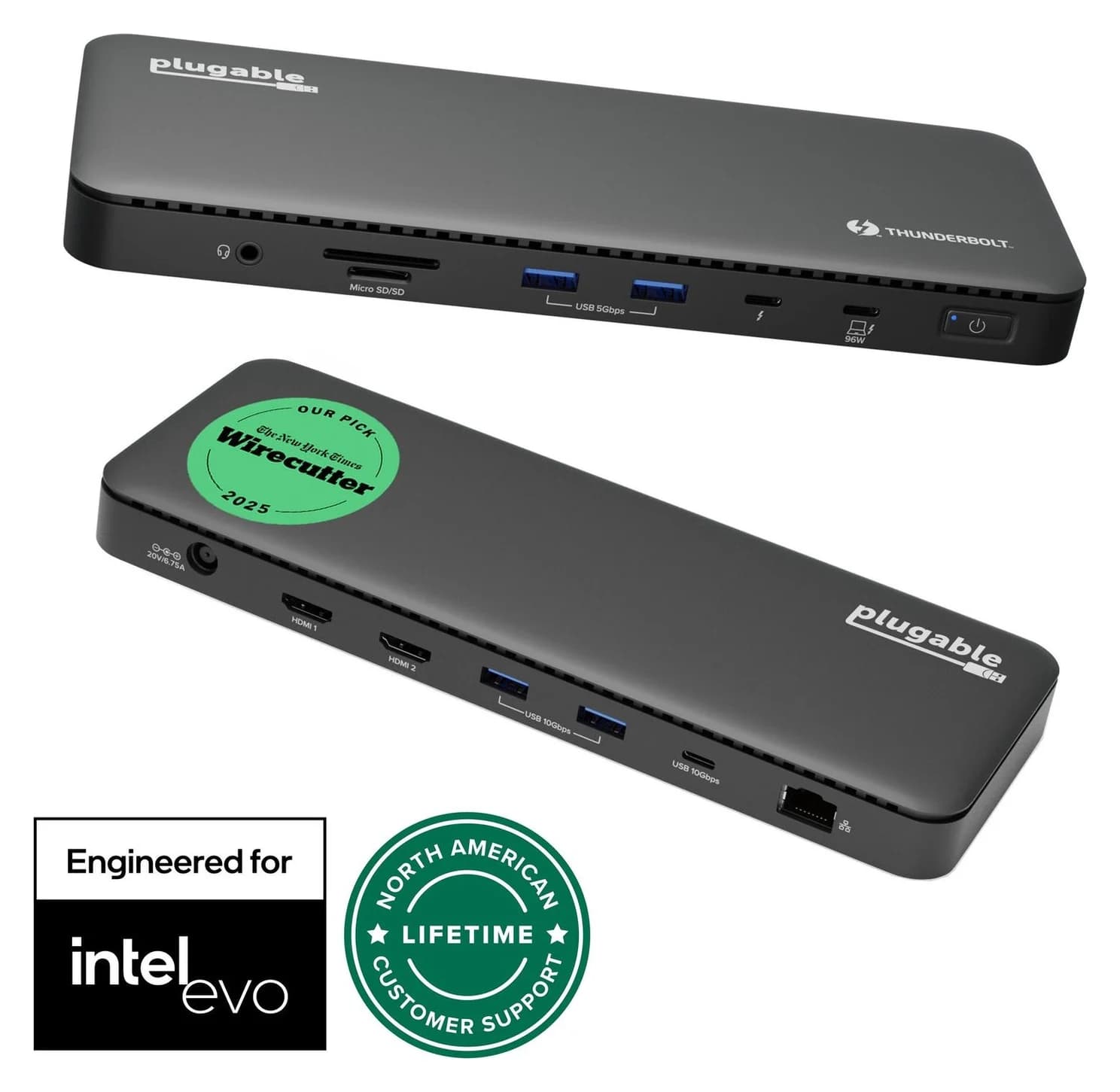
Plugable Thunderbolt 4 Dock (TBT4-UD5)96W PD passthrough · 40 Gbps data · 4K video · 13 ports
- See on Amazon2
Best for creators
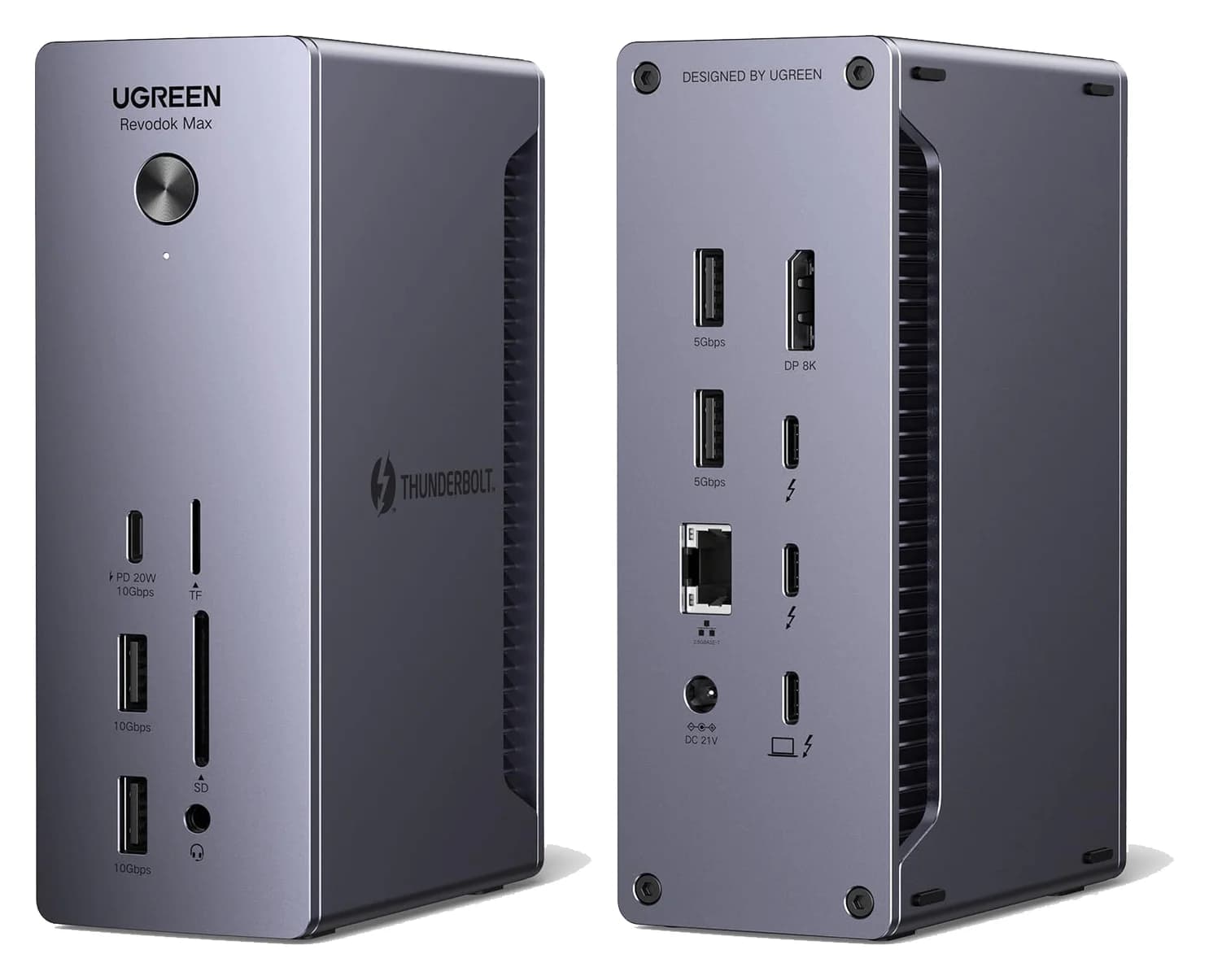
UGREEN Revodok Max 213 Thunderbolt 4 Dock (13-in-1)90W PD passthrough · 40 Gbps data · 4K video · 13 ports
- See on Amazon3
Best Thunderbolt 4 hub-style dock
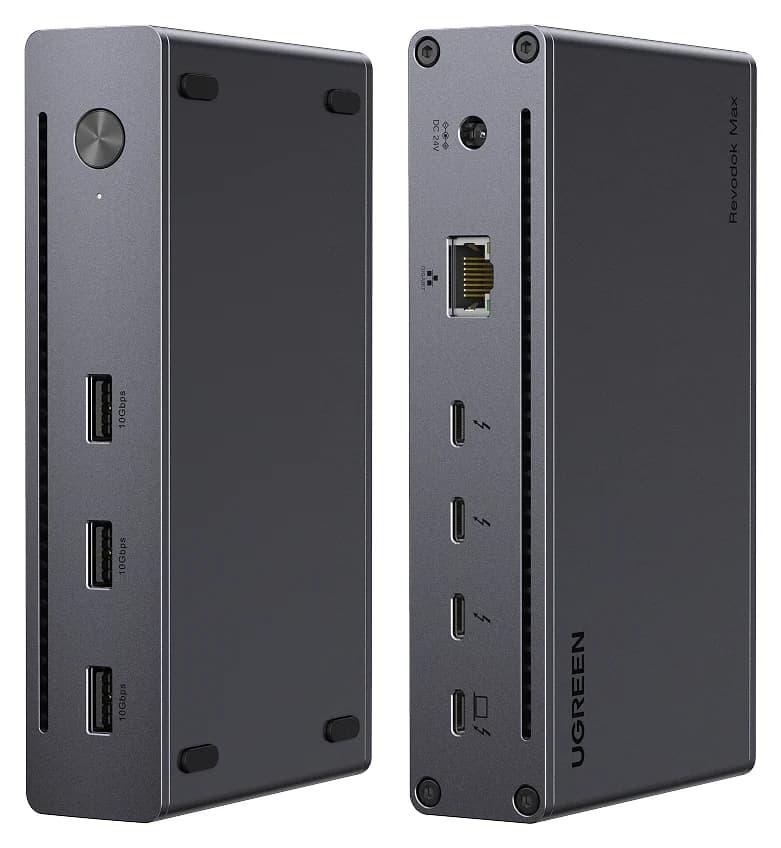
UGREEN Revodok Max 208 Thunderbolt 4 Dock (8-in-1)85W PD passthrough · 40 Gbps data · 4K video · 8 ports
- See on Amazon4
Best Thunderbolt 5 dock
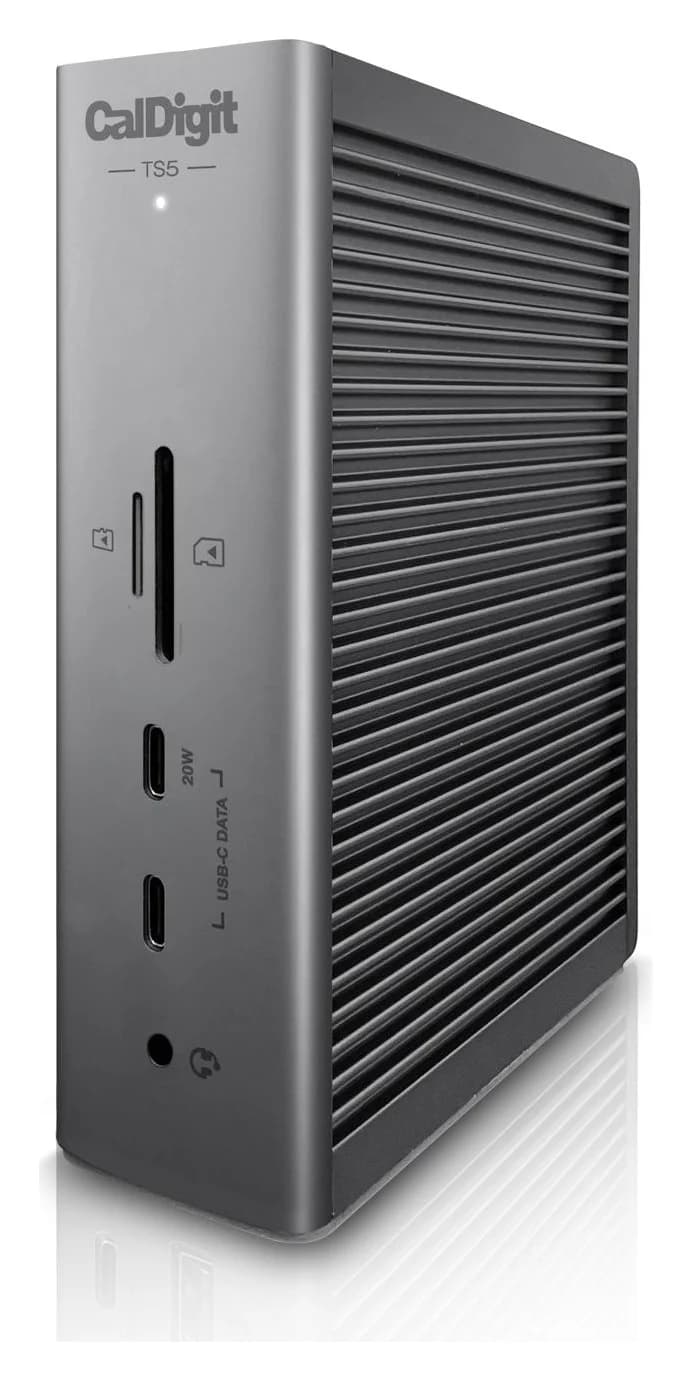
CalDigit TS5 Thunderbolt 5 Dock140W PD passthrough · 80 Gbps data · Via Thunderb video · 15 ports
If you want one cable that charges your laptop and connects two monitors, Ethernet and your accessories, the Plugable TBT4-UD5 is the Thunderbolt 4 dock to get. It has two HDMI ports built in, so you don't need extra adapters. If your laptop has Thunderbolt 5, or you have a 16-inch laptop that needs 140W, the CalDigit TS5 is the step up.
Every dock below works with Mac and Windows, but what you get (displays in particular) depends on your laptop's chip and port. We note the limits each maker publishes.
Quick picks
| Pick | Award | Host link | Host charging | Built-in video | Ethernet |
|---|---|---|---|---|---|
| Plugable TBT4-UD5 | Best overall TB4 | Thunderbolt 4 | 100W (96W certified) | 2x HDMI 2.0 | 1GbE |
| UGREEN Revodok Max 213 | Best for creators | Thunderbolt 4 | 90W | 1x DisplayPort 1.4 | 2.5GbE |
| UGREEN Revodok Max 208 | Best TB4 hub-style | Thunderbolt 4 | 85W | None (via TB4 ports) | 1GbE |
| CalDigit TS5 | Best Thunderbolt 5 | Thunderbolt 5 | 140W | None (via TB5 ports) | 2.5GbE |
Thunderbolt 4, Thunderbolt 5 and USB4 in one paragraph
Thunderbolt 4 and USB4 both top out at 40Gbps over USB-C. Thunderbolt 4 guarantees more, such as two 4K displays and PCIe for fast storage, while USB4 features vary by laptop. Thunderbolt 5 (and USB4 v2) raises the link to 80Gbps, with a 120Gbps one-way Bandwidth Boost for multi-monitor setups. All of these docks are backward compatible. A TB5 dock on a TB4 laptop runs at TB4 speed and display limits, which is still useful if you plan to upgrade the laptop later.
Best overall Thunderbolt 4 dock: Plugable TBT4-UD5
Plugable
Plugable Thunderbolt 4 Dock (TBT4-UD5)
A Thunderbolt 4 dock with dual HDMI, 100W laptop charging (96W certified), Gigabit Ethernet and an SD/microSD reader.
- 96W PD passthrough
- 40 Gbps data
- 4K video
- 13 ports
The TBT4-UD5 is the most straightforward way to connect two HDMI monitors to a Thunderbolt laptop. According to Plugable's spec sheet, you get:
- 2x HDMI 2.0 (dual 4K at 60Hz, or a single 8K through the downstream Thunderbolt port on supported systems)
- 1x downstream Thunderbolt 4 (40Gbps, 15W)
- 2x USB-A 10Gbps, 2x USB-A 5Gbps, 1x USB-C 10Gbps
- Gigabit Ethernet, a UHS-II SD/microSD reader and a 3.5mm combo jack
- 100W host charging (96W certified) from a 134W power supply, plus a 1m Thunderbolt 4 cable
Plugable's Mac notes are specific. Pro and Max chips, and M4/M5, get dual displays. Base M3 gets dual displays only with the lid closed. Base M1 and M2 get one display. Windows Thunderbolt 4/5 and USB4 laptops typically get two. The limitations are Gigabit rather than 2.5GbE Ethernet, and HDMI capped at 60Hz, so it isn't suited to high-refresh gaming monitors.
See the Plugable TBT4-UD5 on Amazon
Best for creators: UGREEN Revodok Max 213
UGREEN
UGREEN Revodok Max 213 Thunderbolt 4 Dock (13-in-1)
A 13-in-1 Thunderbolt 4 dock with DisplayPort 1.4, 2.5GbE, SD/TF 4.0 readers and 90W laptop charging.
- 90W PD passthrough
- 40 Gbps data
- 4K video
- 13 ports
If you shoot photos or video, the Revodok Max 213 has the ports you'll use: SD 4.0 and TF (microSD) 4.0 readers, 2.5GbE for a NAS, and a mix of fast USB. UGREEN's spec page lists:
- 2x Thunderbolt 4 downstream (40Gbps, 15W each)
- 1x DisplayPort 1.4
- 1x USB-C 10Gbps with 20W charging for a phone
- 2x USB-A 10Gbps and 2x USB-A 5Gbps
- 2.5GbE, 3.5mm audio
- Up to 90W laptop charging, from an included 180W GaN adapter
UGREEN lists dual 4K60 or single 8K30 on Windows, dual 4K60 on M1-M3 Pro/Max Macs, and a single 4K60 display on base M1-M3. There's no HDMI port, so an HDMI monitor needs a USB-C to HDMI cable on one of the Thunderbolt ports. At 90W, it's fine for most 14-inch laptops but won't fast-charge a 16-inch MacBook Pro.
See the UGREEN Revodok Max 213 on Amazon
Best Thunderbolt 4 hub-style dock: UGREEN Revodok Max 208
UGREEN
UGREEN Revodok Max 208 Thunderbolt 4 Dock (8-in-1)
A Thunderbolt 4 hub-style dock with three downstream Thunderbolt 4 ports, three 10Gbps USB-A ports, Gigabit Ethernet and 85W laptop charging.
- 85W PD passthrough
- 40 Gbps data
- 4K video
- 8 ports
The Revodok Max 208 is simpler: a Thunderbolt 4 hub with a few extras. You get three downstream Thunderbolt 4 ports (40Gbps, 15W each), three USB-A 10Gbps ports and Gigabit Ethernet, with 85W laptop charging from an included 140W GaN adapter.
That works well if your monitors and drives are already USB-C or Thunderbolt, such as a Studio Display, a USB-C monitor, or a Thunderbolt SSD enclosure. UGREEN lists dual 4K60 or single 8K30 on Windows, dual 4K60 on Pro/Max MacBooks, and a single 4K60 display on base M-series chips. There's no HDMI, DisplayPort, card reader or audio jack. If you need those, the 213 or the Plugable is a better fit.
See the UGREEN Revodok Max 208 on Amazon
Best Thunderbolt 5 dock: CalDigit TS5
CalDigit
CalDigit TS5 Thunderbolt 5 Dock
A 15-port Thunderbolt 5 dock with three downstream 80Gb/s Thunderbolt 5 ports, 2.5GbE, UHS-II readers and 140W laptop charging.
- 140W PD passthrough
- 80 Gbps data
- Via Thunderb video
- 15 ports
The TS5 is the pick for Thunderbolt 5 laptops, and for anyone who needs 140W host charging for a 16-inch MacBook Pro or a high-power Windows laptop. CalDigit's spec page lists 15 ports:
- 1x Thunderbolt 5 host port (up to 120Gb/s with Bandwidth Boost)
- 3x Thunderbolt 5 downstream, 80Gb/s, 15W each
- 3x USB-C 10Gb/s (one front port at 20W), 1x USB-A 10Gb/s, 1x USB-A USB 2.0
- 2.5GbE, SD 4.0 and microSD 4.0 (UHS-II), three 3.5mm audio jacks
- 140W host charging from a 240W power supply, and a 1m Thunderbolt 5 cable
Displays connect through the Thunderbolt 5 ports (there's no HDMI or DisplayPort). CalDigit lists up to three displays on Thunderbolt 5 Windows laptops and two on TB4/USB4. On Macs, it depends on the chip: one on base M1-M3, two on M4/M5 base and Pro/Max, and more on M5 Pro and M5 Max. It requires macOS 15 or Windows 11 or later, and it also works with TB4, TB3 Mac and USB4 hosts. If your laptop is Thunderbolt 4, you pay for speed you can't use yet. The 140W charging still applies.
See the CalDigit TS5 on Amazon
How we choose
We haven't physically tried these docks. Our picks come from research:
- Spec sheets. Ports, host charging, power supplies and display limits come from Plugable's, UGREEN's and CalDigit's product pages.
- Standards. We check claims against Intel's Thunderbolt 4 and 5 requirements and the USB4 spec, including 40 vs 80Gbps, display guarantees and backward compatibility.
- Mac display limits. We cross-check each maker's display notes against how Apple silicon handles external displays.
- Known buyer patterns. For example, base-chip MacBooks showing only one monitor, and HDMI monitors stuck at 30Hz because of cabling.
We also confirm each ASIN matches the model. This guide's previous version called the Plugable dock the "TBT4-UDZ" and listed specs (three Thunderbolt ports, 2.5GbE, HDMI 2.1) that don't match Plugable's page for the TBT4-UD5 sold under this ASIN. We corrected that, updated the UGREEN 208's charging to UGREEN's published 85W, and added a Thunderbolt 5 pick.
Buying guide
Start with your laptop's port. Thunderbolt 4/5 or USB4 gets the full dock experience. Plain USB-C with DisplayPort Alt Mode works, but usually with one display. A data-only USB-C port won't drive monitors through any dock. Our USB-C vs USB-A explainer shows how to identify your ports.
Match host charging to your laptop. 85-100W suits most 13-14-inch laptops. 16-inch performance laptops want 140W. Lower charging still works, just more slowly under load.
Count your displays and their connectors. If your monitors are HDMI, a dock with built-in HDMI (like the Plugable) avoids adapters. If they're USB-C or Thunderbolt, a hub-style dock is fine. Then check your Mac's display limit.
Use the included cable. Thunderbolt docks need a certified 40Gbps or 80Gbps cable. A charging cable won't work. If you need a longer or spare one, see our USB-C cable guide.
Dock or hub? For a travel bag, a USB-C hub is lighter. See best USB-C hubs for MacBook and best USB-C hubs for Windows laptops. For a fixed desk, a dock is worth the extra size.
Verdict
For most Thunderbolt 4 desks, the Plugable TBT4-UD5 is the easiest recommendation: dual HDMI built in, 96W-certified charging and clear Mac and Windows display notes. Creators should look at the UGREEN Revodok Max 213 for 2.5GbE and SD 4.0. Choose the UGREEN Revodok Max 208 if your gear is already Thunderbolt. If you have a Thunderbolt 5 laptop or a 16-inch machine that needs 140W, the CalDigit TS5 is the dock to get.
Frequently asked questions
What is the difference between Thunderbolt 4 and Thunderbolt 5 docks?
Thunderbolt 4 runs at 40Gbps. Thunderbolt 5 doubles that to 80Gbps, and up to 120Gbps in one direction with Bandwidth Boost for heavy display setups. Thunderbolt 5 docks also tend to offer more host charging, like the 140W on the CalDigit TS5. You only get Thunderbolt 5 speed with a Thunderbolt 5 laptop; on a Thunderbolt 4 or USB4 laptop, a TB5 dock works at that laptop's speed.
How many monitors can a Thunderbolt dock run on a MacBook?
It depends on the Mac's chip, not the dock. Base M1 and M2 MacBooks support one external display. Base M3 supports two with the lid closed. Pro and Max chips support two or more. Plugable, UGREEN and CalDigit all publish these limits on their dock pages. No Thunderbolt dock can get around them.
Will a Thunderbolt dock work with a USB4 or USB-C laptop?
Usually, yes. Thunderbolt 4 and 5 docks are backward compatible with USB4 and most USB-C laptops, but features can drop. For example, Plugable says Thunderbolt 3 and plain USB-C hosts get a single display from its TB4 dock. Check the dock maker's compatibility notes for your laptop's port type.
Is a Thunderbolt dock worth it over a USB-C hub?
For a permanent desk with two monitors, wired Ethernet, fast storage and laptop charging over one cable, yes. Docks have their own power supply, so they don't take power from the laptop, and they offer more bandwidth for displays and drives. For travel or a single monitor, a USB-C hub is smaller and simpler.