Black Friday: the specs to check before you buy
Comparison
Plugable TBT4-UD5 vs UD-3900PDH: Which Dock for Dual Monitors?
Choose between Plugable's TBT4-UD5 Thunderbolt 4 dock and UD-3900PDH DisplayLink dock: which laptop ports they need, display counts, charging and software.
By thisUSB EditorialUpdated November 5, 20269 min read2 picks
Our picks at a glance
Best for Thunderbolt 4, USB4 and M4/M5 MacsPlugable
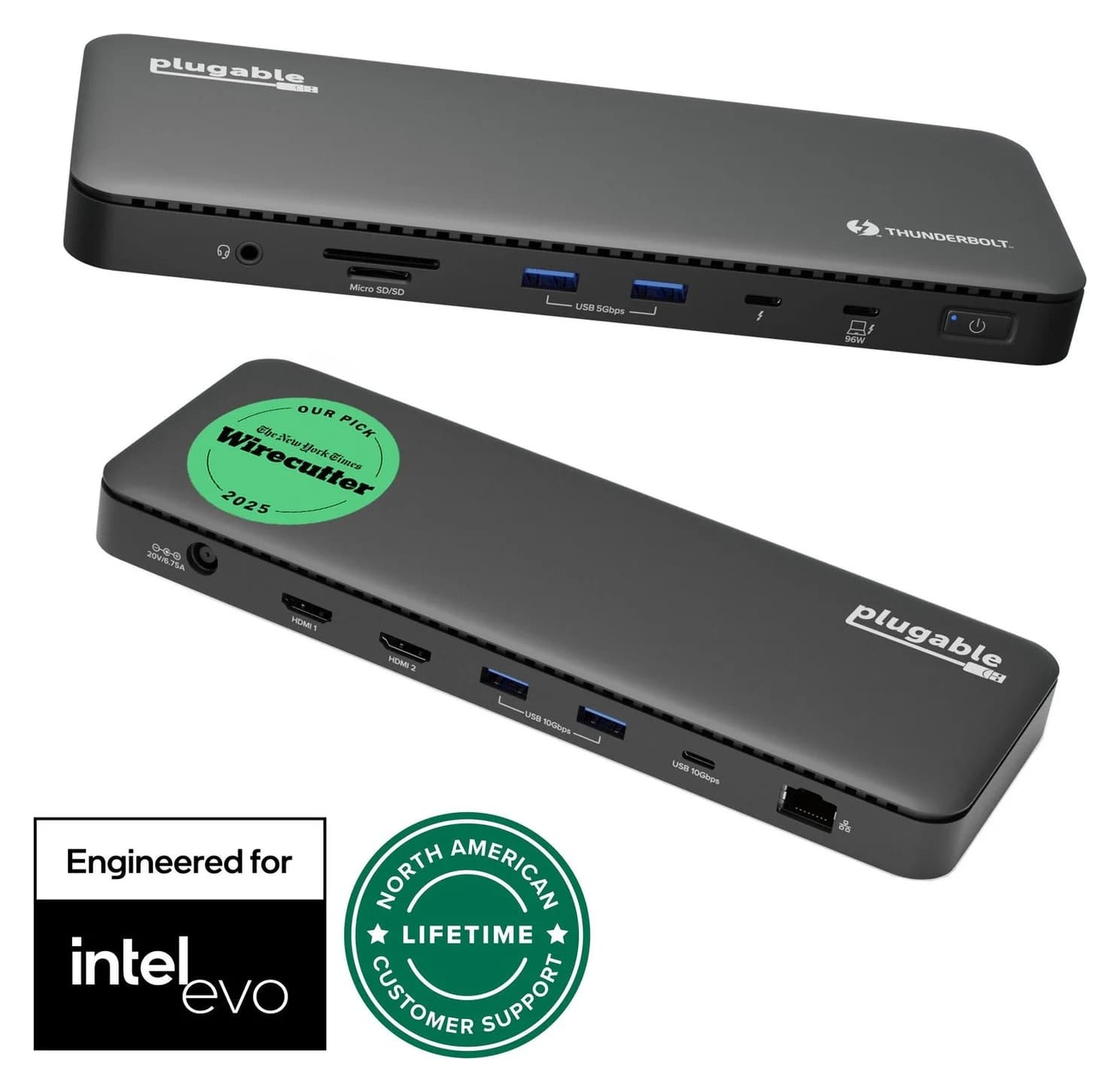
Plugable Thunderbolt 4 Dock (TBT4-UD5)
- to laptop
- 96W
- data
- 40 Gbps
- video
- 4K
- Choose
- Native dual 4K 60Hz HDMI with no DisplayLink software, a 40Gbps Thunderbolt 4 host link and 100W advertised (96W certified) charging on qualifying hosts.
- Limit
- Gigabit (not 2.5GbE) Ethernet
Buy the Plugable TBT4-UD5 if your laptop has a Thunderbolt 4, Thunderbolt 5 or USB4 port and can natively drive two displays: it gives you two HDMI outputs at up to 4K 60Hz each with no software to install, a 40Gbps host link and 100W advertised (96W certified) laptop charging. Buy the Plugable UD-3900PDH only when your laptop's own video is the bottleneck — an ordinary USB-C port, or a base M1, M2 or M3 MacBook — and you can install DisplayLink software with admin rights: it drives up to three HDMI displays on hardware that natively supports one. One honest caveat first: Plugable's own page now marks the UD-3900PDH discontinued and replaced by the UD-3900PDZ, so treat it as a leftover-stock purchase and check which model you are actually being sold.
- 3HDMI displays the DisplayLink dock drives, even on laptops that natively support one
- 2Native 4K 60Hz HDMI displays from the Thunderbolt 4 dock on qualifying hosts
- 40GbpsThunderbolt 4 host link on the TBT4-UD5
- 100WAdvertised laptop charging from either dock
Quick picks
| Pick | Best for | Why |
|---|---|---|
| TBT4-UD5 | Thunderbolt 4 / Thunderbolt 5 / USB4 laptops, Macs with M4, M5 or Pro/Max chips | Native dual 4K 60Hz, driverless, fast USB, 8K capable front port |
| UD-3900PDH | Ordinary USB-C laptops and base M1/M2/M3 Macs; three screens | DisplayLink reaches past the laptop's display limit; 100W charging |
| Neither | HDCP-protected streaming or gaming on the DisplayLink path | Both jobs are outside what Plugable says DisplayLink can do; use native video |
Which dock for your laptop?
The decision hinges on the port on the side of your laptop and, on a Mac, the chip. Plugable's compatibility notes for the TBT4-UD5 require a built-in Thunderbolt 4 or USB4 port running Windows 10 or later or macOS 11 or later for dual displays; Thunderbolt 3 and USB-C hosts with DisplayPort are limited to one external display. On Apple Silicon, dual displays need an M1 Pro or Max, M2 Pro or Max, M3 Pro or Max, or any M4 or M5 chip; base M1, M2 and M3 Macs get a single display, except that the M3 supports two in clamshell mode.
The UD-3900PDH asks far less of the port: any USB-C connection with Alt Mode and Power Delivery works, including USB4, Thunderbolt 4, Thunderbolt 3 and plain USB-C, on Windows 10 and newer, macOS (Plugable's product copy says 10.14+, its current support guidance says macOS 14, 15, 26 and 27) and ChromeOS 100 or later. The cost moves to software instead: a DisplayLink driver with administrative permissions, and on a Mac the Screen Recording permission plus a running DisplayLink Manager app.
Check the laptop port
Thunderbolt or USB4 logo next to the port means the TBT4-UD5's native path is open; a plain USB-C logo points to the UD-3900PDH.
Check the chip (Macs)
Base M1/M2/M3 MacBooks natively drive one display, so the DisplayLink dock is the only way to two or three screens; M4, M5, Pro and Max chips can use the TBT4-UD5's two.
Check your permission to install software
Work laptop? DisplayLink needs admin rights and, on managed Macs, a Screen Recording permission IT may refuse.
Check what you'll watch and play
Protected streaming and games work over the TBT4-UD5's native video; Plugable rules both out for the DisplayLink dock.
Side-by-side: the exact hardware
Both are aluminum desktop docks with power supplies and host cables in the box. Figures below come from Plugable's own product pages for each model.
| Specification | TBT4-UD5 | UD-3900PDH |
|---|---|---|
| Video technology | Native DisplayPort Alt Mode over Thunderbolt 4 | DisplayLink (DL-3900) over USB 3.0 |
| Host port | Thunderbolt 4 or USB4; one display on Thunderbolt 3/USB-C | USB-C Alt Mode with PD: USB4, Thunderbolt 4/3, USB-C |
| Displays | Up to 2 (host dependent); 8K on the front Thunderbolt port | Up to 3 HDMI |
| Per-display maximum | 2x HDMI 2.0, each up to 4K 60Hz | 1x HDMI 2.0 up to 4K 60Hz; 2x HDMI 1.3 up to 1920x1200 60Hz |
| Host data link | 40Gbps | 5Gbps |
| Laptop charging | 100W advertised (96W certified) | 100W |
| Included power supply | 134W (21.0V, 6.4A) | 130W (20.0V, 6.5A) |
| USB data ports | 2x USB-A 10Gbps, 2x USB-A 5Gbps, 1x USB-C 10Gbps | 4x USB-A 5Gbps, 1x USB-A 5Gbps with 7.5W battery charging |
| Card reader | SD and microSD, UHS-II (312MB/s) | SD and microSD, UHS-II (312MB/s) |
| Ethernet | Gigabit | Gigabit |
| Weight | 365 grams (12.9 ounces) | 360 grams (12.7 ounces) |
| Software | Typically none | DisplayLink driver required |
| Status on Plugable's site | Current | Discontinued, replaced by UD-3900PDZ |
Sources: Plugable's TBT4-UD5 page and UD-3900PDH page.
Best for Thunderbolt 4, USB4 and modern Macs: TBT4-UD5
Plugable
Plugable Thunderbolt 4 Dock (TBT4-UD5)
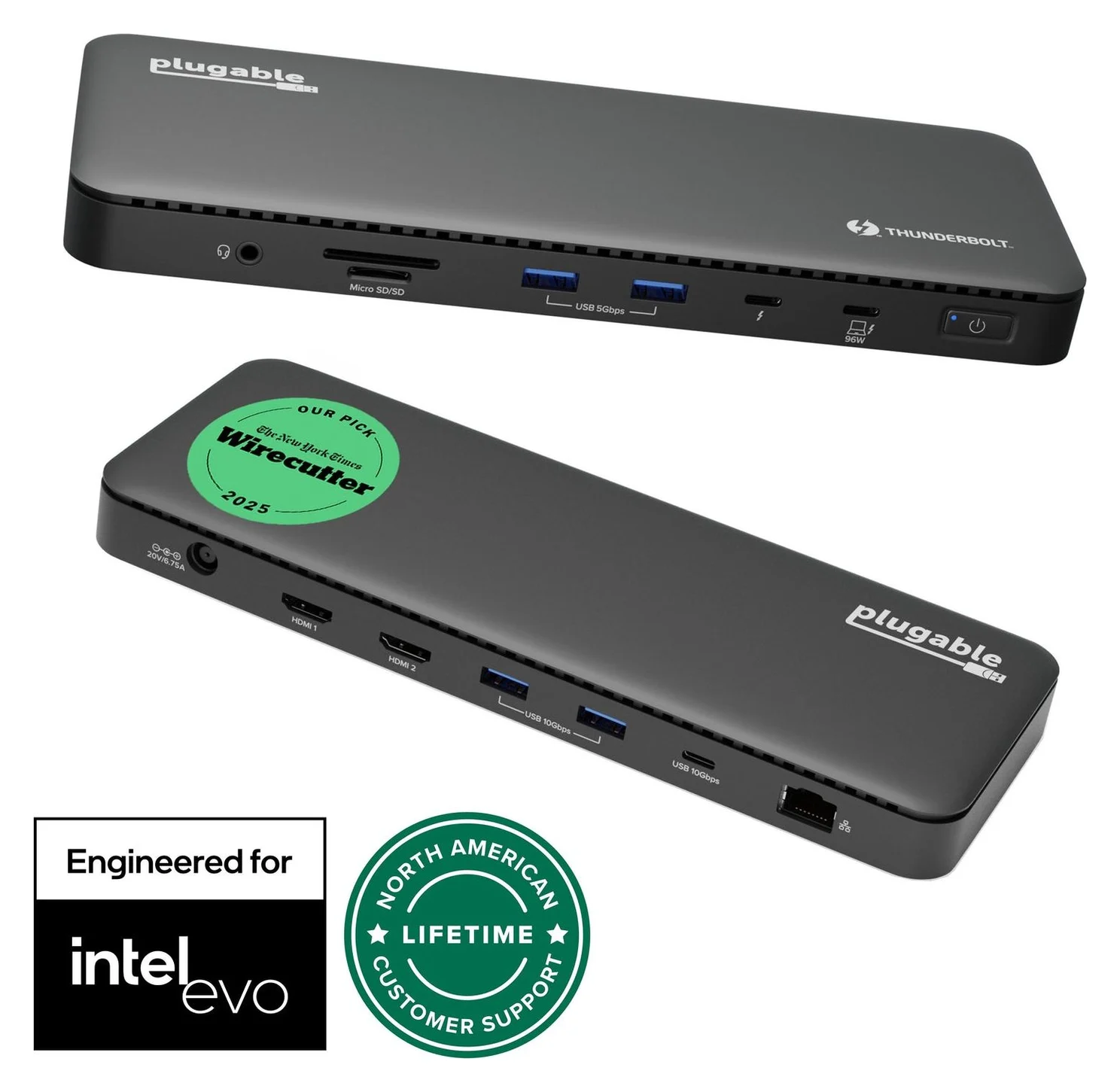
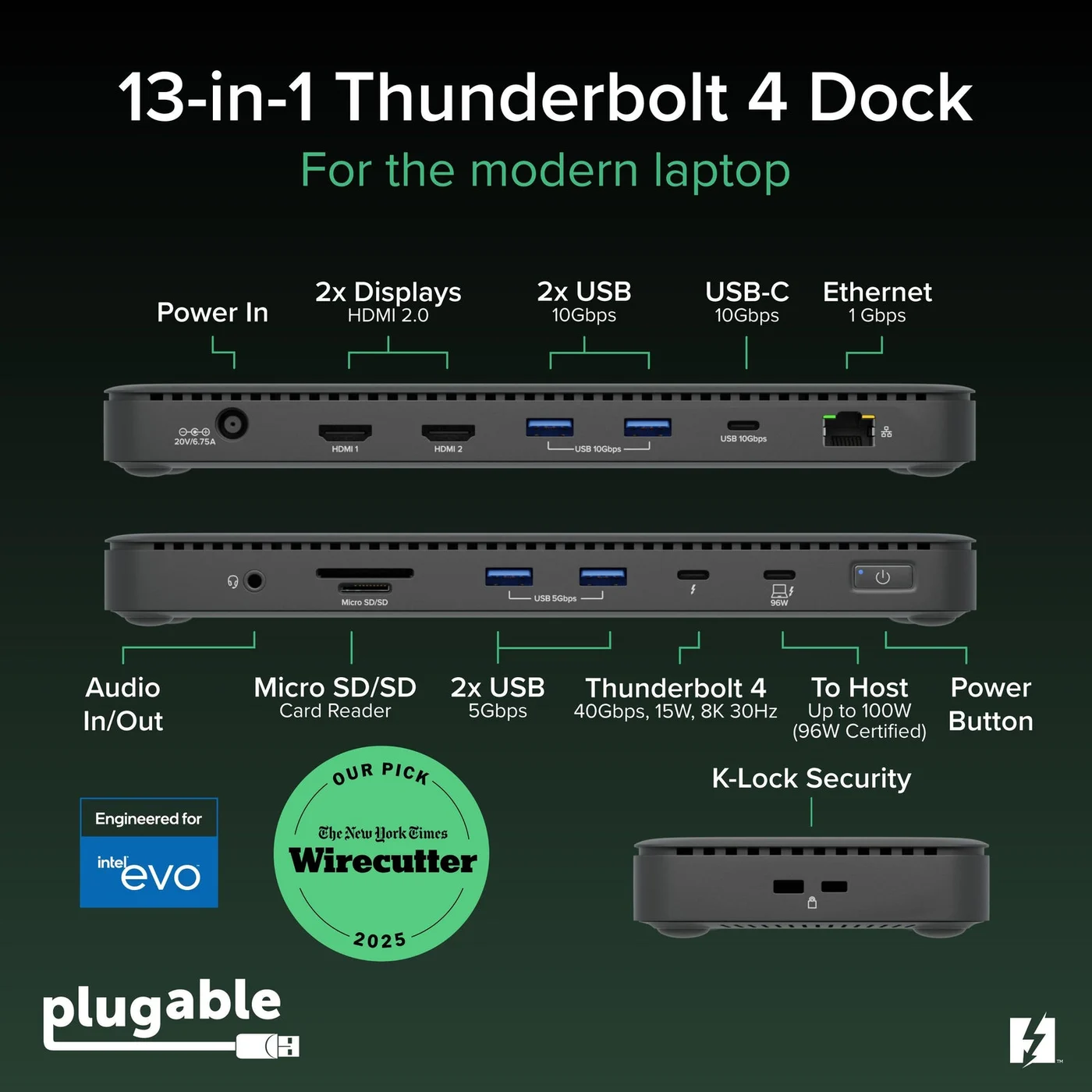
A Thunderbolt 4 dock with dual HDMI, 100W laptop charging (96W certified), Gigabit Ethernet and an SD/microSD reader.
- 96W PD passthrough
- 40 Gbps data
- 4K video
- 13 ports
This is the dock you buy when your laptop's port can carry the video natively. Two built-in HDMI 2.0 outputs each run up to 4K 60Hz on hosts with Thunderbolt 4, Thunderbolt 5 or USB4, and the front Thunderbolt 4 downstream port adds DisplayPort 1.4 modes up to 8K (7680x4320 at 30Hz) — with a total of two displays possible. Nothing here runs on a graphics driver: Plugable describes it as a driverless dock, apart from a possible manual Ethernet driver install on Windows for best performance.
The rest of the dock is a generation ahead of the DisplayLink model: a 40Gbps host link, two 10Gbps USB-A ports, a 10Gbps USB-C port and 15W charging from the front Thunderbolt port. Plugable advertises 100W Power Delivery to the laptop (96W certified in its specification table), from a 134W supply. In the box you get the dock, a 1.0m 40Gbps 240W Thunderbolt 4 cable, the power supply and its power cable — everything except the HDMI cables to your monitors.
Two limits worth knowing before you click buy. First, backwards compatibility is real but display-limited: Thunderbolt 3 and USB-C DisplayPort hosts are supported with a single display, and Plugable's own pages conflict here — the video-mode table lists one or two displays for Thunderbolt 3 hosts with two display streams, while the compatibility text and FAQ say Thunderbolt 3 means one display. Treat one as the safe answer. Second, first-time setup includes a security approval: Windows asks you to approve the dock in the Thunderbolt Control Center, and Apple Silicon Macs on macOS 13 or later ask to allow the accessory. For more Thunderbolt options, see our best Thunderbolt docks roundup and the Thunderbolt 5 vs USB4 explainer.
Check the Plugable TBT4-UD5 on Amazon
Best for ordinary USB-C and base M1/M2/M3 Macs: UD-3900PDH
The UD-3900PDH exists for the laptops the TBT4-UD5 can't fully serve. Because its displays are rendered by DisplayLink's DL-3900 chipset in software, the dock works from any USB-C port with Alt Mode and Power Delivery — USB4, Thunderbolt 4, Thunderbolt 3 or plain USB-C — and Plugable advertises up to three HDMI displays even on laptops that only support one, like M1, M2 or M3 Macs. For a base MacBook Air owner who wants two or three external screens, this is the path Plugable itself points to, and our MacBook dual-monitor guide explains why no native dock can do it.
Read the fine print before choosing it, because the trade-offs are real:
- The middle screen is the good one: one HDMI 2.0 output reaches 4K 60Hz, while the other two are HDMI 1.3 capped at 1920x1200 60Hz.
- The software needs administrative permissions to install, and on a Mac the DisplayLink Manager app must be granted the Screen Recording permission in Privacy & Security and stay running; no screen is actually recorded, but IT policies sometimes refuse the permission outright.
- HDCP protected content will not play on any display, including the laptop's own, while the dock is connected on macOS, and Plugable recommends against games, graphics applications, full screen video playback and video editing on this dock.
- The host link is 5Gbps USB 3.0, so file transfers and the peripherals all share a fraction of the Thunderbolt dock's bandwidth.
- Plugable does not recommend DisplayLink docks on Linux.
In the box: the dock, a 1.0m USB-C host cable, the 130W power adapter and a quick start guide; as with the TBT4-UD5, you supply the HDMI cables. Charging reaches 100W (20.0V, 5.0A) to the laptop. And the status caveat: Plugable's page marks this dock discontinued, out of stock, replaced by the UD-3900PDZ — the successor with three HDMI 2.0 ports that Plugable lists at 1920x1080 60Hz each. If what you actually want is a current DisplayLink model, buy the PDZ; and if your laptop has Thunderbolt 4 or USB4 after all, the best Thunderbolt docks roundup lists current native alternatives. if you find UD-3900PDH stock at a clearance price, its one-4K-plus-two-1200p layout is the better video arrangement for dual 4K-style workflows.
What each dock costs you beyond the price tag
Neither dock includes display cables, so budget one HDMI cable per monitor for either model. The TBT4-UD5 needs nothing else: host cable and power supply are in the box, and its HDMI outputs are native. The UD-3900PDH also includes its host cable and power supply, but its real added cost is the software dependency — an installer with admin rights, a permission on the Mac, and behavior tied to DisplayLink driver updates rather than pure hardware.
Charging is effectively a wash on paper: both docks advertise up to 100W to the laptop through the host cable, with included supplies rated 134W (TBT4-UD5) and 130W (UD-3900PDH). If your laptop draws more than 100W, like many gaming and workstation machines, neither dock is the right pick; see our Windows laptop hub guide for higher-wattage native options.
- Yes: TBT4-UD5 on a Thunderbolt 4, Thunderbolt 5 or USB4 Windows laptop: two extended 4K 60Hz displays, driverless
- Yes: TBT4-UD5 on an M4, M5, Pro or Max Mac: two displays (base M3 with the lid closed)
- Yes: UD-3900PDH on any USB-C Alt-Mode port: up to three extended displays after DisplayLink setup
- Yes: Both docks: up to 100W laptop charging and UHS-II card readers
- Partly: TBT4-UD5 on Thunderbolt 3 or ordinary USB-C: one display (Plugable's own pages conflict on Thunderbolt 3)
- No: UD-3900PDH for HDCP streaming, games or video editing: not supported or not recommended
- No: UD-3900PDH on Linux: not recommended
The Black Friday check that changes the choice
We don't quote prices — Amazon only allows them through its API — but two model-identity checks matter more than any discount this season. First, the UD-3900PDH is discontinued: a deal on one is a clearance of old stock, and Plugable's own comparison table shows the replacement UD-3900PDZ trades its 4K 60Hz main HDMI output for three 1080p 60Hz outputs. If your second and third screens are 1080p anyway, that swap costs you nothing; if you wanted a 4K main monitor, leftover UD-3900PDH stock or a different dock wins. Second, confirm the exact model code in any offer — Plugable sells many similarly named UD- docks, and the display behavior differs between them. If both docks are priced closely and your laptop has Thunderbolt 4 or USB4, the TBT4-UD5 is the safer purchase for every reason above its price.
How we choose
We haven't put either dock on a test bench. Every claim on this page comes from Plugable's own product pages for the TBT4-UD5 and UD-3900PDH, including their specification tables, video-mode tables, compatibility notes and support articles, plus the DisplayLink software requirements Plugable documents for the UD-3900PDH. Where Plugable's own pages conflict — Thunderbolt 3 display counts, and the macOS versions supported for DisplayLink — we say so instead of quietly picking one. For general dock selection rather than this exact pair, start with our Windows laptop and Thunderbolt dock guides.
Verdict
For a dual-monitor desk on a laptop with Thunderbolt 4, Thunderbolt 5 or USB4, buy the Plugable TBT4-UD5: two native HDMI outputs at up to 4K 60Hz, no driver, 40Gbps of bandwidth and 100W advertised charging — and it stays useful on Thunderbolt 3 or USB-C with a single display. Buy the Plugable UD-3900PDH only when your laptop's own video is the limit — a base M1, M2 or M3 Mac, or a plain USB-C Windows laptop — and you accept DisplayLink software, its permissions, its HDCP and gaming restrictions and its two 1920x1200 side displays; and buy it knowing Plugable has replaced it with the UD-3900PDZ, checking that the offer in front of you is the model you actually want.
Frequently asked questions
Are Thunderbolt 4 docks backwards compatible with Thunderbolt 3 and USB-C?
Yes, with a display catch. Plugable says the TBT4-UD5 works from Thunderbolt 3 and non-Thunderbolt USB-C ports, but those hosts support a single external display; dual displays need a Thunderbolt 4, Thunderbolt 5 or USB4 port (and on Macs, a Pro, Max, M4 or M5 chip, or a base M3 with the lid closed). The UD-3900PDH is the opposite: it runs from USB-C, USB4, Thunderbolt 3 or Thunderbolt 4 alike and still drives up to three displays, because its video comes from DisplayLink software rather than the port's native video streams.
Which Plugable dock is better for dual monitors?
If your laptop has Thunderbolt 4, Thunderbolt 5 or USB4 and can natively drive two displays, the TBT4-UD5 is the better buy: two HDMI outputs at up to 4K 60Hz each, no driver to install, and faster USB ports. If your laptop only has ordinary USB-C, or it is a base M1, M2 or M3 MacBook that natively supports one display, the UD-3900PDH reaches two or three screens through DisplayLink instead. The UD-3900PDH supplies up to 100W to the laptop; Plugable's TBT4-UD5 FAQ says that dock charges the laptop with up to 96W (host-dependent), although its product page advertises 100W USB Power Delivery (96W certified).
Does the UD-3900PDH work with a base M1, M2 or M3 MacBook?
Yes, and that is its strongest use case: Plugable advertises up to three HDMI displays even on laptops that only support one, like M1, M2 or M3 Macs. You must install DisplayLink Manager, grant it the macOS Screen Recording permission, and keep the app running. Plugable's current support guidance supports macOS 14, 15, 26 and 27 for DisplayLink products, while the older product copy mentions macOS 10.14+; trust the newer list.
Do I need to install software for the TBT4-UD5?
Usually not. Plugable says typically no driver installation is necessary for the TBT4-UD5, though on Windows it may be necessary to manually install an Ethernet adapter driver for best performance. On Windows you may also have to approve the dock once in the Thunderbolt Control Center, and on Apple Silicon Macs with macOS 13 or later you approve the accessory when macOS asks.
Can I watch protected video or play games through the UD-3900PDH?
No to both, per Plugable. HDCP protected content will not play on any display, including the laptop's own screen, while the dock is connected on macOS; Plugable also states that full screen video playback, video editing software and games may not work as expected and are not recommended. Games and graphics-heavy apps need hardware GPU acceleration that DisplayLink software does not provide. The TBT4-UD5's native video has no such restriction.
Is the Plugable UD-3900PDH discontinued?
Yes. Plugable's own product page marks the UD-3900PDH discontinued and out of stock, replaced by the UD-3900PDZ. The successor's spec sheet differs: Plugable lists the UD-3900PDZ with three HDMI 2.0 ports at 1920x1080 60Hz each, versus the UD-3900PDH's one HDMI 2.0 port at up to 4K 60Hz plus two HDMI 1.3 ports at 1920x1200 60Hz. Check exactly which model an offer is for, especially around Black Friday.
Related guides
Best External GPU Enclosures in 2026: Thunderbolt eGPUs That Still Exist
The current Thunderbolt eGPU enclosures from maker pages: Sonnet's Breakaway Box 850 T5 and 750ex and Razer's Core X V2, plus the Mac compatibility truth and what to check before buying.
Updated November 7, 2026Read
OWC Thunderbolt Go vs CalDigit TS4: Which Thunderbolt Dock Should You Buy?
The Go Dock packs its own power for travel; the TS4 anchors a desk with 18 ports and 98W charging. Compare full kits, monitors and which to buy.
Updated November 5, 2026Read
UGREEN Revodok Max 208 vs Belkin Connect Pro TB4: Which Thunderbolt 4 Dock?
A spec-sheet comparison of the UGREEN Revodok Max 208 and Belkin CONNECT Pro TB4 dock: ports, dual 4K displays, charging and the complete kit you actually buy.
Updated November 5, 2026Read