Black Friday: the specs to check before you buy
Comparison
Updated November 5, 2026UGREEN Revodok Max 208 vs Belkin Connect Pro TB4: Which Thunderbolt 4 Dock?
Short answer
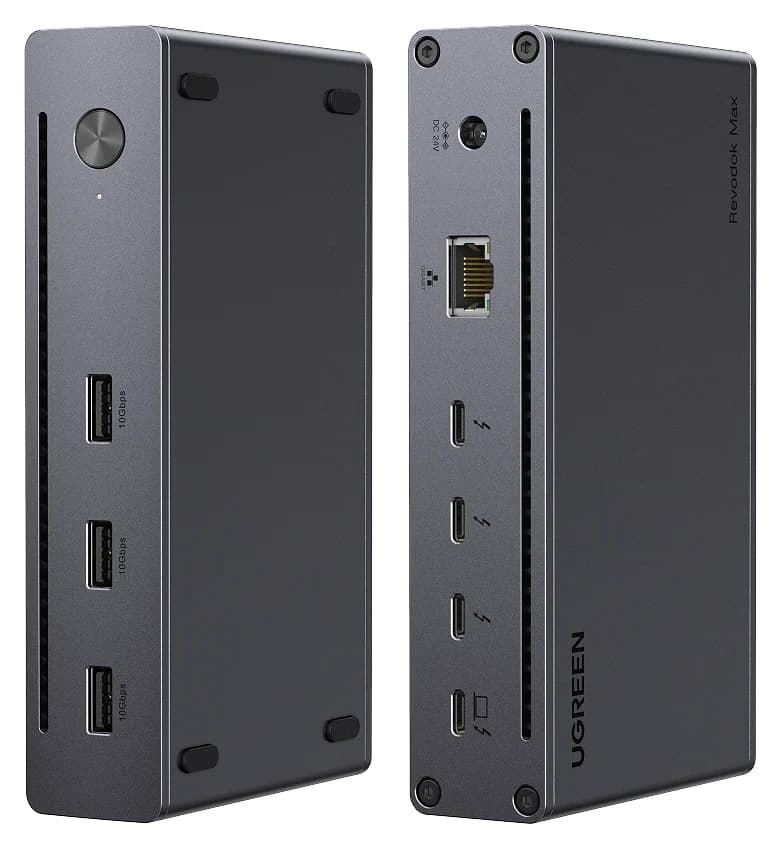
For most people choosing between these two, the UGREEN Revodok Max 208 is the better Thunderbolt 4 dock: it turns one laptop port into three downstream Thunderbolt 4 ports plus three 10Gbps USB-A ports, and its 140W GaN power adapter is included. The Belkin CONNECT Pro (INC006ttSGY) is the right pick for a fixed desk built around HDMI monitors: its twelve ports include two HDMI 2.0 outputs, an SD card reader and an audio jack, and its box includes both the Thunderbolt 4 host cable and the 120W power supply. Both docks share a 40Gbps Thunderbolt 4 host connection, and both charge a laptop below Apple's fast-charge lines, so charging wattage does not decide this comparison.
Our picks at a glance
Best overallUGREEN
UGREEN Revodok Max 208 Thunderbolt 4 Dock (8-in-1)
- to laptop
- 85W
- data
- 40 Gbps
- video
- 4K
- Choose
- Three downstream Thunderbolt 4 ports, three 10Gbps USB-A ports and an included 140W GaN power adapter make it the more flexible desk hub.
- Limit
- No HDMI or DisplayPort; monitors need USB-C or adapters
- 85WThe most the UGREEN Revodok Max 208 gives the host laptop
- 90WThe most the Belkin CONNECT Pro gives the host laptop
- 40GbpsHost connection bandwidth both docks share
Quick picks
| Your desk | Our pick | Deciding reason |
|---|---|---|
| Monitors with DisplayPort or USB-C, plus Thunderbolt storage | UGREEN Revodok Max 208 | Three downstream Thunderbolt 4 ports and 10Gbps on every USB-A port |
| Fixed Windows desk with two HDMI monitors | Belkin CONNECT Pro INC006ttSGY | Two built-in HDMI 2.0 outputs, plus SD reader and audio jack |
| Apple-silicon MacBook, two external screens | UGREEN Revodok Max 208 | Maker documents dual 4K at 60Hz on Pro/Max and Intel MacBooks |
| Desk with card readers, headsets and wired Ethernet | Belkin CONNECT Pro INC006ttSGY | SD 4.0 slot and audio in/out that the UGREEN lacks |
These are manufacturer-specification picks, not bench-tested rankings. For a wider shortlist, see our Thunderbolt 3 dock buying guide or the UGREEN Thunderbolt 4 dock versions explainer.
Exact models and the complete-kit table
Naming first, because both makers are loose with it. UGREEN's page is titled "Revodok Max 208 Thunderbolt 8-in-1 Docking Station" and its specification table gives the SKU as 25053; the US and Canadian store pages carry regional variant codes of that number, so confirm the bundle when shopping across regions. Belkin's own page titles this product "Pro Thunderbolt 4 Dock" under its Connect line, while retail listings call it the CONNECT Pro; the complete model code INC006ttSGY is the only unambiguous identifier. Use it, not the marketing name.
| Connection or included item | UGREEN Revodok Max 208 (25053) | Belkin CONNECT Pro (INC006ttSGY) |
|---|---|---|
| Host connection | 1x Thunderbolt 4 upstream | 1x Thunderbolt 4 upstream (front) |
| Downstream Thunderbolt 4 | 3x, 40Gbps; store copy says up to 15W per port | 1x (the page's "2x Thunderbolt 4" counts the host connection) |
| Other USB-C data | None beyond Thunderbolt | 1x USB-C 3.1 Gen 2 with Quick Charge 4.0 |
| USB-A | 3x USB-A 3.2 Gen 2, 10Gbps | 2x USB-A 3.1 and 2x USB-A 2.0 |
| Video outputs | Via Thunderbolt only | 2x HDMI 2.0, plus video over Thunderbolt |
| Ethernet | 1x Gigabit | 1x Gigabit |
| Card reader and audio | None | 1x SD card reader, 1x audio in/out |
| Host charging | Up to 85W | Up to 90W |
| Power supply | 140W GaN adapter included | 120W power supply unit included |
| Host cable | Not itemised on the maker's page we cite; confirm the box contents with the seller | 2.6-foot / 0.8m Thunderbolt 4 cable included |
Sources: UGREEN's Revodok Max 208 page, UGREEN's support data for U708 and Belkin's INC006ttSGY product page.
Read the correct specification column. Belkin's product page also carries a comparison carousel for other docks in its range; its 96W host-output and 150W supply entries belong to those other models, not the INC006. The INC006's own specification list is the one quoted above. Belkin advertises the dock as Thunderbolt 4 certified, USB4-compliant and backward compatible with Thunderbolt 3, USB 3.0 and more.
Two monitors: match the host before counting connectors
On a Windows laptop, UGREEN supports two 4K displays at 60Hz or a single 8K display at 30Hz, and support data caps it at two displays. Belkin supports up to three simultaneous monitor connections, subject to the host's graphics capability: its table lists one display at 8K 30Hz, 5K 60Hz or 4K 120Hz over Thunderbolt 4, 4K 60Hz over HDMI, two displays at 4K 60Hz, and three displays at 4K 60Hz over Thunderbolt or 4K 30Hz over HDMI. Actual output varies with the laptop. The difference is wiring. The Belkin's two HDMI 2.0 outputs connect HDMI monitors directly and leave its one downstream Thunderbolt port free for an SSD. The UGREEN has no video sockets at all: each monitor connects over Thunderbolt, so an HDMI screen needs a USB-C to HDMI adapter and a DisplayPort screen a USB-C to DisplayPort adapter or a Thunderbolt-to-DisplayPort cable.
On a Mac, the hosts differ more than the docks. UGREEN documents two 4K at 60Hz displays on MacBooks with Pro or Max M-chips and Intel chips, and a single 4K at 60Hz display on MacBooks with base M-chips. Belkin states that M1-based MacBooks can only enable one extended screen, and that Intel-based MacBooks require a USB-C to video adapter to enable two extended screens. Apple's fast-charge page is a reminder to check the host, not the dock, first: display and charging limits both live in the laptop.
- Yes: Windows laptop and two HDMI monitors with Belkin: no video adapters needed
- Yes: Windows laptop and DisplayPort or USB-C monitors with UGREEN: two 4K at 60Hz over Thunderbolt
- Yes: MacBook with Pro or Max M-chips or Intel chips and UGREEN: two 4K at 60Hz displays
- Partly: Intel-based MacBook with Belkin: two extended screens only via a USB-C video adapter
- No: M1-based MacBook with Belkin: one extended screen
- No: HDMI-only monitors with UGREEN: one USB-C video adapter per screen
Our Belkin Connect Thunderbolt 4 dock versions explainer covers the other docks in this range, and the MacBook Air M4 Thunderbolt 4 dock guide covers Apple-silicon hosts in detail.
Drives, Ethernet, card readers and the remaining ports
The UGREEN's argument is Thunderbolt headroom. With three downstream Thunderbolt 4 ports at 40Gbps — and up to 15W each in UGREEN's store copy — a fast external SSD, a Thunderbolt display and a daisy-chained device can all stay connected at once, and every one of its three USB-A ports runs at 10Gbps, so a fast flash drive is as quick in any socket.
The Belkin's argument is the fixed desk. Its twelve ports include the SD card reader and audio in/out that the UGREEN omits, and its separate USB-C 3.1 Gen 2 data port means a phone or peripheral does not consume the single downstream Thunderbolt port. But its USB-A bank is mixed: two 3.1 sockets and two 2.0 sockets, so a fast drive must go in the right pair, and its one downstream Thunderbolt port is the only path for Thunderbolt-speed storage. Both docks have one Gigabit Ethernet socket. Extra sockets do not multiply the host link: everything shares the one 40Gbps Thunderbolt 4 connection.
Laptop charging and the supplied host cable
UGREEN advertises up to 85W to the laptop from its included 140W GaN charger, and notes the dock must be connected to that charger to work. Belkin's FAQ says the dock can supply a laptop up to 90W; that support article also labels the separate accessory USB-C 3.1 Gen 2 port as Quick Charge 4.0 and PD 3.0 90W. The 5W difference is not a buying reason; the ceiling both share is. Apple's fast-charge specifications put the fast-charge line at 96W or higher for current 14-inch MacBook Pro models and 140W for 16-inch models, so neither dock fast charges them. For a typical 65W business laptop, either dock is the only charger you need at the desk.
Source: UGREEN's and Belkin's product pages, and Apple's fast-charge page
The host cable is part of the purchase, not an accessory. Belkin includes a 2.6-foot / 0.8m Thunderbolt 4 cable, which is short for a floor-standing desk but rated for the full 40Gbps. UGREEN's page we cite lists the 140W GaN charger but does not itemise a host cable, so check the box contents on the exact listing before buying, and budget for a certified Thunderbolt 4 cable if none is included — a plain USB-C charge cable will not carry 40Gbps or dual 4K video.
Best overall: UGREEN Revodok Max 208
UGREEN
UGREEN Revodok Max 208 Thunderbolt 4 Dock (8-in-1)
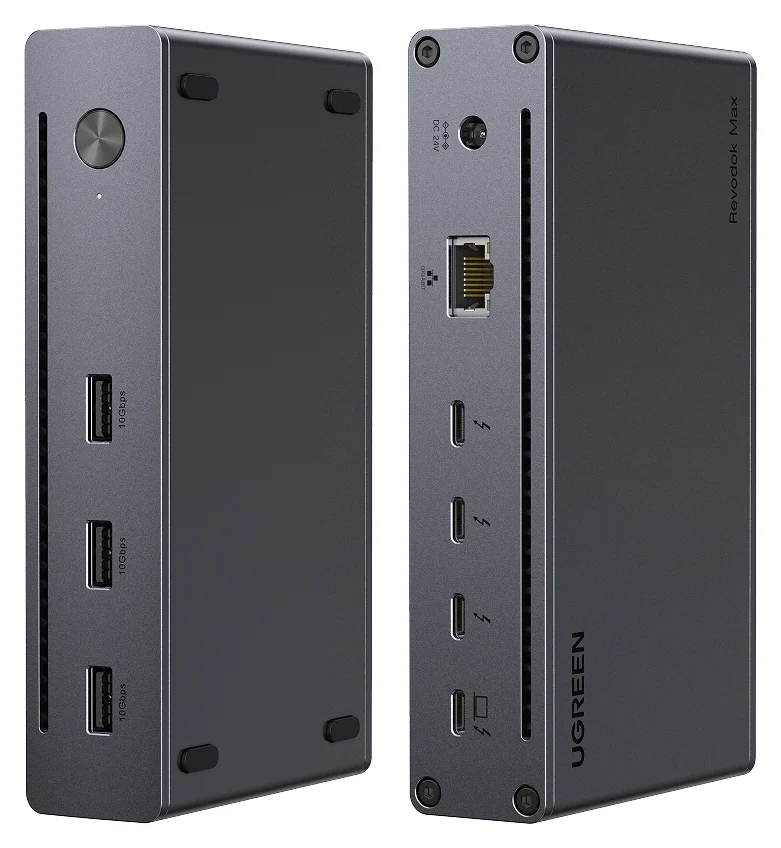
A Thunderbolt 4 hub-style dock with three downstream Thunderbolt 4 ports, three 10Gbps USB-A ports, Gigabit Ethernet and 85W laptop charging.
- 85W PD passthrough
- 40 Gbps data
- 4K video
- 8 ports
This is the more flexible of the two on paper. One upstream and three downstream Thunderbolt 4 ports, all at 40Gbps — with up to 15W each in UGREEN's store copy — give it storage and display headroom the Belkin cannot match, and its three USB-A ports at 10Gbps mean no slow sockets. The 140W GaN power adapter is included and stays compact for a full desktop dock.
Its display rules are also better documented for Macs: UGREEN's store page states dual 4K at 60Hz for MacBooks with Pro or Max M-chips and Intel chips, and a single 4K at 60Hz display for base M-chip MacBooks. Its current support data lists Windows 10 23H2 or later and macOS 15.0 or later, while the regional store page cites macOS 11.4 or later, so confirm an older configuration with UGREEN before buying. It is not compatible with the Mac mini from 2018 with Intel processors, per UGREEN's compatibility note. What it lacks is everything the Belkin has on its fixed desk: HDMI sockets, an SD reader, audio and a separate USB-C data port.
Check price on Amazon for the UGREEN Revodok Max 208
Best for a fixed HDMI desk: Belkin CONNECT Pro INC006ttSGY
Belkin's dock is a twelve-port desktop dock, and its port mix suits a desk that will not change: two HDMI 2.0 outputs for the monitors, an SD card reader, audio in/out, Gigabit Ethernet, a USB-C 3.1 Gen 2 data port with Quick Charge 4.0, two USB-A 3.1 and two USB-A 2.0 ports, and one downstream Thunderbolt 4 port. The 2.6-foot Thunderbolt 4 host cable and the 120W power supply are in the box, and Belkin covers it with a 2-year warranty. It is Thunderbolt 4 certified, USB4-compliant, and backward compatible with Thunderbolt 3, USB 3.0 and more.
Two conditions on this recommendation. First, the Mac rules above: M1-based MacBooks get one extended screen, and Intel-based MacBooks need a USB-C to video adapter for two. Second, availability: at the November 5, 2026 research check, Belkin's own US page listed the INC006ttSGY as out of stock, and no Amazon ASIN for this exact model could be confirmed without crawling retailer pages. That is not evidence of discontinuation; it is a reason to confirm the exact model code and the complete bundle, including the power supply, before paying.
See the Belkin CONNECT Pro INC006ttSGY at Belkin
How we choose
This is a specification comparison, not a review. Every port count, wattage, resolution and box item above comes from UGREEN's and Belkin's own product pages, linked throughout, plus Apple's fast-charge page for the charging thresholds and the Thunderbolt specification's own compatibility statements. Where a maker's page is inconsistent — Belkin's carousel mixing other docks' specs into the page, UGREEN not itemising the host cable — we name the conflict instead of guessing. Buyer-reported patterns inform the structure, not the numbers.
Buying advice: hub plus adapters versus full dock
Count the complete kit, not the dock. The UGREEN's smaller hub-style body hides its real cost in adapters: two HDMI monitors need two USB-C to HDMI adapters, and if no host cable is in the box, add a certified Thunderbolt 4 cable. The Belkin's price is closer to final for an HDMI desk, but its mixed USB-A speeds and single Thunderbolt port cap it if your storage grows.
Around Black Friday and Cyber Monday, compare equal usable setups rather than sticker prices: dock, power supply, host cable and every video adapter each desk needs. A deal on a dock without its power supply or cable is a different purchase, and on the Belkin specifically, confirm the INC006ttSGY bundle rather than a bare dock. If neither kit matches your monitors, our Thunderbolt 3 dock buying guide covers docks with built-in DisplayPort, and the UGREEN Thunderbolt 4 dock versions explainer covers the larger Revodok Max 213.
Verdict
Buy the UGREEN Revodok Max 208 if your monitors have DisplayPort or USB-C inputs, or if you want Thunderbolt storage headroom: three downstream Thunderbolt 4 ports and 10Gbps on every USB-A port, with the 140W GaN adapter included, and dual 4K at 60Hz documented for Pro/Max and Intel MacBooks. Buy the Belkin CONNECT Pro INC006ttSGY only for the desk it was drawn for: two HDMI monitors, an SD card and a headset, on a Windows laptop — and after confirming that the complete kit, with cable and 120W power supply, is actually available. Charging does not separate them: 85W against 90W, both under Apple's fast-charge lines.
Frequently asked questions
Are Thunderbolt 4 docks backwards compatible?
Mostly. UGREEN's regional store pages advertise compatibility with Thunderbolt 4, Thunderbolt 3, USB4 and USB-C computers, but its current support data lists Windows and Mac computers with Thunderbolt 4/5 ports; Belkin states the CONNECT Pro is backward compatible with Thunderbolt 3 and USB 3.0. USB4 is based on Intel's Thunderbolt protocol specification, and Thunderbolt 4 has compliance with USB4 and compatibility with prior generations of Thunderbolt and USB products. On a plain full-function USB-C host, UGREEN documents data, charging and a single display rather than a dual-monitor desktop, but confirm the exact host with support.
Which is better, the UGREEN Revodok Max 208 or the Belkin Connect Pro TB4?
For most desks, the UGREEN. It has three downstream Thunderbolt 4 ports against Belkin's one, all three of its USB-A ports run at 10Gbps against Belkin's mixed pair of 3.1 and 2.0 ports, and its 140W GaN power adapter is included. Choose the Belkin when your monitors already use HDMI and you want the SD card reader and audio jack it adds; its two HDMI outputs leave its one Thunderbolt port free.
Can either dock fast charge a MacBook Pro?
No. UGREEN advertises up to 85W to the host laptop and Belkin up to 90W, while Apple's fast-charge line is 96W or higher for current 14-inch MacBook Pro models and 140W for 16-inch models. Apple defines fast charging as up to 50 percent battery in around 30 minutes with a compatible adapter and cable; neither dock meets the listed 96W/140W fast-charge adapters for these MacBook Pro models.
Can the Belkin Connect Pro drive two extended displays on a Mac?
It depends on the Mac. Belkin states that M1-based MacBooks can only enable one extended screen, and that Intel-based MacBooks require a USB-C to video adapter to enable two extended screens, rather than using both HDMI sockets. UGREEN documents two 4K at 60Hz displays on MacBooks with Pro or Max M-chips and Intel chips, and a single 4K at 60Hz display on base M-chip MacBooks.
Does the UGREEN Revodok Max 208 have HDMI?
No. Its eight connections are one upstream Thunderbolt 4 port, three downstream Thunderbolt 4 ports, three 10Gbps USB-A ports and Gigabit Ethernet. Every display connects over Thunderbolt, so an HDMI or DisplayPort monitor needs a USB-C video adapter or a Thunderbolt-to-DisplayPort cable, which is the main hidden cost of the smaller, hub-style design.
Related guides
Best External GPU Enclosures in 2026: Thunderbolt eGPUs That Still Exist
The current Thunderbolt eGPU enclosures from maker pages: Sonnet's Breakaway Box 850 T5 and 750ex and Razer's Core X V2, plus the Mac compatibility truth and what to check before buying.
Updated November 7, 2026Read
OWC Thunderbolt Go vs CalDigit TS4: Which Thunderbolt Dock Should You Buy?
The Go Dock packs its own power for travel; the TS4 anchors a desk with 18 ports and 98W charging. Compare full kits, monitors and which to buy.
Updated November 5, 2026Read
Plugable TBT4-UD5 vs UD-3900PDH: Which Dock for Dual Monitors?
Choose between Plugable's TBT4-UD5 Thunderbolt 4 dock and UD-3900PDH DisplayLink dock: which laptop ports they need, display counts, charging and software.
Updated November 5, 2026Read