Black Friday: the specs to check before you buy
Buying guide
Updated November 3, 2026Thunderbolt 3 Dock Buying Guide: Older Mac and Windows Compatibility
Short answer
For an older Intel Mac that needs two native external monitors, our Thunderbolt 3 docking station pick is the CalDigit TS3 Plus: CalDigit documents dual 4K 60Hz output and macOS support starting at 10.12. Choose the Plugable TBT4-UD5 for one HDMI screen on an older Thunderbolt laptop; Plugable limits its Thunderbolt 3 hosts to one display. For two office screens when native display support is the blocker, consider the Plugable UD-6950PDH, provided you can install DisplayLink software and accept its restrictions.
Our picks at a glance
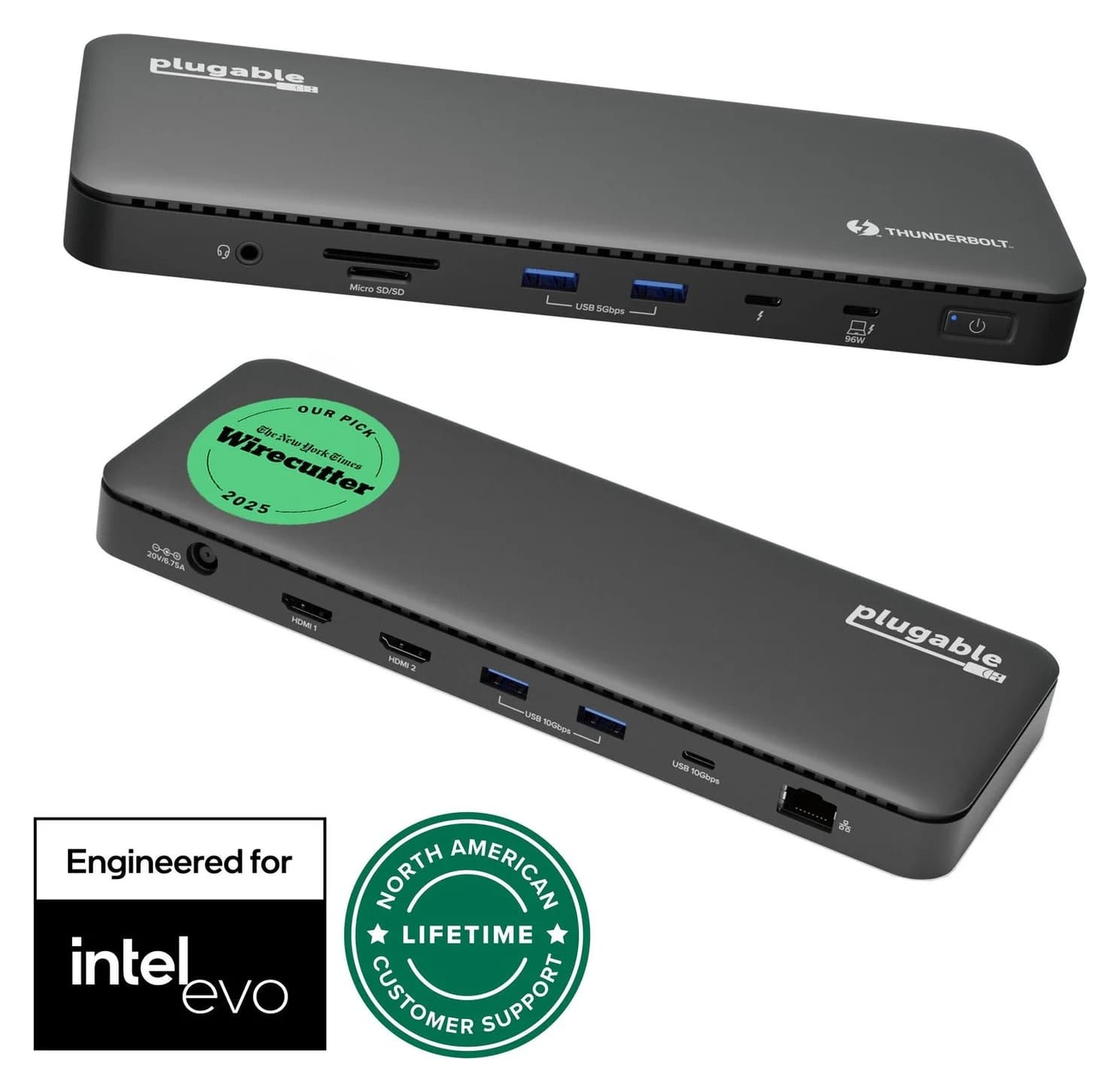
Best newer dock for one monitorPlugable
Plugable Thunderbolt 4 Dock (TBT4-UD5)
- to laptop
- 96W
- data
- 40 Gbps
- video
- 4K
- Choose
- Built-in HDMI and an included Thunderbolt cable suit a single-screen desk; Plugable explicitly limits Thunderbolt 3 hosts to one display.
- Limit
- Gigabit (not 2.5GbE) Ethernet
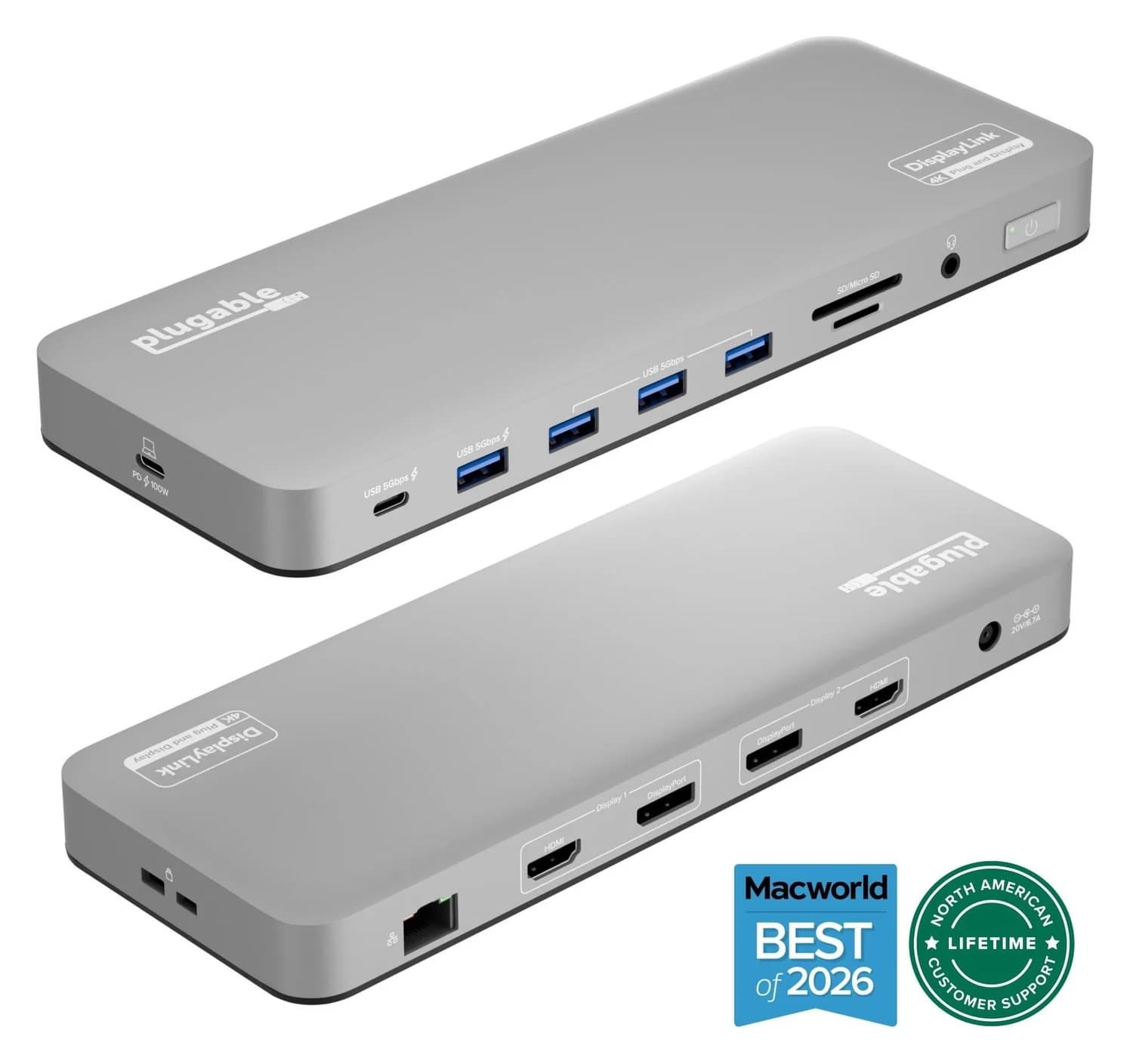
Best USB graphics fallback for office workPlugable
Plugable UD-6950PDH USB-C Dual 4K DisplayLink Dock (100W Charging)
- to laptop
- 100W
- data
- 5 Gbps
- video
- 4K60
- Choose
- DisplayLink provides two extended displays up to 4K 60Hz on supported USB-C hosts, with software and workload restrictions.
- Limit
- Requires the DisplayLink Manager app on macOS, plus Screen Recording permission
Quick picks
| Dock | Choose it for | Purchase blocker |
|---|---|---|
| CalDigit TS3 Plus | Native dual 4K 60Hz on a supported Intel Thunderbolt Mac | Ordinary USB-C hosts unsupported; Windows dual output needs checking |
| Plugable TBT4-UD5 | One HDMI monitor on Thunderbolt 3; a newer dock for a later desk upgrade | Thunderbolt 3 hosts get one external display |
| Plugable UD-6950PDH | Two extended 4K 60Hz office displays using USB graphics | DisplayLink software required; unsuitable for GPU-heavy work |
Best native option for Intel Macs: CalDigit TS3 Plus
The TS3 Plus earns its place through documented older-host support: macOS 10.12 or later and Windows 10 or later. CalDigit explicitly supports Thunderbolt 3 and Thunderbolt 4 computers, including Intel Macs with two external monitors through Thunderbolt. Its ordinary USB-C compatibility is equally clear: there is none.
For dual monitors, connect one to DisplayPort and the other to the spare Thunderbolt port, using a USB-C video adapter if needed. The dock's other USB-C ports are data-only. For HDMI conversion from its DisplayPort output, CalDigit requires an active adapter; factor that into the kit before comparing offers.
Windows needs a separate check. CalDigit warns that some Thunderbolt 3 laptops expose only one DisplayPort stream, limiting output to a single 4K 60Hz screen or dual 4K 30Hz. Ask the laptop maker about the exact model's Thunderbolt display output; the TS3 Plus's dual-screen capability cannot establish the laptop's capability.
Its charging ceiling is 87W with the appropriate firmware. That matches the adapter Apple supplied with the 15-inch MacBook Pro from 2016 on paper. This is a useful fit, rather than a promise of measured charging performance.
Check the complete US TS3 Plus kit at CalDigit
Best newer dock for one monitor: Plugable TBT4-UD5
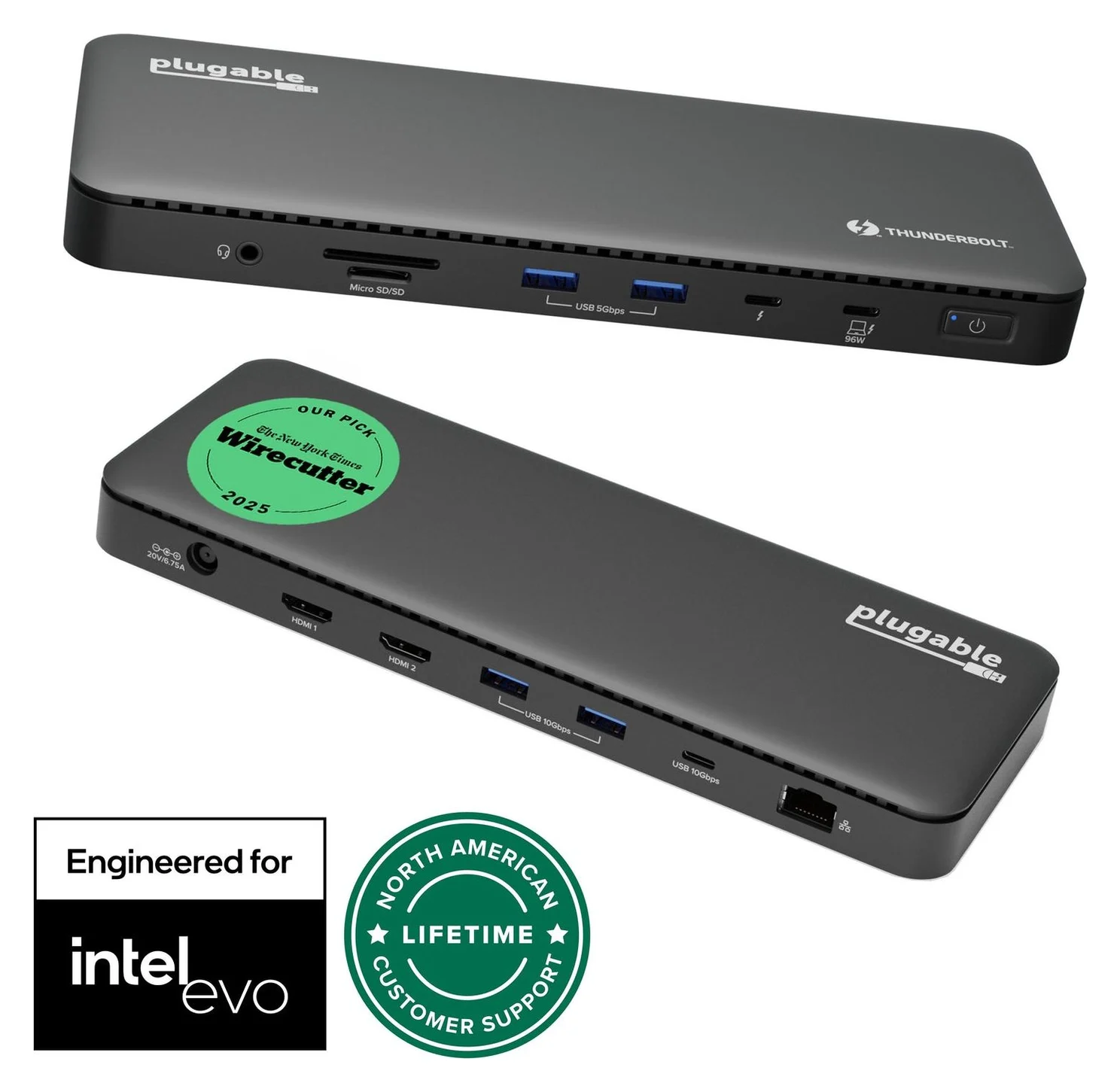
Plugable
Plugable Thunderbolt 4 Dock (TBT4-UD5)
A Thunderbolt 4 dock with dual HDMI, 100W laptop charging (96W certified), Gigabit Ethernet and an SD/microSD reader.
- 96W PD passthrough
- 40 Gbps data
- 4K video
- 13 ports
Buy the TBT4-UD5 when your older laptop needs one HDMI monitor and you want a newer dock. Its HDMI outputs support up to 4K 60Hz, but Plugable's host-specific guidance limits Thunderbolt 3 to one external display. The dual-display headline applies to supported newer hosts. Two HDMI sockets do not override that rule.
Plugable lists Windows 10 or later and macOS 11 or later. Its general dual-monitor marketing is therefore not a reason to replace a working native dual-monitor dock on an older Intel Mac. On a supported Thunderbolt 4 host, Plugable documents up to two displays; our general Thunderbolt dock guide covers that broader purchase.
Charging is advertised as 100W, with 96W certified; the detailed host-power table lists 96W. Use that certified figure when comparing it with your laptop's adapter. Plugable says the dock typically needs no driver installation, although Windows Ethernet may need a driver for best performance. Windows Thunderbolt authentication can also be required before attached devices work.
Best USB graphics fallback for office work: Plugable UD-6950PDH
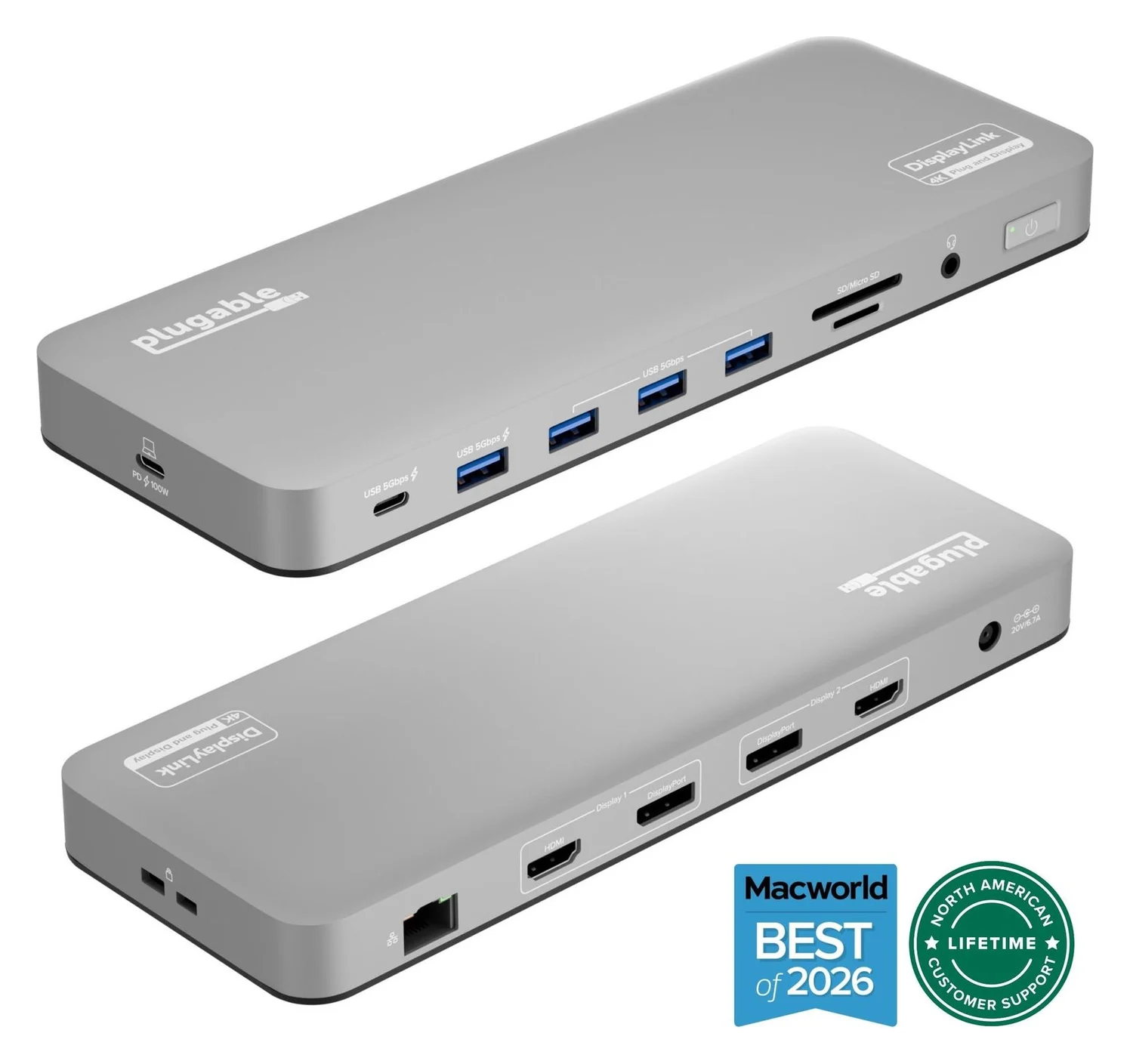
Plugable
Plugable UD-6950PDH USB-C Dual 4K DisplayLink Dock (100W Charging)
A 14-in-1 DisplayLink USB-C dock that adds two extended 4K@60Hz displays over HDMI or DisplayPort, plus 100W laptop charging, Gigabit Ethernet, SD readers and five USB ports.
- 100W PD passthrough
- 5 Gbps data
- 4K60 video
- 14 ports
The UD-6950PDH is the alternative when you need two office screens and native output is insufficient. Plugable specifies two additional extended displays up to 4K 60Hz, connected through HDMI, DisplayPort or a mixture. The dock uses DisplayLink software and a 5Gbps USB host connection, rather than native Thunderbolt display output; it provides up to 100W charging.
Check its minimum requirements: Windows 10/11, macOS 11 or later, or ChromeOS 100 or later, and a USB-C port with Power Delivery. Plugable lists Intel Thunderbolt 3 MacBooks among supported hosts. Windows software installation is typically automatic; macOS requires installing DisplayLink Manager and granting screen-access permission.
There is an important older-Mac catch: the dock's macOS minimum is not the current driver's minimum. Synaptics's download page lists DisplayLink Manager 17.0 for macOS 14 and later, while its legacy 1.9 release lists Big Sur 11 through Sonoma 14. Select an OS-matched release before buying, especially on a managed laptop where you cannot install software yourself.
Choose native video for games, video editing and graphics work. Plugable recommends this dock for office applications and warns against those demanding workloads. It also says HDCP-protected video cannot play on any Mac display while the dock is connected, including the built-in screen. See our Mac dual-monitor guide for the wider native-versus-USB-graphics decision.
How we choose
These recommendations come from manufacturer specifications, support documentation and host requirements. We prioritize the supported laptop, OS and monitor combination over a dock's headline display count. We compare the complete power-and-cable bundle and identify documentation conflicts below. Charging comparisons are based on published ratings; this is specification research, with no physical performance measurements.
Start with the exact laptop, OS and monitor pair
Write down the laptop's model, installed OS, monitor inputs, required resolution and refresh rate, and original charger rating. Two examples show why that matters:
- MacBook Pro, 15-inch, 2016: Apple specifies Thunderbolt 3 ports and an 87W adapter. For a supported macOS installation and two native screens, start with the TS3 Plus. For just one screen, the TBT4-UD5 is an alternative only once you meet its macOS minimum.
- Lenovo ThinkPad T480, Windows 10: Lenovo's platform specification lists a USB-C port with DisplayPort and Power Delivery plus a separate USB-C/Thunderbolt 3 port. Use the Thunderbolt connector for the TS3 Plus. For one display, consider the TBT4-UD5; for two office displays without establishing native dual-stream support, consider the UD-6950PDH and its software requirements. Lenovo's overall display count alone does not establish dual output through this particular dock.
For a newer Thunderbolt 4 laptop, yes, you can keep a TS3 Plus: CalDigit explicitly supports that host type. For ordinary USB-C, it explicitly excludes it. Our Thunderbolt and USB4 explainer covers the standards; use the model-specific limits here to decide what to buy.
- Yes: TS3 Plus: supported Thunderbolt 3 and Thunderbolt 4 Mac or PC hosts
- No: TS3 Plus: ordinary USB-C computers
- Partly: TBT4-UD5 on Thunderbolt 3: one external display, despite two HDMI sockets
Compare the complete PSU-and-cable kit
These are the makers' standard bundles, not promises about an individual used listing. Laptop charging is separate from the power brick's rating.
| Standard kit | Laptop power | Included dock power supply | Included host cable | Monitor connection to plan |
|---|---|---|---|---|
| TS3 Plus, US SKU TS3Plus-US07-SG | Up to 87W after required firmware | 180W, plus power cord | Certified 40Gbps Thunderbolt 3 cable; confirm offered length | DisplayPort plus spare Thunderbolt for dual screens; active adapter for DisplayPort-to-HDMI |
| TBT4-UD5 | 100W advertised / 96W certified | 134W, plus power cable | 1m Thunderbolt 4 cable | HDMI for the older host's single screen |
| UD-6950PDH | Up to 100W | 130W adapter | 1m USB-C cable | HDMI and/or DisplayPort, up to two displays |
Sources: CalDigit's TS3 Plus specifications, US kit and power-supply specification; Plugable's TBT4-UD5 and UD-6950PDH specifications.
For a TS3 Plus replacement host cable, CalDigit specifies a certified 40Gbps Thunderbolt 3 or Thunderbolt 4 cable and warns that some Thunderbolt 3 cables offer only 20Gbps. Do not substitute a cable based on connector shape. Our USB-C cable guide explains the markings.
Also compare charging with your original adapter. Apple's 16-inch MacBook Pro from 2019 shipped with 96W, above the TS3 Plus's 87W ceiling. CalDigit recommends connecting the factory charger during CPU/GPU-intensive use when the laptop's adapter exceeds that ceiling.
Older listings, variants and missing accessories
Identify the exact bundle. CalDigit's standard US SKU is TS3Plus-US07-SG; its standard store page lists a two-year limited warranty, while the separate open-box listing lists one year. Its standard-page description directs buyers to open-box stock, but the separate open-box product data marked that condition unavailable at our source check. Confirm the selected condition's availability rather than treating that link as a stock promise.
Check the older dock's firmware. CalDigit's firmware instructions identify 44.1 as the update enabling 87W charging and say it is not required for units purchased after November 2020. The documented Intel Mac updater requires macOS 10.15 or later; that differs from the dock's 10.12 operating minimum. Arrange an update path with CalDigit before buying an older unit if that charging rating matters.
Check the DisplayLink revision too. Plugable identifies updated UD-6950PDH units from serial 4157 onward, with a front USB-C port; the original has a different port layout. Its video-specification table says HDMI 2.0, but its revision FAQ says HDMI 1.4. That conflict is unresolved: confirm with Plugable if the HDMI revision determines your purchase.
Match the model and condition
Ask for the dock label and the complete accessory list.
Match the power supply
Require the model-correct supply and the power cord for your region.
Match the host cable
For TS3 Plus, require the certified Thunderbolt cable described above.
Resolve firmware and displays
Confirm the update path and your exact monitor pair before buying.
Compare the whole purchase: dock, correct PSU, regional power cord, host cable, monitor cables and required video adapters. Ask for the supplied power-adapter label and connector details rather than guessing from wattage alone. CalDigit identifies the TS3 Plus supply as FSP180-ACAN3, 20V/9A; use its specification when checking a replacement. If accessories or compatibility remain unclear, pass on that bundle.
Final buy-by-host compatibility table
| Host and job | Buy or keep | Check before ordering |
|---|---|---|
| Intel Thunderbolt 3 Mac, older supported macOS, two native screens | TS3 Plus | DisplayPort plus spare Thunderbolt connection; charging firmware |
| Thunderbolt 3 Windows laptop, one HDMI screen | TBT4-UD5 | Supported Windows installation and Thunderbolt authentication |
| T480 on Windows 10, two office screens, native dual output unconfirmed | UD-6950PDH | USB-C Power Delivery port and permission to install DisplayLink |
| Ordinary USB-C laptop, one native screen | TBT4-UD5 | Host must support DisplayPort; TS3 Plus is excluded |
| Thunderbolt 4 laptop replacing an older host | Keep a working TS3 Plus, or choose TBT4-UD5 for built-in HDMI | Laptop's supported display count and charging requirement |
Verdict
Buy the TS3 Plus complete kit for a supported older Intel Mac and native dual monitors. Choose the TBT4-UD5 for one HDMI screen on Thunderbolt 3, accepting its explicit host limit. Choose the UD-6950PDH for two office screens when USB graphics solves the problem and software is allowed. For an older bundle, settle the power supply, cable, firmware and monitor connections before paying.
Frequently asked questions
Can I use a Thunderbolt 3 dock with Thunderbolt 4?
Yes, for the native dock here: CalDigit explicitly supports the TS3 Plus on Thunderbolt 3 and Thunderbolt 4 Mac and PC hosts. It accepts its supplied Thunderbolt 3 cable or a certified 40Gbps Thunderbolt 4 cable. Keep the dock's own display and charging limits in mind, and check the laptop's display capabilities; a newer host does not remove those limits.
Can a Thunderbolt 4 docking station work with a Thunderbolt 3 laptop?
Some can, but check the specific dock. Plugable documents Thunderbolt 3 host support for the TBT4-UD5 with a maximum of one external display, even though it has two HDMI outputs. Its published operating-system requirements are Windows 10 or later and macOS 11 or later. Choose it for a single monitor on the older laptop, rather than assuming the dual-monitor headline applies.
Will a Thunderbolt 3 dock work with a normal USB-C port?
The TS3 Plus will not: CalDigit explicitly excludes ordinary USB-C computers. For the TBT4-UD5, Plugable allows one display on a USB-C host with DisplayPort support. The UD-6950PDH uses DisplayLink USB graphics instead, but its stated minimum is a USB-C port with Power Delivery and a supported operating system. It also needs DisplayLink software, so it is a different purchase with different restrictions.
Can a Thunderbolt 3 dock run two 4K monitors at 60Hz?
The TS3 Plus can on supported hosts. CalDigit lists dual 4K 60Hz, with one monitor on DisplayPort and another on the spare Thunderbolt port through a suitable video adapter. It warns that some Windows Thunderbolt 3 laptops carry only one DisplayPort stream and can be limited to one 4K 60Hz screen or two at 30Hz. Confirm the laptop's output before buying for that pair.
Which DisplayLink driver should I use on an older Mac?
Match the software to the installed macOS version. Plugable lists the UD-6950PDH for macOS 11 and later, but Synaptics lists the current DisplayLink Manager 17.0 for macOS 14 and later. Its official legacy downloads list version 1.9 for Big Sur 11 through Sonoma 14. Check the release's OS list before installing, and grant the screen-access permission required by DisplayLink.
Related guides
Best External GPU Enclosures in 2026: Thunderbolt eGPUs That Still Exist
The current Thunderbolt eGPU enclosures from maker pages: Sonnet's Breakaway Box 850 T5 and 750ex and Razer's Core X V2, plus the Mac compatibility truth and what to check before buying.
Updated November 7, 2026Read
OWC Thunderbolt Go vs CalDigit TS4: Which Thunderbolt Dock Should You Buy?
The Go Dock packs its own power for travel; the TS4 anchors a desk with 18 ports and 98W charging. Compare full kits, monitors and which to buy.
Updated November 5, 2026Read
Plugable TBT4-UD5 vs UD-3900PDH: Which Dock for Dual Monitors?
Choose between Plugable's TBT4-UD5 Thunderbolt 4 dock and UD-3900PDH DisplayLink dock: which laptop ports they need, display counts, charging and software.
Updated November 5, 2026Read