Black Friday: the specs to check before you buy
Comparison
Updated November 4, 2026Belkin CONNECT Pro Thunderbolt 4 vs UGREEN Revodok Max 213: Which Dock?
Short answer
For a desk with DisplayPort monitors, a Thunderbolt SSD and wired networking, choose the UGREEN Revodok Max 213: its two downstream Thunderbolt ports and 2.5 Gigabit Ethernet offer more flexibility. The Belkin CONNECT Pro INC006ttSGY makes sense for a supported Windows laptop with HDMI monitors, where its two HDMI outputs leave its downstream Thunderbolt port free. Both advertise up to 90W laptop charging, so charging wattage does not decide this comparison.
Our picks at a glance
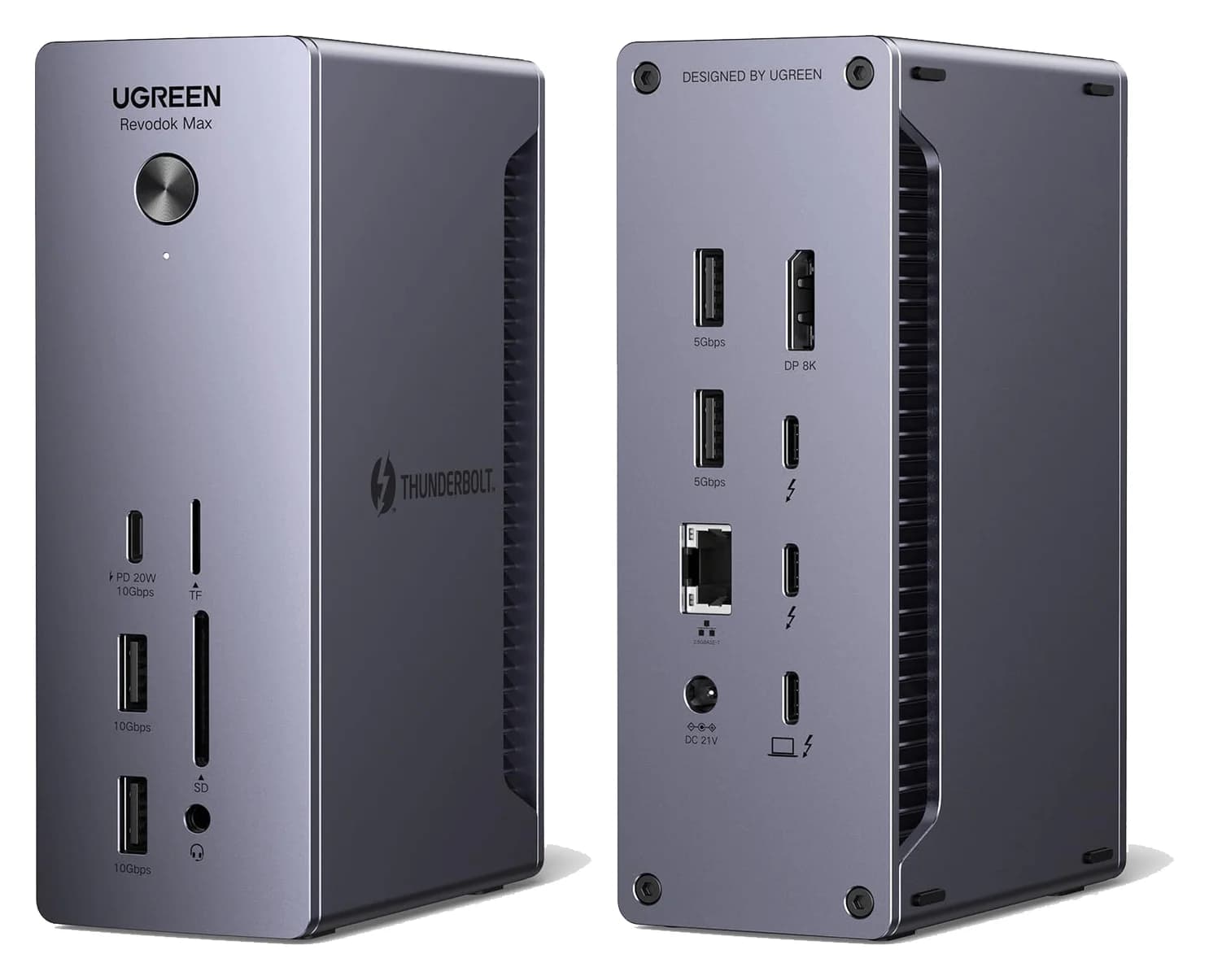
Best for DisplayPort and fast peripheralsUGREEN
UGREEN Revodok Max 213 Thunderbolt 4 Dock (13-in-1)
- to laptop
- 90W
- data
- 40 Gbps
- video
- 4K
- Choose
- Two downstream Thunderbolt 4 ports, DisplayPort 1.4 and 2.5 Gigabit Ethernet suit a desk with monitors and external storage.
- Limit
- No HDMI port
Belkin INC006ttSGY, if available
Quick picks
| Your desk | Our pick | Deciding reason |
|---|---|---|
| DisplayPort screens, external storage and fast wired networking | UGREEN Max 213 | DisplayPort, two downstream Thunderbolt ports and 2.5 Gigabit Ethernet |
| Windows laptop and HDMI screens | Belkin INC006ttSGY, if available | Two built-in HDMI outputs avoid video adapters |
| Intel Mac, two extended screens and a direct Thunderbolt SSD | UGREEN Max 213 | UGREEN keeps a Thunderbolt port free; Belkin does not specify where its required USB-C video adapter connects |
| Laptop needing more than 90W from its dock | Neither for that requirement | Both advertise a 90W host ceiling |
These are manufacturer-specification picks. For a wider shortlist, see our best Thunderbolt docks.
Exact models and comparison table
This comparison covers Belkin's US INC006ttSGY listing and UGREEN's Max 213, labeled 25054A on its Canadian page and 25054 in its US specification table. That naming difference needs a label-and-bundle check when shopping across regions; it does not establish that every regional package is interchangeable. Belkin's CONNECT name alone is insufficient: use the complete model code.
| Connection or included item | Belkin CONNECT Pro INC006ttSGY | UGREEN Revodok Max 213 |
|---|---|---|
| Host connection | Thunderbolt 4, up to 40Gbps | Thunderbolt 4, up to 40Gbps |
| Thunderbolt ports for peripherals, excluding host | One | Two |
| Built-in video sockets | Two HDMI 2.0; no DisplayPort | One DisplayPort 1.4; no HDMI |
| USB-A | Two USB-A 3.1, two USB-A 2.0 | Two 10Gbps, two 5Gbps |
| Separate USB-C data port | USB-C 3.1 Gen 2 | 10Gbps, up to 20W |
| Ethernet | Gigabit | 2.5 Gigabit |
| Camera-card slots | SD 4.0 | SD 4.0 and TF/microSD 4.0 |
| Audio | 3.5mm input/output | 3.5mm audio |
| Laptop charging | Up to 90W | Up to 90W |
| Included power supply | 120W | 180W GaN |
| Included host cable | 0.8m Thunderbolt 4 | 0.8m Thunderbolt 4 |
Sources: Belkin's product page, its INC006 port guide, and UGREEN's Max 213 hardware and box contents. Belkin's two Thunderbolt sockets include the computer connection; UGREEN explicitly lists its upstream connection separately from its two downstream ports.
Read the correct specification column. Belkin's product page also contains a comparison carousel for other docks; its 96W host output and 150W supply entries belong to the INC030ttSGY, rather than the INC006. UGREEN's US comparison table has an inconsistent Ethernet entry of “40 Gbps,” while that page's dedicated Ethernet specification and the launch page identify 2.5 Gigabit. Treat that table as inconsistent, rather than claiming a faster network port.
Best for DisplayPort and fast peripherals: UGREEN Revodok Max 213
UGREEN
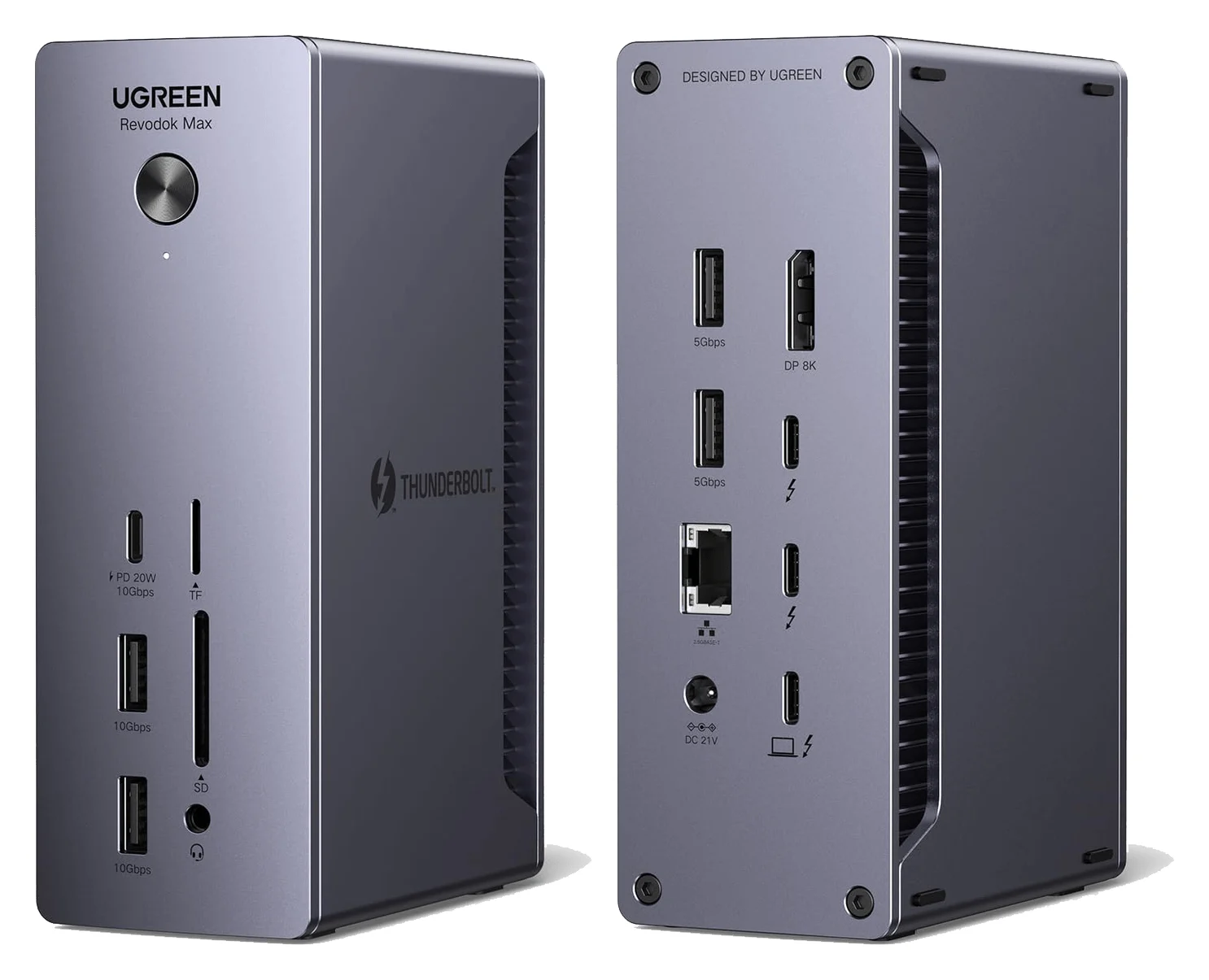
UGREEN Revodok Max 213 Thunderbolt 4 Dock (13-in-1)
A 13-in-1 Thunderbolt 4 dock with DisplayPort 1.4, 2.5GbE, SD/TF 4.0 readers and 90W laptop charging.
- 90W PD passthrough
- 40 Gbps data
- 4K video
- 13 ports
UGREEN's useful advantage is the combination of built-in DisplayPort and two downstream Thunderbolt ports. Connect a DisplayPort screen directly and a second screen through a suitable USB-C video cable from a Thunderbolt port, and another Thunderbolt port remains for storage. Its ordinary USB-C data port is separate, so that display route does not occupy it.
The network and card-reader differences also matter: UGREEN specifies 2.5 Gigabit Ethernet plus separate SD and TF slots, whereas Belkin lists Gigabit Ethernet and SD. Prioritize those features if your desk needs them; the Ethernet rating alone is no reason to replace a working dock.
Skip it if your priority is plugging existing HDMI cables straight into the dock. There is no HDMI socket. Include the appropriate video conversion in the purchase comparison, especially if both Thunderbolt ports would otherwise be used for HDMI adapters.
Check price on Amazon for the UGREEN Max 213
Conditional pick for Windows HDMI: Belkin CONNECT Pro INC006ttSGY
Belkin provides two HDMI 2.0 outputs and lists dual-display support up to 4K at 60Hz, subject to the host's capabilities. On a supported Windows desk, that makes it a straightforward wiring choice: the HDMI cables handle the screens and the rear Thunderbolt port remains available for an SSD.
Its USB-A selection deserves attention. Belkin lists two USB-A 3.1 ports and two USB-A 2.0 ports, rather than four equivalent high-speed connections. Reserve the faster pair for devices that benefit from them. For a keyboard receiver, webcam and occasional storage, write down the connection each device needs before deciding the mix is sufficient.
Availability is a condition of this recommendation. At the November 3, 2026 research check, Belkin's US INC006ttSGY page marked the item unavailable. That does not establish discontinuation or stock elsewhere. Confirm the exact model, seller and included power supply before paying for a listing.
Check the Belkin INC006ttSGY and availability at Belkin
Two displays: match the host before counting connectors
For a concrete Windows example, use a ThinkPad X1 Carbon Gen 9 running Windows 11 with its 65W USB-C adapter configuration. Lenovo's specifications list Thunderbolt 4/USB4 ports with Power Delivery and DisplayPort, Windows 11 options and 65W adapters. Both dock makers advertise dual 4K at 60Hz on supported Windows hosts; the wiring plan below follows those specifications.
For the Mac example, use the Intel 16-inch MacBook Pro from 2019 on macOS 11.4 or later. Apple lists Thunderbolt 3 ports and a 96W adapter. Belkin's Mac compatibility page specifies HDMI plus a USB-C video adapter for two extended displays on Intel Macs, and warns that the two HDMI sockets instead mirror the desktop. That changes the available storage connection.
Apple silicon needs its own check. UGREEN's 25054A page explicitly lists dual 4K at 60Hz for M1/M2/M3 Pro and Max Macs, but one external display from this dock for base M1/M2/M3 models. A 14-inch M1 Pro MacBook Pro supports two external displays according to Apple; Belkin's cited guidance does not separately qualify M1 Pro. Prefer UGREEN for that documented combination, and get a model-specific answer from Belkin before buying its dock for it.
- Yes: Intel Mac with Belkin: use HDMI plus a video adapter on the downstream Thunderbolt port for extended displays
- No: Intel Mac with Belkin: its two HDMI sockets do not provide two extended desktops
- Partly: Newer Mac: confirm the exact chip and dock matrix before applying an older model's display rule
Our MacBook Pro dock guide covers the broader Mac choices; the Windows docking guide covers other host-port types.
What remains after the displays are connected?
Use the same desk for both comparisons: two 4K/60Hz monitors that each accept HDMI and DisplayPort, a directly connected Thunderbolt SSD, USB-A webcam, USB-A keyboard/mouse receiver, SD card and wired Ethernet. This is a proposed configuration, not a report of physical testing. The allocations below are deductions from the makers' port lists and display rules.
| Host and dock | Screen connections | Thunderbolt ports left for the SSD |
|---|---|---|
| Windows ThinkPad + Belkin | Both HDMI sockets | One; the SSD fits |
| Windows ThinkPad + UGREEN | DisplayPort plus a Thunderbolt-to-DisplayPort cable | One; the SSD fits |
| Intel MacBook Pro + Belkin | HDMI plus a USB-C video adapter; Belkin does not identify the adapter's dock port | Unconfirmed; verify with Belkin before relying on the SSD connection |
| Intel MacBook Pro + UGREEN | DisplayPort plus a Thunderbolt-to-DisplayPort cable | One; the SSD fits |
The webcam and receiver occupy two of either dock's four USB-A sockets, leaving two. The SD slot and Ethernet socket handle the remaining desk items. Belkin's separate USB-C data port also remains free in these layouts, as does UGREEN's.
HDMI-only monitors change the result. Belkin needs no video adapters for the Windows layout. Intel Mac users need a USB-C video adapter, but Belkin does not identify its dock port; verify that route before assuming the SSD connection remains. Using both UGREEN downstream Thunderbolt ports for HDMI adapters would leave neither free for the SSD; include a suitable DisplayPort-to-HDMI solution in your connection plan if retaining a Thunderbolt port matters.
Extra sockets do not multiply the upstream bandwidth. Both docks use an up-to-40Gbps host connection; Intel describes Thunderbolt 4's rating as total theoretical bandwidth. These allocations establish where devices connect, not a promise of simultaneous maximum transfer speeds.
Charging, box contents and the complete purchase
Both docks advertise up to 90W to the host, despite their different power bricks. That ceiling exceeds the example ThinkPad configuration's 65W adapter rating, but falls below the Intel MacBook Pro's supplied 96W adapter. Compare the host's own charging requirements; the power supply's 120W or 180W label is not laptop output.
Neither is our pick for a MacBook Pro fast-charging requirement: Apple specifies a 96W adapter for fast charging the example 14-inch M1 Pro model, and its 16-inch fast-charge instructions list a 140W adapter. Keep the appropriate laptop charger in the plan when charging speed matters more than a single cable.
Belkin lists the dock, 120W supply, 0.8m Thunderbolt cable, quick-start guide and regulatory documentation. UGREEN's launch page lists the dock, an included 180W GaN charger and a 0.8m Thunderbolt 4 cable; verify the regional package label before buying. Video cables are absent from those box lists, so budget for any you do not already own. Confirm the regional AC plug and lead, especially when comparing the Canadian 25054A page with a US offer.
For the matched Windows desk, compare Belkin plus any missing HDMI cables against UGREEN plus any missing DisplayPort and Thunderbolt-to-DisplayPort cables. On the Intel Mac desk, both plans need a Thunderbolt-to-video cable, but only UGREEN retains a dock connection for the direct Thunderbolt SSD.
Match the label
Check the full Belkin model code or UGREEN regional SKU, seller and included supply.
Build the cable basket
Include the display cables and conversion your chosen port plan requires.
Check the charging requirement
Compare laptop output from the dock with the laptop's own specification.
Compare checkout totals
Include missing accessories and delivery, then choose the supported configuration.
For Black Friday or Cyber Monday shopping, use that same complete-kit comparison. A lower Belkin checkout total can make it the sensible Windows HDMI choice if the exact kit is available. I would pay extra for UGREEN when its networking, card slots or remaining Thunderbolt connection solves a specific desk requirement. Check price on Amazon through the UGREEN link above; verify the model and bundle again before ordering.
How we choose
Our recommendations come from the makers' product pages, hardware lists, display restrictions and box contents, checked against Apple and Lenovo host specifications and Intel's Thunderbolt documentation. Port-allocation tables are editorial deductions from those documents. We have not physically tested these docks, and we make no measured claims about SSD throughput, charging under load or reliability. Where official pages conflict or omit a host qualification, we identify that limit instead of filling it with an assumption.
Verdict
Buy the UGREEN Revodok Max 213 for the matched DisplayPort-and-SSD desk, particularly the documented Intel Mac layout: it keeps a Thunderbolt connection for storage and adds 2.5 Gigabit Ethernet. Consider the Belkin INC006ttSGY for a supported Windows HDMI desk when the complete kit is available and its checkout total makes sense. Choose neither solely to satisfy a laptop charging requirement above their advertised 90W ceiling.
Frequently asked questions
Which is better, Belkin CONNECT Pro or UGREEN Revodok Max 213?
Choose UGREEN for DisplayPort monitors, 2.5 Gigabit Ethernet and two downstream Thunderbolt ports. Belkin suits a supported Windows desk with HDMI monitors because its two HDMI outputs leave its downstream Thunderbolt port available. Both advertise up to 90W laptop charging. Compare the complete cable and adapter basket, and confirm availability of the exact Belkin INC006ttSGY before choosing it.
Can the Belkin CONNECT Pro run two extended monitors on a Mac?
Belkin documents two extended displays on Intel Macs using HDMI plus a USB-C video adapter, without saying which dock port the adapter must use. It says using both HDMI ports on an Intel Mac mirrors the desktop instead. Belkin's guidance covers Intel and original-M1 MacBooks and recommends Thunderbolt-enabled laptops manufactured no later than 2019; it does not qualify M1 Pro or any later Mac. Confirm your exact Mac and required video adapter route with Belkin before buying for dual displays.
Does the UGREEN Revodok Max 213 have HDMI?
The Max 213 has no HDMI socket. Its video connections are DisplayPort 1.4 and the downstream Thunderbolt ports. For HDMI monitors, include suitable video adapters in the basket. Connecting both displays through the two downstream Thunderbolt ports occupies both of them, so account for the connection your external SSD needs before ordering. The port plan matters more than the advertised total port count.
Does the included UGREEN 180W charger deliver 180W to the laptop?
The included 180W adapter supplies the dock. UGREEN specifies up to 90W to the laptop; 180W is the included power adapter's rating. Belkin also advertises up to 90W host charging, with a 120W supply. Both makers list an included 0.8m Thunderbolt 4 host cable. Compare the laptop's charging requirements with host output, rather than comparing the wattages printed on the dock power bricks.
Are these Thunderbolt 4 docks backwards compatible?
Both makers list Thunderbolt 3 compatibility, and UGREEN also lists USB4 and USB-C hosts. That does not make every connection equivalent: UGREEN specifies a single display on a full-function USB-C host. For a dual-display purchase, check the exact laptop port, operating system and dock display matrix. A USB-C connector by itself is insufficient evidence of the features you need.
Best for DisplayPort and fast peripherals
UGREEN Revodok Max 213 Thunderbolt 4 Dock (13-in-1)
Related guides
Best External GPU Enclosures in 2026: Thunderbolt eGPUs That Still Exist
The current Thunderbolt eGPU enclosures from maker pages: Sonnet's Breakaway Box 850 T5 and 750ex and Razer's Core X V2, plus the Mac compatibility truth and what to check before buying.
Updated November 7, 2026Read
OWC Thunderbolt Go vs CalDigit TS4: Which Thunderbolt Dock Should You Buy?
The Go Dock packs its own power for travel; the TS4 anchors a desk with 18 ports and 98W charging. Compare full kits, monitors and which to buy.
Updated November 5, 2026Read
Plugable TBT4-UD5 vs UD-3900PDH: Which Dock for Dual Monitors?
Choose between Plugable's TBT4-UD5 Thunderbolt 4 dock and UD-3900PDH DisplayLink dock: which laptop ports they need, display counts, charging and software.
Updated November 5, 2026Read