Black Friday: the specs to check before you buy
Comparison
UGREEN Revodok Max 213 vs CalDigit TS4: Which Thunderbolt 4 Dock?
Choose between the UGREEN Revodok Max 213 and CalDigit TS4 docks: monitor connections, 2.5GbE, card readers, ports left over and laptop charging, from their spec sheets.
By thisUSB EditorialUpdated November 5, 202611 min read2 picks
Our picks at a glance
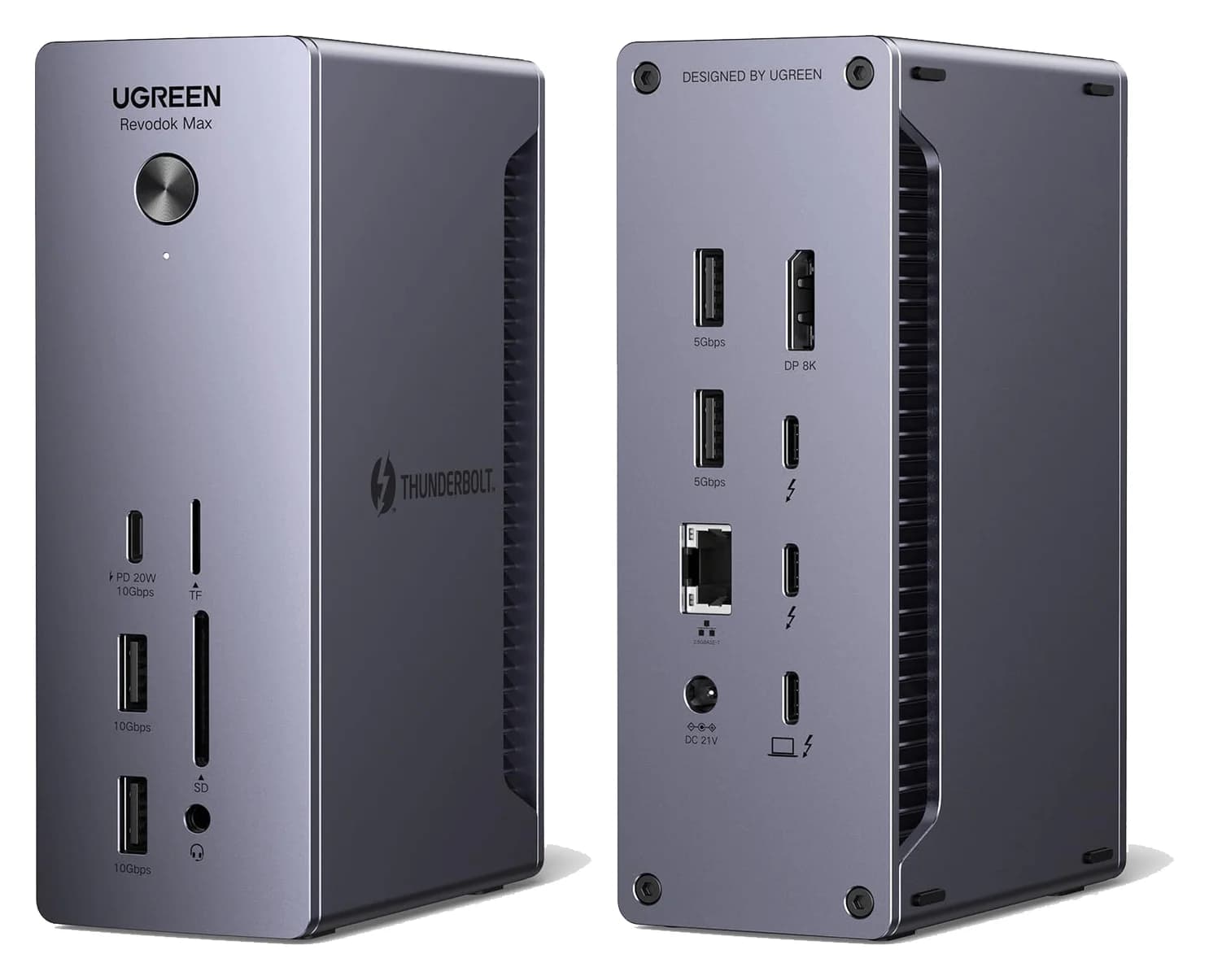
Best for the money and media slotsUGREEN
UGREEN Revodok Max 213 Thunderbolt 4 Dock (13-in-1)
- to laptop
- 90W
- data
- 40 Gbps
- video
- 4K
- Choose
- Matching 2.5GbE and SD/microSD slots, plus a 20W front USB-C port, at a lower complete-desk cost.
- Limit
- No HDMI port
CalDigit TS4
For a full desktop dock, the UGREEN Revodok Max 213 and the CalDigit TS4 are near-twins on the two specs buyers shop for — Thunderbolt 4 at 40Gbps, DisplayPort 1.4, 2.5 Gigabit Ethernet — so the decision comes down to the remaining ports, laptop charging and total desk cost. Buy the Max 213 for the same networking, the same SD and microSD slots, a 20W front USB-C phone port and a lower complete-kit price; CalDigit rates its TS4 slots UHS-II, while UGREEN specifies SD/TF 4.0 and up to 312MB/s without an official UHS-II rating. Buy the TS4 for 18 ports against 13, 98W host charging that CalDigit says never drops, and dual 6K60 displays on DSC-capable Macs. This page compares the two against each other; for a wider field see our best Thunderbolt docks roundup.
- 13Ports on the UGREEN Revodok Max 213
- 18Ports on the CalDigit TS4
- 2.5GbEThe Ethernet speed both docks carry
- 0HDMI ports on either dock
Quick picks
| Your desk | Our pick | Deciding reason |
|---|---|---|
| Two DisplayPort or two USB-C monitors, wired NAS, camera cards | UGREEN Max 213 | Same 2.5GbE, SD and microSD slots, 20W front USB-C, lower complete-kit cost |
| Every USB accessory you own, plus maximum charging | CalDigit TS4 | 8 USB data ports, 98W that CalDigit says never drops, offline charging on 8 ports |
| Dual 6K60 monitors on a DSC-capable Mac | CalDigit TS4 | CalDigit lists dual 6K 60Hz through DSC; UGREEN tops out at dual 4K60 |
| A plain full-function USB-C laptop | Reconsider both | Both makers limit a USB-C host to a single display, and the TS4's Ethernet needs Thunderbolt |
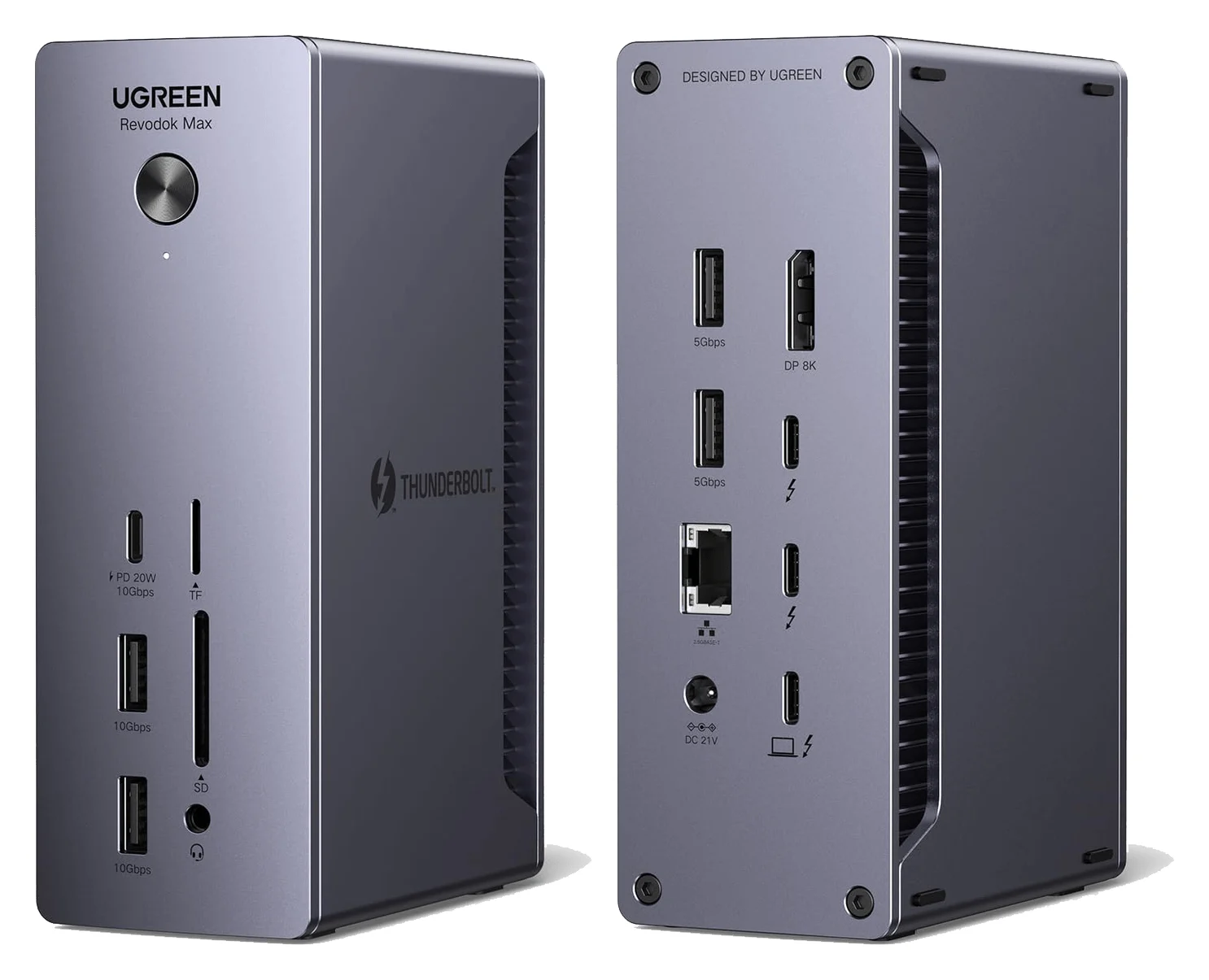
Both are full desktop docks with external power bricks and a rear host port; if you were instead weighing the hub-style UGREEN Max 208, that is a different comparison — see our UGREEN Thunderbolt 4 dock versions page.
Two fixed models, both Thunderbolt 4
This comparison covers two specific models: UGREEN's Revodok Max 213, SKU 25054A on UGREEN's Canadian page, and CalDigit's TS4. Both use an upstream Thunderbolt 4 connection rated at 40Gbps, and both makers say the host port doubles as the charger. UGREEN's page labels its SKU 25054A; the US variant carries its own listing label, so verify the regional bundle before ordering.
Each includes its own power supply and a Thunderbolt 4 host cable:
| Connection or included item | UGREEN Revodok Max 213 | CalDigit TS4 |
|---|---|---|
| Host connection | Thunderbolt 4, 40Gbps | Thunderbolt 4, 40Gbps |
| Thunderbolt ports for peripherals, excluding host | Two | Two |
| Built-in video socket | 1x DisplayPort 1.4 | 1x DisplayPort 1.4 |
| USB data ports | 1x USB-C 10Gbps, 2x USB-A 10Gbps, 2x USB-A 5Gbps | 3x USB-C 10Gbps, 5x USB-A 10Gbps |
| Ethernet | 2.5 Gigabit | 2.5 Gigabit |
| Card readers | SD 4.0 and TF/microSD 4.0; UGREEN does not state UHS-II | SD 4.0 and microSD 4.0 (both UHS-II) |
| Audio | 3.5mm | 3x 3.5mm (front combo, rear in, rear out) |
| Laptop charging | Up to 90W | Up to 98W |
| Included power supply | 180W GaN | 230W |
| Included host cable | 0.8m Thunderbolt 4 | 0.8m Thunderbolt 4 |
Sources: UGREEN's Max 213 page and launch specifications, and CalDigit's TS4 specifications and US store listing. UGREEN's compatibility table places its two Thunderbolt 4 ports downstream of the host connection.
The advertised port totals count differently. UGREEN says 13 ports for the Max 213; CalDigit says 18 for the TS4. Both figures include the host Thunderbolt port, card slots, audio jacks and the DC input, not just data sockets. The real data-port difference is five USB sockets on the Max 213 against eight on the TS4, with the TS4's extra three all rated at 10Gbps.
Your two-monitor plan: host limits and cable paths
Neither dock has an HDMI socket, so monitor planning is identical in kind: DisplayPort 1.4 built in, plus two downstream Thunderbolt ports for USB-C, Thunderbolt or adapted displays.
| Host | Displays supported |
|---|---|
| Windows, Thunderbolt 3/4 | Two, up to 4K60 each; both docks |
| Windows, plain USB-C | One, and ports may be limited further by the PC maker |
| macOS, M1/M2/M3 (base chips, UGREEN) or M1/M2 (base chips, CalDigit) | One external display; both docks |
| macOS, UGREEN M1/M2/M3 Pro or Max, M1/M2 Ultra or Intel; CalDigit M4/M5 base, M1–M5 Pro or Max, M1–M3 Ultra or Intel | Two, up to 4K60 |
| macOS, M1 Pro/Max/Ultra with DSC | Two, up to 6K60; TS4 only |
On the Max 213, UGREEN lists dual 4K@60Hz for Windows and for M1/M2/M3 Pro, Max and Intel Macs, single 4K@60Hz for base M1/M2/M3 models, and single 8K@30Hz for a Windows host. On the TS4, CalDigit lists dual 4K60 for Intel Macs, Windows and ChromeOS, dual 6K 60Hz through DSC on an M1 Pro, M1 Max or M1 Ultra, and single 8K30 on a compatible Windows computer. Both makers warn that the host, not the dock, sets the limit.
The cable paths for dual DisplayPort screens are also the same: one monitor on the built-in DisplayPort port, the second through a USB-C DisplayPort cable or adapter on a downstream Thunderbolt port. That still leaves each dock one Thunderbolt port free for an SSD. For an HDMI monitor, CalDigit's guidance is an active DisplayPort-to-HDMI adapter or a USB-C-to-HDMI adapter, and it says current Macs are capped at 4K60 over an HDMI adapter; UGREEN's page recommends a USB-C-to-HDMI adapter. HDMI-only desks need that conversion budget on either dock — our best USB-C to HDMI adapters guide covers suitable adapters.
- Yes: Windows or Mac with Pro/Max silicon, two DisplayPort monitors: works on both docks
- Yes: One monitor on the built-in DisplayPort port, one via USB-C on a spare Thunderbolt port: leaves one Thunderbolt port free on each dock
- Partly: Base M1/M2/M3 Mac: single external display only, on both docks
- Partly: HDMI-only monitors: need an active DP-to-HDMI or USB-C-to-HDMI adapter, on both docks
- No: Plain full-function USB-C laptop, dual displays: not supported by either maker
Ethernet, cards and which ports remain
Networking is a draw, with one trap. Both docks carry 2.5 Gigabit Ethernet, and both makers say it works with ordinary 1 Gigabit gear. The trap: CalDigit states the TS4's Ethernet is only supported on Thunderbolt-based hosts — and USB4 hosts that support PCIe — because USB-C alone does not support PCIe, and recommends a USB-A-to-Ethernet adapter as a fallback for USB-C users. UGREEN lists USB-C laptops among its compatible systems but states a full-function USB-C host supports only a single display. On a Thunderbolt laptop, either dock's port is equivalent.
Card readers are similar, but not identically documented. CalDigit specifies SD 4.0 (UHS-II) and microSD 4.0 (UHS-II); UGREEN specifies SD/TF 4.0 and quotes transfers up to 312MB/s, without an official UHS-II rating.
What's left differs more. After two monitors take the DisplayPort port and one Thunderbolt port, the Max 213 has one Thunderbolt port, one USB-C 10Gbps, two USB-A 10Gbps, two USB-A 5Gbps, the card slots and audio. The TS4 has one Thunderbolt port, three USB-C 10Gbps, five USB-A 10Gbps, the card slots and three audio jacks. The TS4 also charges devices offline: CalDigit says the front USB-A, all USB-C ports and two rear USB-A ports charge phones and tablets even with no host connected. UGREEN's front USB-C supplies up to 20W to attached devices, and the TS4's front USB-C is its 20W port; the remaining USB-C ports on the TS4 give 7.5W.
For a desk full of USB-A gear — a webcam, keyboard receiver, headset, controller — the TS4's eight 10Gbps-rated USB sockets are the practical difference. On the Max 213, reserve the two 10Gbps USB-A ports for the fastest devices and put receivers on the 5Gbps pair.
USB storage and simultaneous bandwidth
Both docks put two downstream Thunderbolt 4 ports next to the host connection, and both makers rate each at 40Gbps — UGREEN explicitly, CalDigit as part of "three Thunderbolt 4/USB4 ports with 40Gb/s performance" with one used as the host connection. That is where a Thunderbolt or USB4 NVMe enclosure belongs, at up to 312MB/s for the card readers as UGREEN's ceiling for its slots.
CalDigit adds two notes worth checking against your desk: the TS4's USB-C and USB-A ports are for data only, and users who wish to connect monitors must use the spare Thunderbolt 4/USB4 ports. So on the TS4, a third display or a fast SSD competes for the two Thunderbolt ports, exactly as on the Max 213, where UGREEN's fast data ports are the one USB-C 10Gbps and two USB-A 10Gbps. All of this shares the single 40Gbps upstream, so simultaneous maximum speeds are not additive on either dock.
Laptop charging, power brick and complete desk cost
The TS4's headline charging claim is unusually strong. CalDigit states the TS4 "provides up to 98W of sustained power delivery at all times", and that its power supply "will always provide the full 98W power delivery, and will never drop that performance even when new devices are connected", while a laptop that needs less gets only what it requires. The Max 213 supplies up to 90W to the laptop through its Thunderbolt 4 host port, with the front USB-C adding up to 20W for a phone.
For a 16-inch MacBook Pro, neither reaches Apple's 140W fast-charge line. CalDigit says the TS4's 98W "will power and charge the 16-inch MacBook Pro in the majority of scenarios" and recommends connecting the laptop's own charger for CPU- and GPU-intensive work with bus-powered Thunderbolt devices attached; see our MacBook Pro dock guide for the full charging picture.
The brick rating is not laptop output. The Max 213 includes a 180W GaN power adapter; the TS4 includes a 230W supply (the US listing notes it out of stock there, with open-box stock at the time of our check — availability is a condition to confirm, not a spec). Neither number reaches your laptop: compare the 90W and 98W host figures instead. Neither box includes video cables, so a DisplayPort or USB-C display cable is part of the complete cost on both.
Black Friday and Cyber Monday: compare identical usable setups
Sales events move both listings, and the only fair comparison is the same usable desk on each side: dock, missing display cables, any DP-to-HDMI conversion, and delivery. Add up each total, then decide.
- If the totals land close, the TS4's five extra USB sockets, 98W sustained charging and dual-6K support are worth the margin.
- If the Max 213 comes in meaningfully cheaper with the same monitors, networking and readers — which is its normal position — the savings fund the display cables it doesn't include.
- Verify the exact model label (UGREEN 25054A regional bundle; CalDigit TS4 with 0.8m cable) on whatever listing you buy, not just the maker's name.
When the Max 208 or a different dock is the better purchase
The Revodok Max 208 is a different product class: a hub-style 8-in-1 Thunderbolt 4 unit with 85W charging, no built-in video socket (video goes through its Thunderbolt ports) and 1GbE, as our UGREEN Thunderbolt 4 dock versions and best Thunderbolt docks pages detail. If you carry one dock between desks, or your monitor connects over Thunderbolt already, it is the lighter buy. If you need an 8-port USB desk, 2.5GbE or UHS-II readers, stay in this comparison. And if your monitors are HDMI-only, consider a dock with built-in HDMI before paying for adapters — our hubs with HDMI guide covers lighter HDMI-native options.
Best for the money and media slots: UGREEN Revodok Max 213
UGREEN
UGREEN Revodok Max 213 Thunderbolt 4 Dock (13-in-1)
A 13-in-1 Thunderbolt 4 dock with DisplayPort 1.4, 2.5GbE, SD/TF 4.0 readers and 90W laptop charging.
- 90W PD passthrough
- 40 Gbps data
- 4K video
- 13 ports
The Max 213 matches the TS4 where buyers actually spend: Thunderbolt 4, DisplayPort 1.4, 2.5GbE and both card readers. Its distinguishing extras are the 20W front USB-C for a phone and the 180W GaN brick; its costs are 90W host charging, five USB data ports and two 5Gbps USB-A sockets.
Use it when your desk is two DisplayPort monitors, a NAS on 2.5GbE, a Thunderbolt SSD and camera cards. Skip it for an eight-USB-accessory desk, dual 6K60 monitors or a laptop whose charging you want guaranteed at full output as devices are added.
Check price on Amazon for the UGREEN Max 213
Conditional pick for maximum ports and charging: CalDigit TS4
The TS4's advantages are concrete: 18 ports against 13, eight USB data ports all rated 10Gbps, three audio jacks, a security lock, offline charging on eight ports, and the sustained 98W promise. On dual 6K60 DSC displays it is the only one of the two that qualifies. Its costs are the higher price and 230W supply, no HDMI, and Ethernet that quits on plain USB-C hosts.
Availability is a condition of this recommendation. At our research check, CalDigit's US store marked the TS4 out of stock, with open-box units available. That is not a discontinuation claim; CalDigit's product page still sells the TS4 alongside the TS5. Confirm stock and the exact bundle before ordering.
Check the complete CalDigit TS4 kit at CalDigit
How we choose
These picks come from the makers' own pages — UGREEN's Max 213 product and launch pages, CalDigit's TS4 specifications and US store listing — read against the hosts they qualify (Windows, macOS, USB-C, iPad). Port-allocation tables here are deductions from those documents, not physical testing, and we make no measured claims about throughput, charging under load or reliability. Where a maker qualifies a host or limits a port (CalDigit's USB-C Ethernet note, UGREEN's single-display USB-C note), we report that limit rather than smoothing it over.
Verdict
For most desks comparing these two, buy the UGREEN Revodok Max 213: the monitors, networking and card readers are the same, and the complete kit costs less. Buy the CalDigit TS4 when its five extra USB sockets, dual-6K display headroom or the always-98W charging promise solve a specific problem you can name. On either dock, budget for the display cables neither box includes, and pick a Thunderbolt 4 laptop if you want the Ethernet and dual displays to work as specified.
Frequently asked questions
Which is better, the UGREEN Revodok Max 213 or the CalDigit TS4?
Buy the Max 213 for the same 2.5 Gigabit Ethernet, SD and microSD slots, a 20W front USB-C charging port and a cheaper complete desk. CalDigit rates the TS4's slots UHS-II; UGREEN specifies SD/TF 4.0 and up to 312MB/s but does not state UHS-II. Buy the TS4 for 18 ports, 98W laptop charging that CalDigit says never drops as devices are added, and dual 6K60 displays on DSC-capable Macs. Both carry DisplayPort 1.4 and 2.5GbE, and neither has HDMI, so budget video adapters for HDMI-only monitors either way.
Do either of these docks have an HDMI port?
No. The UGREEN Revodok Max 213 and the CalDigit TS4 both carry DisplayPort 1.4 as their only built-in video socket; everything else goes through the downstream Thunderbolt ports. CalDigit's guidance for an HDMI monitor is an active DisplayPort-to-HDMI adapter, or a USB-C-to-HDMI adapter on a spare Thunderbolt port, and it caps current Macs at 4K60 over an HDMI adapter. HDMI-only monitors need that budget on either dock.
Can they run two 4K monitors?
Yes. UGREEN lists dual 4K60 on Windows and on M1/M2/M3 Pro or Max and Intel Macs; CalDigit lists it on Windows and on M4/M5 base, M1–M5 Pro or Max, M1–M3 Ultra and Intel Macs. Base M-series Macs support a single external display through either dock, and a UGREEN full-function USB-C host is single-display too. The TS4 goes further on paper: dual 6K60 with DSC-supporting M1 Pro, M1 Max or M1 Ultra, and single 8K30 on a capable Windows host, where the Max 213 tops out at single 8K30 on Windows.
Do these docks charge a 16-inch MacBook Pro?
Both power and charge it, but below Apple's 140W fast-charge line. The TS4 gives the host up to 98W, and CalDigit says its power supply keeps the full 98W even as devices are connected. The Max 213 gives up to 90W. CalDigit recommends connecting the 16-inch's own charger under heavy CPU and GPU load with bus-powered Thunderbolt devices attached. Keep the laptop's charger for fast charging either way.
Can I use the Ethernet port on a USB-C laptop that isn't Thunderbolt?
On the TS4, no: CalDigit says the 2.5GbE port works only on Thunderbolt-based hosts, and on USB4 hosts that support PCIe, because USB-C alone does not support PCIe. On the Max 213, UGREEN lists USB-C hosts among the compatible systems but states that a full-function USB-C host supports only a single display. Verify the exact port before buying either dock for a plain USB-C laptop; CalDigit suggests a USB-A-to-Ethernet adapter as a fallback on the TS4.
Which dock has the better card readers?
Both give you an SD slot and a microSD slot, usable together. CalDigit specifies SD 4.0 (UHS-II) and microSD 4.0 (UHS-II); UGREEN specifies SD/TF 4.0 slots and quotes transfers up to 312MB/s, but does not state UHS-II. Neither separates the slots onto different chips. Choose between the docks on ports, charging and price rather than the card readers.
Related guides
Best External GPU Enclosures in 2026: Thunderbolt eGPUs That Still Exist
The current Thunderbolt eGPU enclosures from maker pages: Sonnet's Breakaway Box 850 T5 and 750ex and Razer's Core X V2, plus the Mac compatibility truth and what to check before buying.
Updated November 7, 2026Read
OWC Thunderbolt Go vs CalDigit TS4: Which Thunderbolt Dock Should You Buy?
The Go Dock packs its own power for travel; the TS4 anchors a desk with 18 ports and 98W charging. Compare full kits, monitors and which to buy.
Updated November 5, 2026Read
Plugable TBT4-UD5 vs UD-3900PDH: Which Dock for Dual Monitors?
Choose between Plugable's TBT4-UD5 Thunderbolt 4 dock and UD-3900PDH DisplayLink dock: which laptop ports they need, display counts, charging and software.
Updated November 5, 2026Read