Black Friday: the specs to check before you buy
Comparison
Updated November 5, 2026Satechi OntheGo vs UGREEN Revodok Pro 108 for iPad Pro: Which Hub Should You Buy?
Short answer
Choosing a USB-C hub for an iPad Pro comes down to one question: do you want the hub to also be the stand and the headphone jack? The Satechi OntheGo Foldable Stand Hub (ST-GOTGFC) holds the tablet up, reads UHS-II cards at up to 312MB/s and adds a 3.5mm jack; the UGREEN Revodok Pro 108 (model 75027) is a plain 80g cable hub on a 30cm lead. Both deliver 4K@60Hz HDMI and up to 85W of pass-through charging — and both need a charger bigger than the 20W adapter in the iPad Pro box.
Our picks at a glance
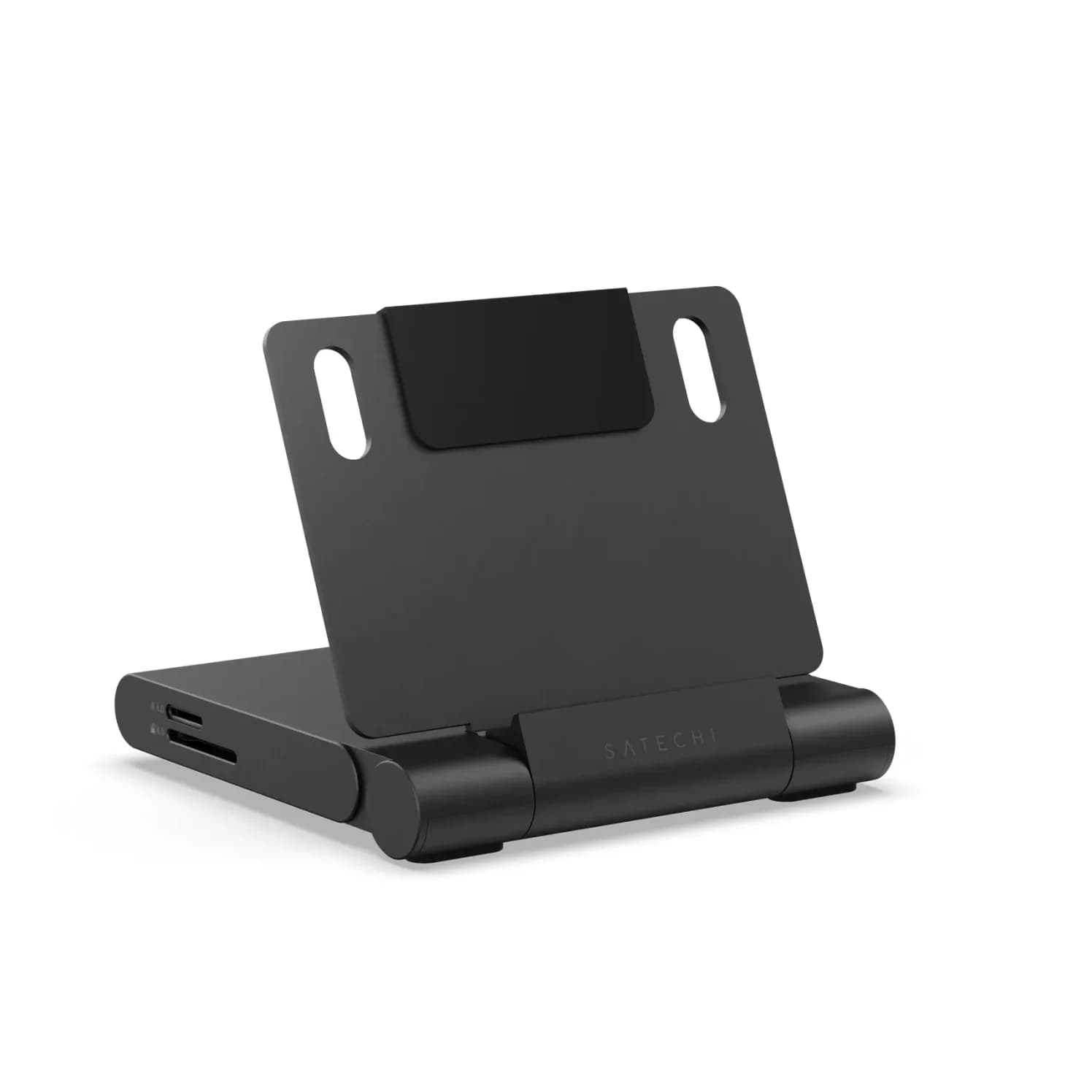
Best stand-and-audio hub for iPad ProSatechi
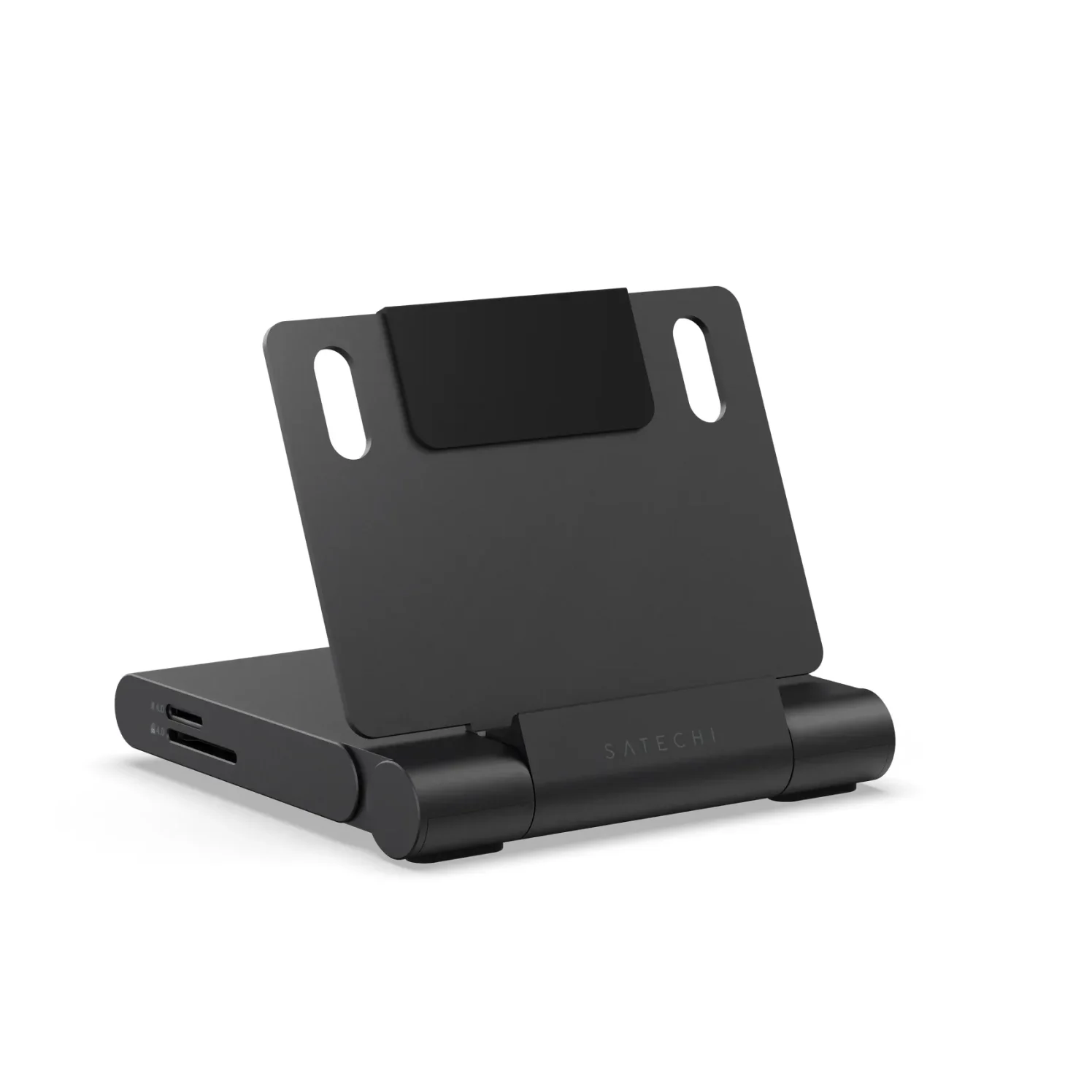
Satechi OntheGo Foldable Stand Hub (7-in-1, Space Black)
- to laptop
- 85W
- data
- 10 Gbps
- video
- 4K60
- Choose
- A fold-flat aluminum stand with UHS-II SD and microSD readers rated up to 312MB/s, a 3.5mm jack with audio out and microphone in, 10Gbps USB ports and 4K@60Hz HDMI; Satechi lists the iPad Pro M5 by name.
- Limit
- One fixed viewing angle
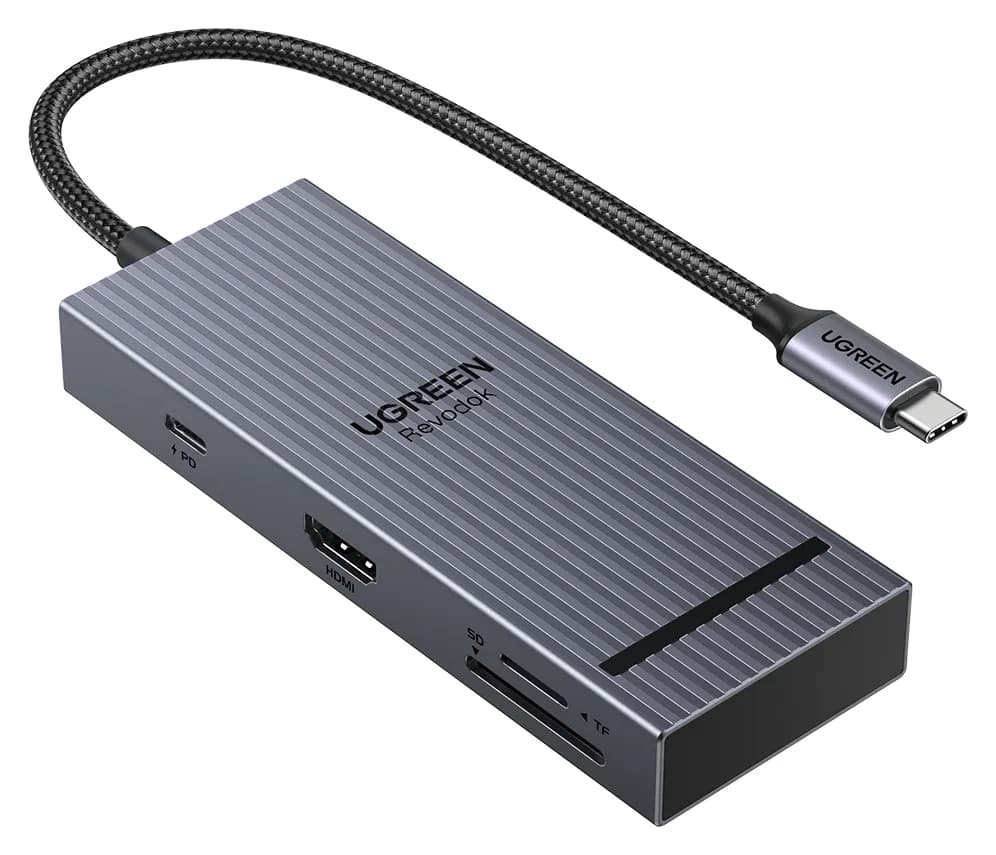
Best cable hub for iPad ProUGREEN
UGREEN Revodok Pro 108 USB-C Hub (8-in-1)
- to laptop
- 85W
- data
- 10 Gbps
- video
- 4K60
- Choose
- An 80g 8-in-1 on a 30cm cable, with 4K@60Hz HDMI, three 10Gbps data ports, 170MB/s SD and microSD readers and up to 85W pass-through charging.
- Limit
- Only one of the two USB-A ports is 10Gbps per UGREEN's port-speed note
This page compares the two hubs that come up most often for iPad Pro desks. Our wider best USB-C hub for iPad guide covers other picks; this one answers only this pair.
- 4K@60HzThe most either hub's HDMI gives an iPad Pro; 6K needs a USB-C or Thunderbolt monitor
- 312MB/sSatechi's UHS-II card readers, against 170MB/s on the UGREEN
- 20WThe adapter in the iPad Pro box, too small to charge through either hub
Quick picks
| If you want | Buy | Why |
|---|---|---|
| A stand, a headphone jack and the fastest card readers | Satechi OntheGo | UHS-II at 312MB/s, 3.5mm audio in and out, folds flat for travel |
| A light travel hub | UGREEN Revodok Pro 108 | 80g on a 30cm cable, three 10Gbps data ports, 170MB/s card readers |
| Wired internet or a bigger port count | Neither | Neither hub has Ethernet; see the iPad hub guide |
| A full desk with one cable | A Thunderbolt dock | The iPad Pro's port supports Thunderbolt 3 at up to 40Gb/s |
The two hubs, exactly
Naming matters here, because both makers sell several hubs. The Satechi in this comparison is the OntheGo Foldable Stand Hub, model ST-GOTGFC, sold in Space Black. The UGREEN is the Revodok Pro 108, model 75027, in Space Grey. Match those model numbers at checkout, not just the family name.
| Satechi OntheGo (ST-GOTGFC) | UGREEN Revodok Pro 108 (75027) | |
|---|---|---|
| Host connection | Built-in 17cm USB-C cable that stores under the stand | Attached 30cm USB-C cable |
| Video | 1x HDMI, up to 4K@60Hz | 1x HDMI, up to 4K@60Hz |
| USB data | 1x USB-C and 1x USB-A, up to 10Gbps | 2x USB-C and 2x USB-A; UGREEN rates three of the four data ports at 10Gbps |
| Card readers | SD and microSD, UHS-II up to 312MB/s | SD and microSD, up to 170MB/s, read and write at the same time |
| Audio | 3.5mm jack, output and input channels | None |
| Charging | 100W max input, up to 85W to the host | 100W PD input; up to 85W to the device, 15W reserved for the hub |
| Stand | Fold-flat aluminum stand | None |
| Size and weight | 11 x 11 x 1.9 cm, 187.5g | 11.9 x 4.5 x 1.6 cm, 80g |
| In the box | Hub, user manual, quick guide | Hub; wall charger and charging cable not included |
Satechi's compatibility list names the iPad Pro M5 (11-inch and 13-inch), the iPad Pro M4, iPad Pro models from 2018 to 2022, current iPad Air, iPad and iPad mini models, plus MacBooks and iPhones. UGREEN's list names the iPad Pro alongside MacBooks, ThinkPads and Dell XPS laptops. On paper, both fit every USB-C iPad that matters here.
What an iPad Pro can actually show through a hub
Apple's tech specs set the baseline. The current iPad Pro's single USB-C port is a Thunderbolt / USB 4 port carrying up to 40Gb/s, and it supports one external display at up to 6K@60Hz or 5K@120Hz; the iPad Pro 11-inch (M4) supports one external display at up to 6K@60Hz. Through adapters, the practical HDMI maximum is lower: Apple lists 3840 x 2160 at 60Hz for iPad Pro with USB-C when using its USB-C Digital AV Multiport Adapter. Both hubs rate their HDMI ports at up to 4K@60Hz, and UGREEN states that reaching 4K@60Hz requires a host USB-C port supporting DisplayPort 1.4 Alt Mode.
Two limits neither hub can change: Apple's current and M4 iPad Pro specs list one external display, so a dual-HDMI hub buys you a mirror, not a second screen; and video needs the iPad's DisplayPort output over USB-C, which both hubs convert to HDMI.
Case fit, cable reach and headphones
The iPad Pro is thin — 5.3mm for the 11-inch and 5.1mm for the 13-inch — and modern cases add several more millimeters. This is where the two hubs genuinely differ:
- The UGREEN's 30cm attached cable plugs into the iPad from a distance, so case thickness, port cutouts and folio covers never matter. The hub itself can sit on the desk or hang behind a stand.
- The Satechi's 17cm host cable is built in, with a storage channel under the base, and can't be swapped for a longer one. The iPad sits in the stand's fixed position, close to the hub. For desks and tray tables that geometry works; for anything where the iPad stays in your hand, the short lead is the constraint.
The 3.5mm jack is the Satechi's quiet advantage. It supports output and input channels, so wired headphones, a headset with a boom mic or a line-level feed all work while the iPad charges — a combination the iPad itself does not offer. The UGREEN has no audio port at all; for headphones, see our gifts for Apple users guide.
SD cards, SSDs and simultaneous accessories
Yes, you can connect multiple devices at once: a display, a keyboard, an SSD and a card reader all share the one USB-C port through either hub, with charging arriving on the hub's separate PD input. The iPad Pro's 40Gb/s link has room for all of them together.
Card speed is where the money goes. Satechi's SD and microSD slots are UHS-II, rated up to 312MB/s; UGREEN's are rated up to 170MB/s with simultaneous read and write. Both beat the UHS-I readers in most generic hubs — but you only see UHS-II speed with UHS-II cards, and only on an iPad whose port can keep up: the iPad Pro's 10Gb/s USB 3 mode does, while a base iPad's USB 2 port does not. For drives, our portable SSD guide covers what to attach.
Source: Satechi's and UGREEN's product pages
UGREEN rates a 20GB file transfer across its 10Gbps ports at 32 seconds; both hubs' USB-C data ports carry data only, not display or charging, so plan video and power around the HDMI and PD ports.
The charger reserve and the complete kit
The fix is the same for both: a 100W USB-C PD charger and a 100W cable in the hub's power port. Neither box includes one. Apple's fast-charge figure for the iPad Pro is 50% in around 30 minutes with an adapter providing 60W or higher, so a 100W charger covers the hub's reserve and fast charging together. UGREEN also recommends keeping a PD charger connected when the hub drives a tablet's video, for stable output. Our USB-C charger guide has picks, and the best USB-C cables for iPad guide covers why the cable rating matters.
Match the model
ST-GOTGFC for the Satechi stand hub, 75027 for the UGREEN Revodok Pro 108.
Add a 100W PD charger and cable
Neither hub includes them; the 20W iPad adapter is not enough.
Add an HDMI cable for the desk
Both hubs' HDMI ports are rated up to 4K@60Hz.
Use the 3.5mm jack or pack flat
The Satechi adds wired audio and folds flat; the UGREEN pockets away at 80g.
Best stand-and-audio hub for iPad Pro: Satechi OntheGo Foldable Stand Hub
Satechi
Satechi OntheGo Foldable Stand Hub (7-in-1, Space Black)
A fold-flat aluminum tablet stand with a built-in 7-port USB-C hub: 4K@60Hz HDMI, 10Gbps USB-C and USB-A, UHS-II SD and microSD readers, a 3.5mm audio jack and 100W USB-C PD pass-through.
- 85W PD passthrough
- 10 Gbps data
- 4K60 video
- 7 ports
The OntheGo solves three iPad problems in one flat slab: it holds the tablet up, it moves photos off UHS-II camera cards at up to 312MB/s, and it gives you a 3.5mm jack with audio out and microphone in while the iPad charges. The 10Gbps USB-C and USB-A ports, 4K@60Hz HDMI and 100W PD input round out the desk. Satechi lists the iPad Pro M5 and M4 by name, and the whole thing folds flat with its 17cm cable stored underneath — Satechi sizes it at 11 x 11 x 1.9 cm, about a slice of bread, at 187.5g.
The trade-offs are physical: one fixed viewing angle, a short built-in host cable that can't be replaced, no Ethernet, and more than twice the UGREEN's weight. If the iPad mostly sits on a desk or tray table, none of that hurts; if it mostly travels in your hand, look at the UGREEN.
See the Satechi OntheGo Foldable Stand Hub on Amazon
Best cable hub for iPad Pro: UGREEN Revodok Pro 108
UGREEN
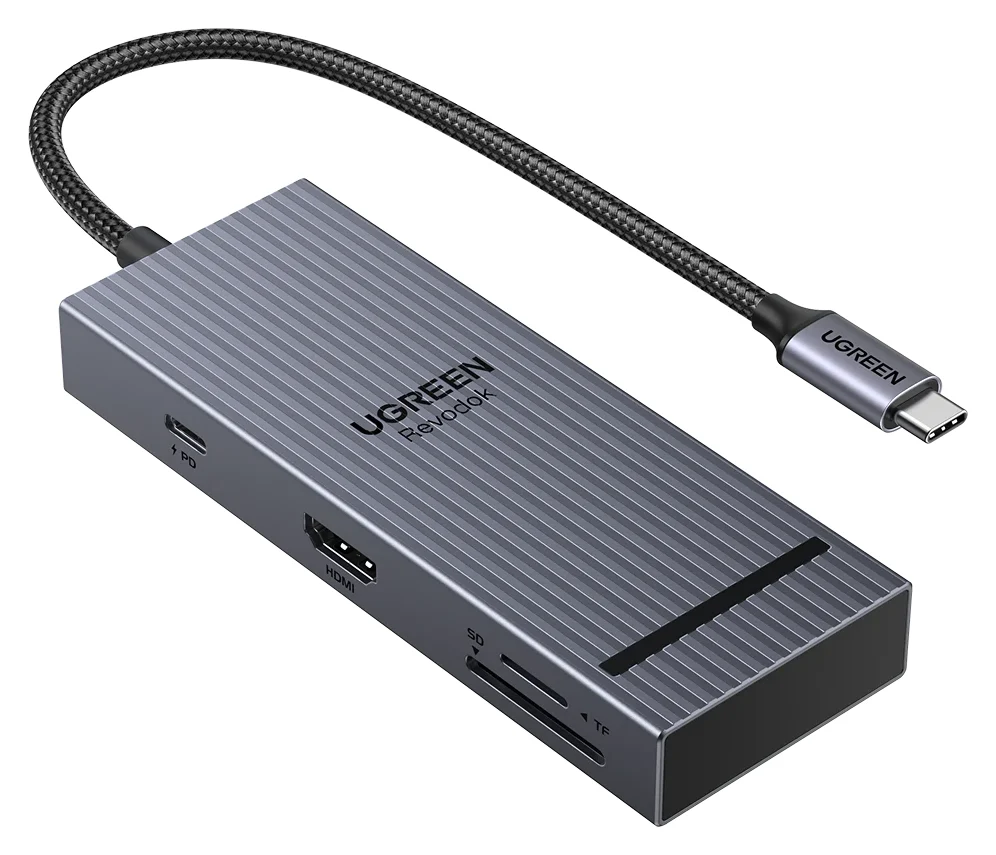
UGREEN Revodok Pro 108 USB-C Hub (8-in-1)
A compact single-cable 8-in-1 USB-C hub with 4K@60Hz HDMI, 10Gbps USB ports, 170MB/s SD and microSD readers and 100W PD input.
- 85W PD passthrough
- 10 Gbps data
- 4K60 video
- 8 ports
The Revodok Pro 108 is the hub that works with everything: its 30cm cable reaches the iPad without a direct dock connection, its 80g body disappears into a bag, and its port list — 4K@60Hz HDMI, two 10Gbps USB-C data ports, two USB-A ports, SD and microSD readers at 170MB/s and a 100W PD input — covers what most people plug into an iPad. UGREEN explicitly states that the wall charger and charging cable are not included, so add those to the order. Check the listing's model number (75027) matches before buying.
What you give up versus the Satechi: card readers at roughly half the speed, no headphone jack, no stand, and one of the four USB data ports is slower than the other three. For a travel-and-case-first buyer, none of those outweigh the 30cm cable and the 80g weight.
See the UGREEN Revodok Pro 108 on Amazon
Gift check: which one to wrap
- Yes: iPad Pro M5, M4, or any USB-C iPad from 2018 on: both hubs fit
- Yes: Photographers and wired-audio users: the Satechi's UHS-II readers and 3.5mm jack
- Yes: Travel and unknown cases: the UGREEN's 30cm cable
- No: Ethernet, a second external screen or 6K over HDMI: neither hub
A hub gift needs the charger with it — the 20W adapter in the iPad box won't power either one — so wrap a 100W PD charger and cable alongside, and an HDMI cable for a desk setup.
When to skip both
If the iPad Pro lives at a desk full-time, a Thunderbolt dock does more over the same port: the iPad Pro's Thunderbolt / USB 4 connection runs at up to 40Gb/s, and our Thunderbolt docks guide covers options — check that the dock supports iPad, and remember the one-external-display limit still applies. If you need Ethernet, neither hub here has it; the best USB-C hub for iPad guide has an Ethernet pick.
How we choose
We haven't physically tested either hub. This comparison is built from:
- Apple's own limits. Port speeds, display support, in-box adapter and fast-charge figures come from Apple's iPad Pro and iPad Air tech specs and its USB-C Digital AV Multiport Adapter listing.
- Manufacturer spec sheets. Ports, speeds, weights, box contents and compatibility lists come from Satechi's and UGREEN's product pages, linked throughout.
- Buyer-reported patterns. The common failure points for iPad hubs — a 20W adapter that can't charge through the hub, a dual-HDMI hub that only mirrors, a flush hub blocked by a case — are the ones this page checks for.
Verdict
Buy the Satechi OntheGo Foldable Stand Hub if your iPad Pro sits somewhere: it is the stand, the UHS-II card reader at up to 312MB/s, the headphone jack and the hub in one fold-flat body. Buy the UGREEN Revodok Pro 108 if your iPad Pro moves: 80g, a 30cm cable, and every port a traveling iPad needs. Either way, the 20W adapter in the iPad Pro box is the wrong charger for the job — a 100W PD charger behind the hub is what makes the kit complete.
Frequently asked questions
Which is better for iPad Pro: the Satechi OntheGo or the UGREEN Revodok Pro 108?
It depends on where the iPad lives. The Satechi OntheGo Foldable Stand Hub (ST-GOTGFC) holds the iPad up, reads UHS-II cards at up to 312MB/s and has a 3.5mm jack with audio out and mic in. The UGREEN Revodok Pro 108 (model 75027) is an 80g hub on a 30cm cable, with three 10Gbps data ports. Both give 4K@60Hz HDMI and pass up to 85W of charging through to the iPad.
Can you connect multiple devices to a USB-C hub on an iPad Pro?
Yes. Each hub splits the iPad's one USB-C port into a display output, USB data ports, card readers and a power input, so a monitor, keyboard, SSD and SD card can all run at the same time. Two limits apply: the USB-C data ports on both hubs carry data only, not video or charging, and the current and M4 iPad Pro specs list one external display, so a second screen is out. UGREEN rates a 20GB file transfer across its 10Gbps ports at 32 seconds.
Will my iPad Pro charge while it's connected to the hub?
Only with a big enough charger. Both hubs take up to 100W in and pass up to 85W to the iPad, but the hub itself keeps about 15W, and the iPad Pro ships with a 20W adapter that leaves almost nothing for the tablet. Use a 100W USB-C PD charger and cable in the hub's power port; neither hub includes one. Apple says an iPad Pro fast charges to 50% in around 30 minutes with an adapter providing 60W or higher.
Can either hub give my iPad Pro a 6K display or a second monitor?
No. Both hubs top out at HDMI 4K@60Hz. The current iPad Pro supports one external display at up to 6K@60Hz or 5K@120Hz, while the iPad Pro 11-inch (M4) supports one display at up to 6K@60Hz; the hubs' HDMI outputs remain limited to 4K@60Hz.
Do these hubs work with a case on the iPad?
The UGREEN does without question: its 30cm attached cable plugs into the iPad no matter how thick the case is. The Satechi's host cable is built into the stand and can't be swapped, and its reach is fixed at 17cm, so a very bulky case or an off-center port cutout is worth checking before you buy.
What else do I need to buy with either hub?
A charger, at minimum. Satechi's box holds the hub, a user manual and a quick guide; UGREEN states outright that the wall charger and charging cable are not included. For a desk setup, add an HDMI cable for the display, and a 3.5mm headset or headphones if you chose the Satechi for its audio jack. Our USB-C charger guide covers suitable 100W chargers.
Best stand-and-audio hub for iPad Pro
Satechi OntheGo Foldable Stand Hub (7-in-1, Space Black)
Related guides
Belkin Core 8-in-1 vs Anker 553: Pick by Laptop and Monitors
Choose between Belkin's Core 8-in-1 and Anker 553 with exact models, Mac and Windows display limits, real laptop charging budgets, and a complete-kit checklist.
Updated November 5, 2026Read
Anker 553 vs Plugable USBC-MSTH2: Hub or Display Adapter?
Choose Anker 553 or Plugable USBC-MSTH2 for dual monitors: check Windows support, 4K limits, Mac mirroring, charging and the complete setup before you buy.
Updated November 4, 2026Read
iPhone Docking Stations: Wired USB-C Docks vs Charging Stands
Choose an iPhone docking station for HDMI, storage or charging. Compare wired USB-C hubs and magnetic stands, check your model and build the right desk kit.
Updated November 3, 2026Read